

 nmap
nmap
failed to create the npcap service : 0x8007007e
help me how can i fix it?
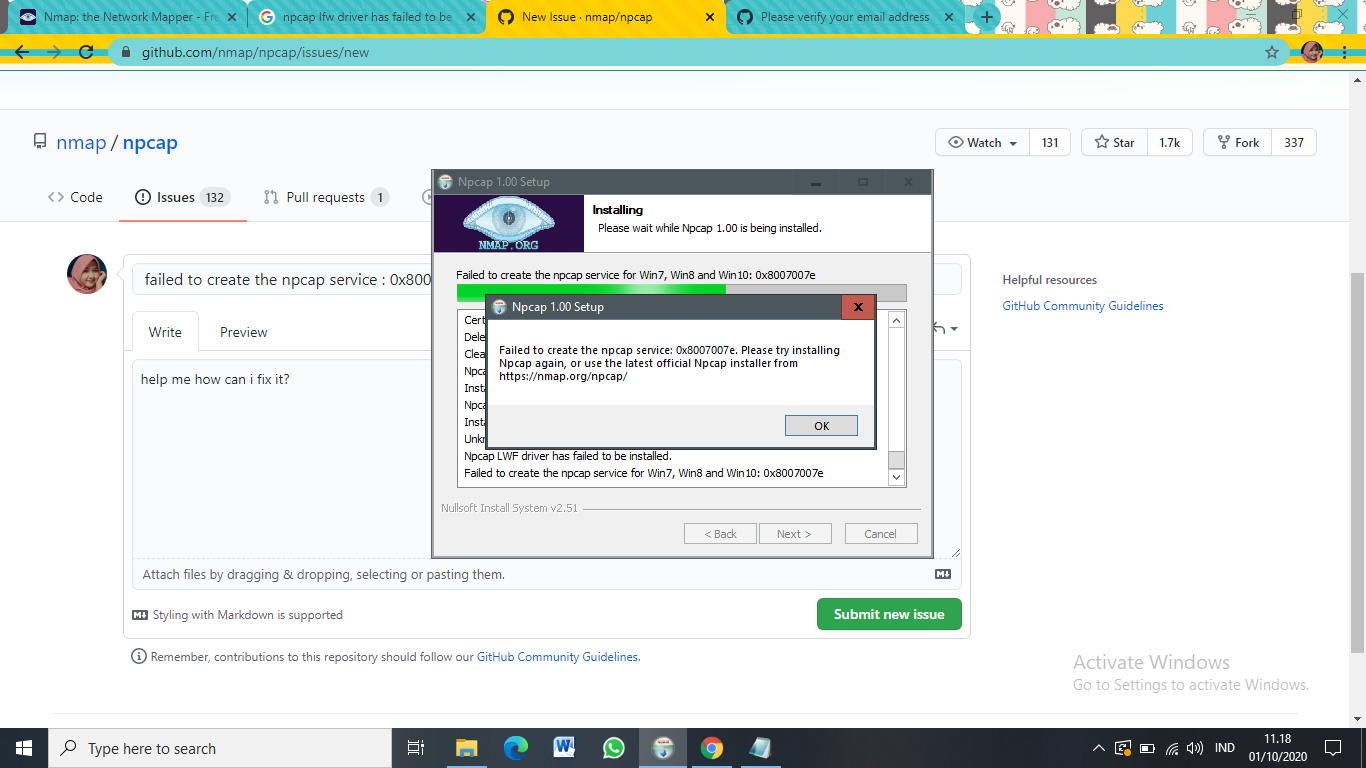
here the setupapi.dev
[Install network driver - INSECURE_NPCAP] Section start 2020/10/01 10:49:14.760 cmd: "C:\Program Files\Npcap\NPFInstall.exe" -n -i dvi: Installing new driver dvi: {Create Device} 10:49:14.764 dvi: {Create Device - INSECURE_NPCAP} dvi: Class GUID - {4d36e974-e325-11ce-bfc1-08002be10318} dvi: Description -
dvi: Flags - 0x00000001 dvi: Created device 'ROOT\INSECURE_NPCAP\0000' dvi: {Create Device - exit(0x00000000)} dvi: {Create Device - exit(0x00000000)} 10:49:14.772 dvi: {Build Driver List} 10:49:14.772 dvi: Searching for hardware ID(s): dvi: insecure_npcap dvi: Created Driver Node: dvi: HardwareID - INSECURE_NPCAP dvi: InfName - C:\WINDOWS\System32\DriverStore\FileRepository\npcap.inf_amd64_bc04a3cb67b96afb\npcap.inf dvi: DevDesc - Npcap Packet Driver (NPCAP) dvi: Section - FilterStandard dvi: Rank - 0x00ff0000 dvi: Signer Score - Authenticode dvi: DrvDate - 09/25/2020 dvi: Version - 10.35.51.668 dvi: {Build Driver List - exit(0x00000000)} 10:49:14.993 dvi: {Select Best Driver} dvi: Class GUID of device changed to: {4d36e974-e325-11ce-bfc1-08002be10318}. dvi: Selected Driver: dvi: Description - Npcap Packet Driver (NPCAP) dvi: InfFile - c:\windows\system32\driverstore\filerepository\npcap.inf_amd64_bc04a3cb67b96afb\npcap.inf dvi: Section - FilterStandard dvi: {Select Best Driver - exit(0x00000000)} dvi: Selected driver: dvi: INF path C:\WINDOWS\INF\oem28.inf dvi: INF section FilterStandard dvi: INF version 10.35.51.668 sig: {_VERIFY_FILE_SIGNATURE} 10:49:15.025 sig: Key = npcap.sys sig: FilePath = C:\WINDOWS\system32\DRIVERS\npcap.sys sig: Catalog = C:\WINDOWS\System32\DriverStore\FileRepository\npcap.inf_amd64_bc04a3cb67b96afb\npcap.cat ! sig: Verifying file against catalog 'npcap.cat' failed. ! sig: Error 2: The system cannot find the file specified. sig: {_VERIFY_FILE_SIGNATURE exit(0x00000002)} 10:49:15.029 flq: Copying 'C:\Program Files\Npcap\npcap.sys' to 'C:\WINDOWS\system32\DRIVERS\npcap.sys'. inf: {Install from INF Section - FilterStandard} 10:49:15.105 inf: Flags - 0x000007af inf: {Install from INF Section - exit(0x00000000)} 10:49:15.109 inf: Flags: 0x00000000 inf: AddService=npcap,,FilterStandard.svc (oem28.inf line 158) dvi: Add Service: Created service 'npcap'. inf: {Install from INF Section - FilterStandard.svc} 10:49:15.121 inf: Flags - 0x00100004 inf: {Install from INF Section - exit(0x00000000)} 10:49:15.121 inf: {Install from INF Section - FilterStandard} 10:49:15.125 inf: Flags - 0x00000040 inf: {Install from INF Section - exit(0x00000000)} 10:49:15.125 inf: {Install from INF Section - FilterStandard.Remove} 10:49:15.133 inf: Flags - 0x000007af inf: {Install from INF Section - exit(0x00000000)} 10:49:15.137 inf: Flags: 0x00000000 inf: DelService=npcap,0x200 (oem28.inf line 184) dvi: Deleted service 'npcap'. inf: {Install from INF Section - FilterStandard.Remove} 10:49:15.185 inf: Flags - 0x00000040 inf: {Install from INF Section - exit(0x00000000)} 10:49:15.185 <<< Section end 2020/10/01 10:49:15.197 <<< [Exit status: FAILURE(0x8007007e)]


