
fastgrant
 fastgrant copied to clipboard
 nicnocquee
Fastlane actions to grant iOS permissions in iPhone Simulator.

About
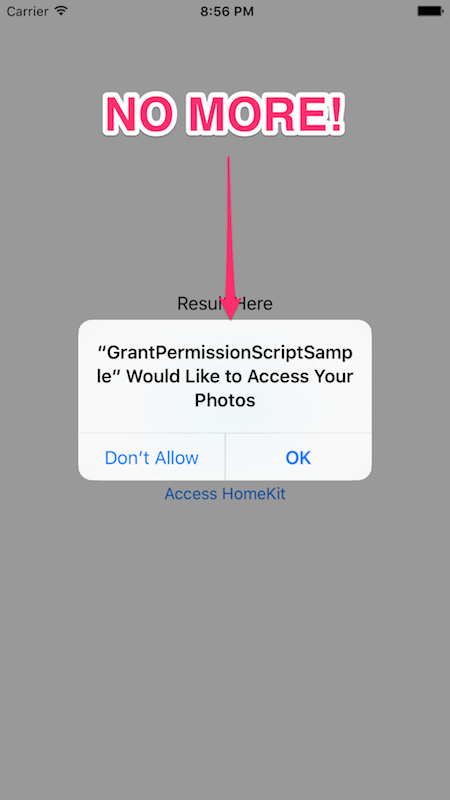
Fastlane actions to grant iOS permissions in iPhone Simulator. They are useful when running unit and UI tests in CIs like Travis. By running the actions before your tests, your app will not be prompted to allow Photos access, etc.
Installation
Copy grant_simulator_permission, reset_simulator_permission, and TCC_template.db files in fastlane/actions directory to your project's fastlane/actions directory.
Usage
There are four types of permissions: photos, calendar, address_book, and home_kit.
To grant permission, add grant_simulator_permission action to your lane, and use reset_simulator_permission action to reset the permissions:
lane :test do
  grant_simulator_permission(
    device: 'iPhone 6',
    os: '9.3',
    access: ['photos', 'address_book', 'calendar', 'home_kit'] # or use ['all']
  )
  scan(
    device: 'iPhone 6',
    clean: true,
    output_directory: 'build'
  )
  reset_simulator_permission(
    device: 'iPhone 6',
    os: '9.3',
    access: ['photos', 'address_book', 'calendar', 'home_kit']
  )
end
Example
You can find a sample iOS project in this repository which is accessing Photos, Calendar, Contacts, and HomeKit. Simply run fastlane test to run the unit tests and the UI tests for the app.
Metadata
Owner
 nicnocquee
Metadata
Fastlane actions to grant iOS permissions in iPhone Simulator.