

 nickgravgaard
Empty tabstops in the middle of a line are wider
I do some thinking about elastic tabstops over on https://elastic-tabstops.readthedocs.io/en/latest/implementation.html and came up with the following testcase:
01
	456789A123
		// rectangle
		aa	dddd	ggggggg
		bbbbbbb	e	hhhhh
		cccccccccccc	fffffffffff	iii

		// triangle top left
		aa	dddd	gggggg
		bbbbbbb	e
		cccccccccccc

		// triangle bottom left
		aa
		bbbbbbb	e
		cccccccccccc	ffffffff	iii

		// triangle top right
		aa	dddd	gggggg
			e	hhhhh
				iii

		// triangle bottom right
				gggggg
			e	hhhhh
		cccccccccccc	ffffffff	iii

		// diagonal down
		aa	dddd
		bbbbbbb		hhhhh
		cccccccccccc			lll

		// diagonal up
		aa			jjj
		bbbbbbb		hhhhh
		cccccccccccc	ffffffff
	45
0123456789A12
Expected:
		// diagonal down
		aa            dddd
		bbbbbbb         hhhhh
		cccccccccccc      lll
In Version 1.9.0 I noticed that the tabstops are wider at diagonal down and diagonal up. I wonder what your opinion is about this. It appears you treat both indentation tabs and empty elastic tabstops as "empty columns".
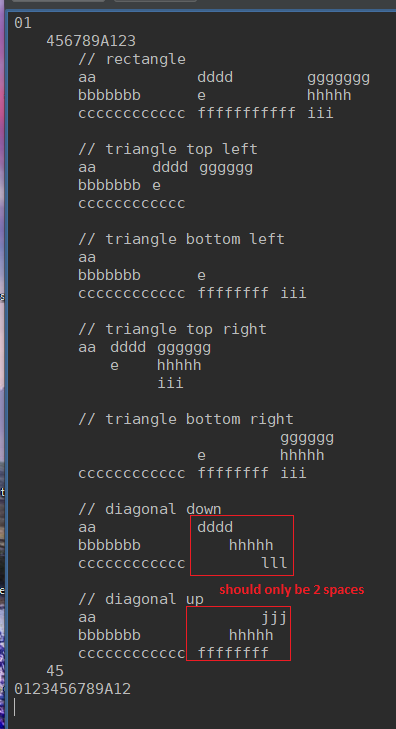
same goes for Always Aligned btw.

Hi Gerold, thanks for spending time writing about elastic tabstops. That's an excellent explanation of the code! There's a typo in my surname at the top of the page though. Could you fix it?
I wrote some test cases to show the behaviour of your diagonal down and up examples. You can see them in the latest commit on the issue-13 branch here: https://github.com/nickgravgaard/ElasticNotepad/commits/issue-13
It works as expected to me. Have I created the test cases incorrectly or are you asking for the behaviour to change?

Have I created the test cases incorrectly or are you asking for the behaviour to change?
I think the expected strings should be:
    val expected3 = List(
      "aa            dddd",
      "bbbbbbb         hhhhh",
      "cccccccccccc      lll"
    ).mkString("\n")
    val expected4 = List(
      "aa                jjj",
      "bbbbbbb         hhhhh",
      "cccccccccccc  ffffffff"
    ).mkString("\n")
let's say the user wants "4 spaces for indentation tabs" and "at least 2 spaces for elastic tabstops". as per this definition a line "bbbbbbb\t\thhhhh" gets cellified into ["bbbbbbb", "", "hhhhh"] (note the empty cell) and thus should only have 2 spaces before "hhhhhh" instead of 4. note that the Cs and Ds or Cs and Fs are only separated by 2 spaces while the empty strings are suddenly separated by 4.
now I ask for your opinion on this because it is "a special case" which we might layout differently on purpose. it may also be you use a different setting/interpretation for elastic tabstops like "make it at least 4 characters wide but only use 2 spaces for padding if the string is already longer". how would you pad the following text?
a\tc
b\td
2 spaces or 3 spaces? I would still only use 2 whereas Elastic Notepad seems to use 3.
more testcases here if you need: https://gitlab.com/gerold.meisinger/elastic-tabstops/-/tree/main/elastic-tabstops/src/test
There's a typo in my surname
fixed. rtfd.io will update on the next trigger.
let's say the user wants "4 spaces for indentation tabs" and "at least 2 spaces for elastic tabstops".
There is no concept of an "indentation tab" currently - cells are treated the same whether they are being used for indentation or not. A column block is as wide as the widest piece of text in the cells it contains (or a minimum width) plus padding. In the code this is:
val cellMinimumWidthSpaces = nofIndentSpaces - cellPaddingWidthSpaces

def calcCellWidth(text: String): Int = math.max(text.length, cellMinimumWidthSpaces) + cellPaddingWidthSpaces
now I ask for your opinion on this because it is "a special case" which we might layout differently on purpose.
Generally I've been trying to avoid special cases because people will be put off using it if they cannot predict its behaviour. What I felt was needed was a general solution which is useful and predictable. I was recently persuaded to implement a fixed-width indentation mode, and I'm also going to make a kind of spreadsheet/grid mode where columns always go from the first line to the last. I think these modes could be useful and predictable.
Maybe what I need to do is make it easier for other people to contribute their own modes to this project. I have ideas about what's good, but other people may have their own ideas, and this would be a good place for people to try them out.
it may also be you use a different setting/interpretation for elastic tabstops like "make it at least 4 characters wide but only use 2 spaces for padding if the string is already longer".
The reason why the padding is hard-coded to be 2 spaces is that this makes it easier to convert a file using spaces to use elastic tabstops. I think allowing padding to be 1 space will make conversion much trickier and makes false positives likely. Maybe I'm wrong here, so this could be a good candidate for a new experimental mode. What do you think?
A column block is as wide as the widest piece of text in the cells it contains (or a minimum width) plus padding.
I think my confusion basically boils down to "minimum width + padding" versus "padding only" and I found "minimum width + padding" more surprising ("sometimes 3 spaces, sometimes 2?"). I will add it in the documentation.
I was recently persuaded to implement a https://github.com/nickgravgaard/ElasticNotepad/issues/4, and I'm also going to make a https://github.com/nickgravgaard/ElasticNotepad/issues/12 where columns always go from the first line to the last. I think these modes could be useful and predictable.
You should definitely take a look at Notepad++ with ColumnsPlusPlus which is a very sophisticated implementation of all things columns and elastic tabstops. (you can run Notepad++ very easily via Wine on Linux)
The reason why the padding is hard-coded to be 2 spaces is that this makes it easier to convert a file using spaces to use elastic tabstops. I think allowing padding to be 1 space will make conversion much trickier and makes false positives likely. Maybe I'm wrong here, so this could be a good candidate for a new experimental mode. What do you think?
I agree. I have outlined some ambiguities here: https://elastic-tabstops.readthedocs.io/en/latest/compatibility.html Although for existing editors I think the way to go is, store as: "aligned spaces with at least 2 spaces for padding" internally (basically: Elastic Tabstops Lite ;) but treat it like elastic tabstops. This way it should be unambigious to convert for and back to elastic tabstops and cursor movements would work correctly in editors. Currently I try to implement elastic tabstops for VSCode but there are some roadblocks which prevents me from using actual elastic tabstops (no access to DOM, cursor movement unpredictable, see https://elastic-tabstops.readthedocs.io/en/latest/implementation.html#monospaced-fonts and https://gitlab.com/gerold.meisinger/elastic-tabstops/-/blob/main/elastic-tabstops/src/utils.ts -> charIdx2etsColPos + etsColPos2charIdx).
It's funny you should mention Notepad++. I contributed the code which makes it possible to set non-uniform tabstops on different lines to the text widget it uses (Scintilla) many years ago (the core requirement for a text widget to do elastic tabstops or anything similar), and someone else then made the original Notepad++ plugin based on that work. I didn't know about ColumnsPlusPlus but I'm glad to see it exists! :)
I would love to see elastic tabstops in VS Code! The first step is probably to add that core functionality that allows the setting of non-uniform tabstops on different lines. That will open the door to lots of possible future functionality beyond just elastic tabstops. I wonder if you could take a similar approach to the one I took with Scintilla and Notepad++. That is, get the generic core functionality added as an API to the core editor widget, and then implement elastic tabstops in an extension/plugin which uses the new API. More core VS Code maintainers will be interested in a generic API that allows the setting of non-uniform tabstops on different lines (giving it an ability which also exists in serious code editors such as Visual Studio, GTK's GtkSourceView, Swing's JTextPane, and Scintilla), than will be interested in elastic tabstops specifically.
I have not tried them side-by-side to see if they function the same, but
https://github.com/isral/elastic_tabstops_mono.vsce
There is a VSCode extension for elastic tabstops.

This is the one I started off from. I collect all known implementations here: https://elastic-tabstops.readthedocs.io/en/latest/editors.html