

 nicehash
[BUG] 3060 After restarting the excavator, full speed is not restored. 0.5.5.0 rc
Describe the bug
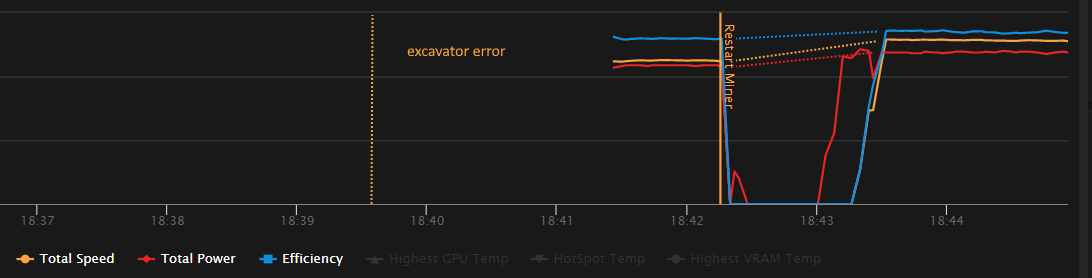
Occasionally an error occurs and the excavator reboots, about 1 time per 2 day. After restarting the excavator, it happens that the mining speed does not return to normal. About 10 percent lower than before the restart. The overclocking parameters are correct, but there are fewer mega hashes than necessary. If i manually restart the excavator again, the speed is restored.
To Reproduce
- Wait a day or two for an error to occur and the excavator to restart.
- Аfter restarting, check the mining speed, speed is lower than expected.
- Energy consumption is lower than usual.
Expected behavior Mining speed in mh/s is always the same. after restarting the excavator, the speed does not change.
Screenshots
Version affected (please complete the following information):
- Version number 0.5.5.0
- RC
NVIDIA driver version 512.77
Hardware zotac 3060 12gb oc palit 1660 su
Additional context The problem is only with the 3060 card. The second card runs at a constant speed.

OCTune can cause lower hashrate. Close it and make sure it does not lower the mining hashrate.
Also, try rebooting the PC. If drivers crashed, then it is expected that the hashrate is lower.

The problem is not related to the tune. The problem arises on its own, then I run OCTune and check there that the video card is working with the desired overclocking.
It is impossible to restart the PC after each error, I work on it during the day.
The problem looks like that after an automatic restart, the hashrate is not restored, and after the second restart, manually, it is restored.
Once the drivers crash, there is not much the excavator can do. User intervention is needed. We cannot prevent driver crashes. You should lower your OC settings for example to make drivers more stable.