

 nginx-proxy
Cannot connect to the MySQL db with nginx-proxy
I'm trying to up my application with docker-gen and jrcs/letsencrypt-nginx-proxy-companion . The application are running, but I could not connect to the db from the application.
Please find my nginx-proxy docker-compose.yml
version: '3'
services:
  nginx:
    image: nginx
    labels:
      com.github.jrcs.letsencrypt_nginx_proxy_companion.nginx_proxy: "true"
    container_name: nginx
    restart: unless-stopped
    networks:
      - reverse-proxy
      - back
    ports:
      - "80:80"
      - "443:443"
    volumes:
      - ./conf.d:/etc/nginx/conf.d
      - ./vhost.d:/etc/nginx/vhost.d
      - ./html:/usr/share/nginx/html
      - ./certs:/etc/nginx/certs:ro

  nginx-gen:
    image: jwilder/docker-gen
    command: -notify-sighup nginx -watch -wait 5s:30s /etc/docker-gen/templates/nginx.tmpl /etc/nginx/conf.d/default.conf
    container_name: nginx-gen
    restart: unless-stopped
    networks:
      - reverse-proxy
      - back
    volumes:
      - ./conf.d:/etc/nginx/conf.d
      - ./vhost.d:/etc/nginx/vhost.d
      - ./html:/usr/share/nginx/html
      - ./certs:/etc/nginx/certs:ro
      - /var/run/docker.sock:/tmp/docker.sock:ro
      - ./nginx.tmpl:/etc/docker-gen/templates/nginx.tmpl:ro

  nginx-letsencrypt:
    image: jrcs/letsencrypt-nginx-proxy-companion
    container_name: nginx-letsencrypt
    restart: unless-stopped
    networks:
      - reverse-proxy
      - back
    volumes:
      - ./conf.d:/etc/nginx/conf.d
      - ./vhost.d:/etc/nginx/vhost.d
      - ./html:/usr/share/nginx/html
      - ./certs:/etc/nginx/certs:rw
      - /var/run/docker.sock:/var/run/docker.sock:ro
    environment:
      NGINX_DOCKER_GEN_CONTAINER: "nginx-gen"
      NGINX_PROXY_CONTAINER: "nginx"
networks:
  reverse-proxy:
    external:
      name: reverse-proxy
  back:
    driver: bridge
This is my application docker-compose.yml
# ./docker-compose.yml

version: '2'

services:
  employee-db:
    build: ./employee-service/database
    environment:
      MYSQL_ROOT_PASSWORD: my_secret_pw_shh
      MYSQL_DATABASE: edu
      MYSQL_USER: devuser
      MYSQL_PASSWORD: devpass
      VIRTUAL_HOST: db.dev
    ports:
      - "9906:3306"
    command: --max_allowed_packet=32505856
  employee-service:
    build: ./employee-service/php-fpm
    domainname: api.dev
    networks:
      - reverse-proxy
      - back
    volumes:
      - ./employee-service/php-fpm:/var/www/html
    environment:
      VIRTUAL_HOST: api.dev
      VIRTUAL_PORT: 8080
      VIRTUAL_ROOT: /var/www/html
    ports:
      - "8080:80"
    links:
      - employee-db
    depends_on:
      - employee-db
    restart: always
networks:
  reverse-proxy:
    external:
      name: reverse-proxy
  back:
    driver: bridge
And see my folder structure.
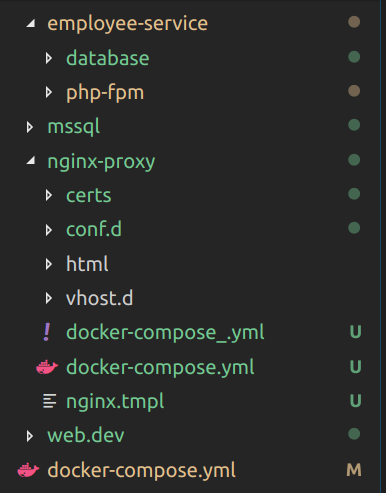
My docker images are:
- employee-service - phpearth/php:7.2-nginx
- employee-db - mysql:5.7
What is the issue with my setup ?


Did you solve your problem or still need help with this? help me too in this!

This repo should no longer handle issues or discussions related to nginx-proxy / the nginx-proxy template, unless there is something we need to change / fix in docker-gen in order to allow a change / fix in nginx-proxy.
