

 nextcloud
Icons for font files are incorrect in Files app
How to use GitHub
- Please use the 👍 reaction to show that you are affected by the same issue.
- Please don't comment if you have no relevant information to add. It's just extra noise for everyone subscribed to this issue.
- Subscribe to receive notifications on status change and new comments.
Steps to reproduce
- Upload a file that is .ttf or .woff
- See the the icon displayed in files app (same as pictures)
Expected behaviour
Have an icon that represent font formats
Actual behaviour
Icon displayed is a "picture" icon
Server configuration
Nextcloud version: 20.0.2
Screenshot
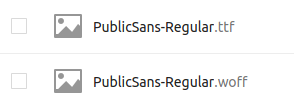

What needs to be done:
Icons are stored here: core/img/filetypes
A mapping for mimetypes: https://github.com/nextcloud/server/blob/master/resources/config/mimetypealiases.dist.json
You either change the existing mapping (e.g. "application/font-woff": "image" to "application/font-woff": "font") or remove the aliases (to fallback to the default resolving).
https://github.com/nextcloud/server/blob/fda6ffc866cf8c5d3579fe95d1731ab747894002/lib/private/Files/Type/Detection.php#L348
Code to resolve a mime type to an icon. It first checks if there is an alias for the mimetype and looks for a file with the mime type name then.

thanks @kesselb i'll do it then
@jancborchardt do you mind creating an icon for font types?

Hi @kesselb ,
I'm trying to attempt this by updating the entry in mimetypealiases.dist.json. However, I got a message in the terminal when running ./occ maintenance:mimetype:update-js:
So I tried to omit the rest after "maintenance" and rerun the command, and I got this:
I thought maybe it's not worth it to do trial and error after the last question that the terminal returned, so I terminated the terminal. Which direction should I take this?
@Mikescops Did you get this too when attempting to solve this issue?
