

 nextcloud
Notifications popup get's scroll bar when clicking an avatar
Same as #100, but not for the tooltip on the files, but on clicking the username:
Clicking test in:
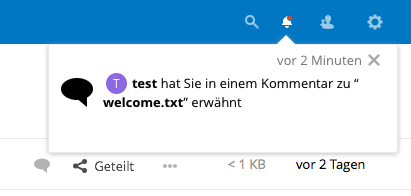
Results in:
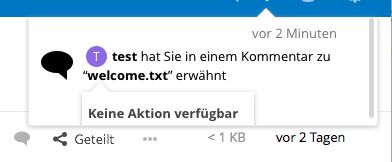
cc @danxuliu

This one is much trickier than #100.
There are two problems with the contacts menu: its position is pure CSS and it is not hidden when its container is scrolled.
When a tooltip is shown its absolute position is set in JavaScript. That makes possible to show the tooltip for certain element while appending the tooltip element to a different one. The position of the contacts menu, on the other hand, is also absolute but set in pure CSS. Due to this, and the fact that notifications are dynamic, its positioning context (the element that the absolute element is relative to) must be the notification in which it is shown; if the notification wrapper was used as the positioning context instead then the contacts menu for every notification will appear in exactly the same position relative to the notification wrapper.
contactsMenu() (in the server) could be modified to set the position using JavaScript and to allow appending the menu to a different element than the one for which it was shown. That would make possible to show the menu for certain element in a notification while appending it to the notification wrapper, which would solve this problem like done in #100.
Unfortunately there is another difference between the contacts menu and tooltips that makes that approach invalid.
Tooltips are hidden if the cursor is moved outside the element that created them, so their position does not need to be updated; if the container is scrolled the tooltips do not need to keep track of the scrolling and update their position accordingly, they simply vanish. The contacts menu, on the other hand, is hidden when clicking outside it, but if the container is scrolled using the mouse wheel the contacts menu is still shown, so it should move accordingly.
The problem is that some days ago I have been experimenting with scroll events and JavaScript for an unrelated feature and, from what I could see, they do not play well together... Maybe I made some stupid mistake, but it seemed that sometimes there was a mismatch between the element position returned in a scroll event handler and the visual representation of the elements. Basically I did not found how to smoothly update the absolute position of an element during a scroll.
Updating the position would be needed because if the contacts menu was added to the notification wrapper then its positioning context would be the document, so scrolling the notification wrapper would not affect it. If position: relative was set for the notification wrapper then the contacts menu would automatically move when the notification wrapper was scrolled... but then it would have not solved anything, because the menu would overflow the notification wrapper and show the scroll bar if it was not already shown, which is the current issue.
The solution to all that could be making the contacts menu behave in a similar way as a tooltip (although not the same): hiding the contacts menu when the cursor leaves the area of the contacts menu (with some extra margins and timeout to prevent annoying the user) or the user scrolls (to ensure that the user does not scrolls while hovering the contacts menu making everything to move except for the menu). But such a change looks like something better suited for Nextcloud 14...
