

 nextcloud
An unknown error is shown although the file upload was successful
Expected behavior
When uploading an attachment with the app the upload process should end without running into an error condition.
Current behavior
As I uploaded files of a size of appr. 5 MB and 10 MB the following message was shown and the upload process aborted:

Surprisingly the attachments have all successfully been uploaded to the attachment folder. In the Thunderbird error console the following messages were logged. The last entry is showing a 401 Unauthorized result:
GET (XHR) https://<my-nextcloud-server>/ocs/v1.php/cloud/user [HTTP/1.1 200 OK 476ms]
PROPFIND (XHR) https://<username>:<password>@<my-nextcloud-server>/remote.php/webdav [HTTP/1.1 207 Multi-Status 5032ms]
PUT (XHR) https://<my-nextcloud-server>/remote.php/webdav/MailAttachments/1507224757618_IMG_0099.MOV [HTTP/1.1 201 Created 7229ms]
POST (XHR) https://<username>:<password>@<my-nextcloud-server>/ocs/v1.php/apps/files_sharing/api/v1/shares [HTTP/1.1 401 Unauthorized 323ms]
To double-check if access to the server is possible with the given URL (the last one), I copy-pasted it to a private browser window. The following message was displayed which might be the reason for the unknown error condition:

Environment
Server Configuration
OS: Linux 3.16.47 Web server: Apache2 2.4.26 Database: MariaDB 10.0.32 PHP version: 5.6.30 Nextcloud version: 12.0.3
Client Configuration
Thunderbird version: 52.3.0 Nextcloud for Filelink add-on version: 1.7 Operating system: Windows 7

i see the same behavior, thunderbird on os x sierra. file upload is successfull but i get an error message, and no file link is created in the email message

ah, my error is resolved now. in the password dialog when adding the account, one has to give the user account password for nextcloud. i thought that was an arbitrary new password to share with recipients of the files
in general i think some minimal documentation of the account setup is necessary. best would be on the plugin homepage
scratch the last comment. it appears i was right the first time. nextcloud-filelink is NOT working for me currently.
i observe this behavior
-
if i create a filelink account with my nextcloud user password in the fielt 'password for uploaded files' i can successfully create shared links. BUT then my nextcloud password is needed for downloading the files
-
if i create a filelink account with an arbitrary password, i get 'unknown error' messages. upload succeeds but no share link
-
it's not possible to create more than one nextcloud share account
also, i am running the nextcloud application in the backround on my computer.
same issue upload is OK but no link generated
error occured : 401 unauthorized
20/Nov/2017:11:38:18 +0100] "POST /ocs/v1.php/apps/files_sharing/api/v1/shares?format=json HTTP/1.1" 401 936 "-" "Mozilla/5.0 (X11; Linux x86_64; rv:52.0) Gecko/20100101 Thunderbird/52.4.0 Lightning/5.4.4"
nextcloud 12 thunderbird 52.4.0 addon 1.7

for me, this was due to the password policy the password entered in the plugin must match the policy (8 character for me)
Same issue here with the same error (Unknown error ...). With let's encrypt and without SSL. Really would be great to have this add-on working because I have to send many emails with big attachments.
Add-on: 1.7 Thunderbird: 52.4.0 OS: Windows 7 Pro (with latest updates)

Thanks @berger-anthony ! For me too, I got an error message ( "Unable to upload FILEXXX to SERVERNAME"). The file uploaded ok, but then would not share due to the password policy on the owncloud server (cloudstor.aarnet.edu.au).
In this case, I needed 11 characters, uppercase, lowercase, and special characters.

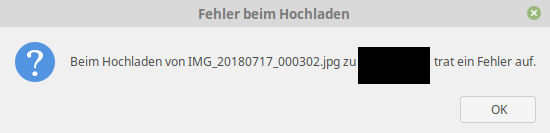 I got the same here. But it's new for me. It worked wonderful long time.
I don't know if anything changed at all, but since today, the error message "unknown error" is shown. Attachements where uploaded correctly, but the error is shown... :(
NC 14.0.1.
Thunderbird 52.9.1
Linux Mint 19 - latest Patchlevel
I got the same here. But it's new for me. It worked wonderful long time.
I don't know if anything changed at all, but since today, the error message "unknown error" is shown. Attachements where uploaded correctly, but the error is shown... :(
NC 14.0.1.
Thunderbird 52.9.1
Linux Mint 19 - latest Patchlevel

for me, this was due to the password policy the password entered in the plugin must match the policy (8 character for me)
Same think for me, remove my provider and create again with strong password works !

I only have this problem if Nextcloud is setup to "Enforce password protection" and i do not set a password in filelink.

I had the same problem with the password. But for me it was because the password didn't meet the required password guidelines. Maybe "Filelink" should check the password for compliance with the password guidelines.

Agree! Or at least it should mention the policy in effect instead of silently fail.
