

 nextcloud
Photo.dateTaken is local time.
The image exif values contain the local time. It would be good, to have a reliable way to get the UTC time, in order to show the time for tracks and Photos in a consistent way.

I've run into this problem, it's a tricky one. Newer EXIF has timezone information, but I don't think Maps uses this information yet, at least for me it seems to assume everything is in UTC.
If it's an older camera it has no timezone info in EXIF, and Maps would have no way to know what timezone the photo was taken from. My workaround for my MILC cameras is that I set it to UTC time. For my cell phone photos it's still wrong in Maps but in this case it has timezone information so Maps could correct this if it read the timezone from EXIF.

What is used, might depend on the part in the part in the frontend. For the photo suggestions a timezone can be chosen, by default the client timezone is used. For photos, which are taken within the same timezone as the client the time looks correct, too.
I'm not seeing the correct times when looking at the Maps photo preview. This photo was not taken at 11:15PM on the 17th, it was taken in the morning at 6:15AM on the 18th.
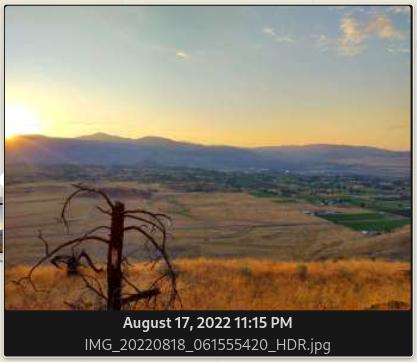
My browser timezone is correct, running Date() in the browser console currently returns:
'Tue Feb 14 2023 10:56:10 GMT-0800 (Pacific Standard Time)'
Nextcloud Calendar shows:
 EXIF data shows the correct PDT local time (without timezone in this case):
# exiv2 IMG_20220818_061555420_HDR.jpg
File name       : IMG_20220818_061555420_HDR.jpg
File size       : 2386712 Bytes
MIME type       : image/jpeg
Image size      : 4160 x 3120
Thumbnail       : image/jpeg, 9777 Bytes
Camera make     : motorola
Camera model    : moto g play (2021)
Image timestamp : 2022:08:18 06:15:58
File number     :
Exposure time   : 1/270 s
Aperture        : F2
Exposure bias   : 0 EV
Flash           : No, compulsory
Flash bias      :
Focal length    : 3.5 mm
Subject distance:
ISO speed       : 100
Exposure mode   : Auto
Metering mode   : Average
Macro mode      :
Image quality   :
White balance   : Auto
Copyright       :
Exif comment    :
Maps seems to assume the time in the EXIF is UTC (even if no timezone exists in EXIF) and then translates that to local time. In this case because there is no timezone in EXIF, maybe Maps should just display the same time as shown in the EXIF. Or ideally there should be a setting where you can specify the default timezone if none is in the EXIF (this would be my preference).
I think Google Photos does a bunch of stuff to try and figure out the timezone with the geolocation if it doesn't exist in the EXIF.
I thought about some things that can be done, when the location is known. So I think the fist questions would be which timzone should be used when displaying map items. The one of the item location, or of the client location?
If the location on the map is used, one needs a function Which maps coordinates to the Timezone. This seems to be bin trivial. Most stack overflow solutions use an external Api for this. Which would then leak all location's to the API provider.
So for photos the easiest thing is probably to not convert the time at all. One could also read the exit timestamp if available.