

 nextcloud
[Bug]: Main window on AppImage 3.6.0 unusable if other windows open
⚠️ Before submitting, please verify the following: ⚠️
- [X] This is a bug, not a question or a configuration issue.
- [X] This issue is not already reported on Github (I've searched it).
- [X] Nextcloud Server and Desktop Client are up to date. See Server Maintenance and Release Schedule and Desktop Releases for supported versions.
- [X] I agree to follow Nextcloud's Code of Conduct
Bug description
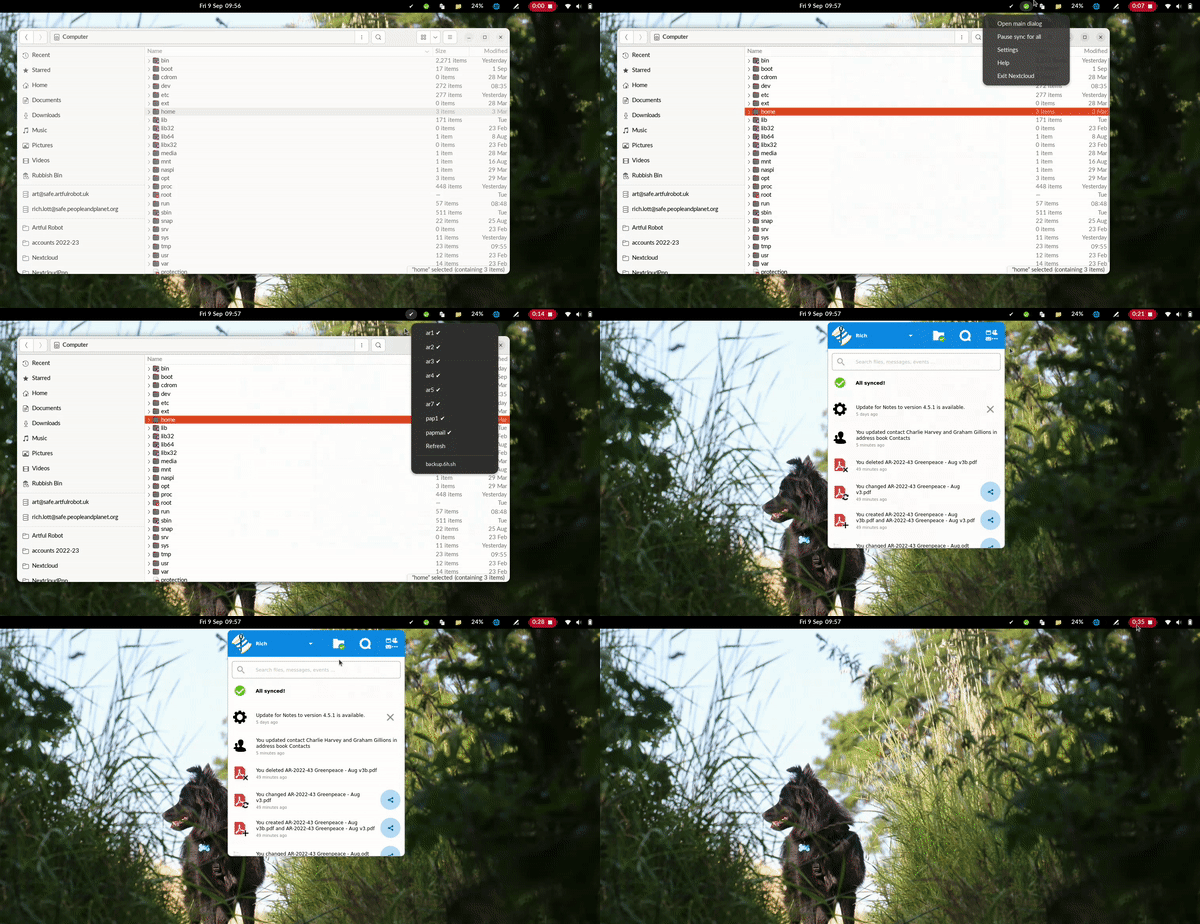
The main window (the blue one) gets closed immediately as it opens under Gnome 42.4 on Wayland on Ubuntu 22.04 using AppImage 3.6.0
- The position of it seems to be fairly random
- The only way to get to it is to minimise all other windows, then open it. But then there's no way to close it. Alternatively, keep opening it until it randomly happens to popup right by your cursor.
- This is probably made worse by focus modes; opening a window does not necessarily focus it under Gnome, by design. (e.g. "sloppy" pointer focus).
- The window cannot be moved by click and drag.
Aside: All these are minior annoyances, but it seems like there are frequent problems with the way this window is created that prevent proper operation of the software, yet it seems the only reason why this isn't a normal native window is to make it look a specific way; I guess that's supposed to be a productivity plus, but on Linux at least it's just been a negative UX for me since it replaced the main Settings window (which I still find more helpful for my at-a-glance needs). It's like adding polish to improve the look of some shoes but it so happens that the polish often glues shoes to the ground. I respect that Linux users are in a minority, and I respect that I may not have the full picture but hope by sharing my experience it might help make the project more reliable.
Steps to reproduce
- have other windows open
- click open main window
- window appears at random positions, then is typically immediately closed.
And
- minimise all other windows
- click open main window
- try to move window: can't.
Expected behavior
Opening the "main window" should open a user interface that I'm able to interact with like I can interact with any other window. I should have control over placement of the window, and I should be able to close it when I want. It should not vanish without my wanting it to vanish.
Which files are affected by this bug
huh?
Operating system
Linux
Which version of the operating system you are running.
Ubuntu 22.04
Package
Appimage
Nextcloud Server version
24.0.4
Nextcloud Desktop Client version
3.6.0
Is this bug present after an update or on a fresh install?
Updated to a major version (ex. 3.3.6 to 3.4.0)
Are you using the Nextcloud Server Encryption module?
Encryption is Disabled
Are you using an external user-backend?
- [ ] Default internal user-backend
- [ ] LDAP/ Active Directory
- [ ] SSO - SAML
- [ ] Other
Nextcloud Server logs
No response
Additional info
I have not attached debug logs as it is unclear to me what data would be in that log. Typically logs include filenames, and server URLs which are sensitive.

On Wayland the tray dialog is supposed to be a normal window. The debug logs contain debug output about how the tray window is formed and how it decides to present itself, could you share the logs? Thanks!

@claucambra happy to if you can provide some info on what other data is in the logs, specifically whether filenames, file content, usernames, server URLs etc. are included? They're 10.4MB big which is quite a lot for a human to search through.
@claucambra happy to if you can provide some info on what other data is in the logs, specifically whether filenames, file content, usernames, server URLs etc. are included? They're 10.4MB big which is quite a lot for a human to search through.
These are included, yes. If you'd rather not provide the full logs you can search for log lines containing computeWindow and share only those
@artfulrobot Two questions for you:
- What is the output for you of running
echo $XDG_SESSION_TYPEin the terminal? - Do you have focus follow mouse enabled?
Hi,
i had a similar issue on Arch with gnome (wayland), the main dialog don't appear (or may be too quickly to see it) when i click on open main dialog in the nexcloud-client's tray icon menu.
I found this warning in my log file :
2022-09-09 17:32:38:783 [ warning nextcloud.gui.systray /build/nextcloud-client/src/nextcloud-client/src/gui/systray.cpp:145 ]: "qrc:/qml/src/gui/tray/Window.qml:146 Type UserStatusSelectorPage unavailable\nqrc:/qml/src/gui/UserStatusSelectorPage.qml:39 Type UserStatusSelector unavailable\nqrc:/qml/src/gui/UserStatusSelector.qml:16 module \"QtQuick.Dialogs\" is not installed\n"
Arch's nextcloud-client package depend on qt5-quickcontrols2 but after installing manually qt5-quickcontrols and restart nextcloud-client the main windows appear.
i hope this help

Hi,
i had a similar issue on Arch with gnome (wayland), the main dialog don't appear (or may be too quickly to see it) when i click on
open main dialogin the nexcloud-client's tray icon menu.I found this warning in my log file :
2022-09-09 17:32:38:783 [ warning nextcloud.gui.systray /build/nextcloud-client/src/nextcloud-client/src/gui/systray.cpp:145 ]: "qrc:/qml/src/gui/tray/Window.qml:146 Type UserStatusSelectorPage unavailable\nqrc:/qml/src/gui/UserStatusSelectorPage.qml:39 Type UserStatusSelector unavailable\nqrc:/qml/src/gui/UserStatusSelector.qml:16 module \"QtQuick.Dialogs\" is not installed\n"Arch's nextcloud-client package depend on qt5-quickcontrols2 but after installing manually qt5-quickcontrols and restart nextcloud-client the main windows appear.
i hope this help
This is a separate issue related to packaging, but thanks for bringing it up
@claucambra
What is the output for you of running echo $XDG_SESSION_TYPE in the terminal?
wayland
Do you have focus follow mouse enabled?
Yes. I have "Secondary Click" selected (previously known as sloppy focus)

Hi
I got this issue somewhat resolved by configuring
QT_QPA_PLATFORM=wayland
You can test by running nextcloud fro a terminal using
export QT_QPA_PLATFORM=wayland
nextcloud
And if it works for you, edit
~/.profile
and add
export QT_QPA_PLATFORM=wayland
To the end of the file.
By "somewhat" I mean the dialog is showing and usable but cannot be moved.

Re QT_QPA_PLATFORM=wayland
Warning: Ignoring XDG_SESSION_TYPE=wayland on Gnome. Use QT_QPA_PLATFORM=wayland to run on Wayland anyway.
qt.qpa.plugin: Could not find the Qt platform plugin "wayland" in ""
This application failed to start because no Qt platform plugin could be initialized. Reinstalling the application may fix this problem.

Available platform plugins are: xcb.

zsh: IOT instruction (core dumped)  ./Nextcloud.AppImage
On Ubuntu 22.04 I installed sudo apt install libqt5quickcontrols2-5 which seemed the nearest thing I had available to the package mentioned above, but then I got the same error.
By the way, I'm now testing/using 3.6.1
Just to steer the discussion away from wayland specifics: I have the same issue in X with a tiling window manager (bspwm): the main window opens but as soon as I move my cursor towards the main window and the cursor has to pass another window, the main window closes (focus follows mouse).
To quote the original report:
Opening the "main window" should open a user interface that I'm able to interact with like I can interact with any other window. I should have control over placement of the window, and I should be able to close it when I want. It should not vanish without my wanting it to vanish.
