

 nextcloud
[Bug]: Windows Client gets logged out and cannot be logged into without a restart
⚠️ Before submitting, please verify the following: ⚠️
- [X] This is a bug, not a question or a configuration issue.
- [X] This issue is not already reported on Github (I've searched it).
- [X] Nextcloud Server and Desktop Client are up to date. See Server Maintenance and Release Schedule and Desktop Releases for supported versions.
- [X] I agree to follow Nextcloud's Code of Conduct
Bug description
We have ~500 clients on-prem. Sometimes a device will show "logged out" in the sync client.
There is no "sign in" button, the only way of signing in is to close and re-open the sync client. Once that happens you're takent ot he website to "Grant Access" again.
Steps to reproduce
Get logged out of your Nextcloud account for (unknown reasons)
Expected behavior
The OwnCloud client has a "log in" button. Nextcloud client should also have a "Log In" button when it knows it's logged out.
Which files are affected by this bug
(whole client)
Operating system
Windows
Which version of the operating system you are running.
Windows 10 21H1
Package
Other
Nextcloud Server version
24.0.3
Nextcloud Desktop Client version
3.5.2 / 3.5.3
Is this bug present after an update or on a fresh install?
Fresh desktop client install
Are you using the Nextcloud Server Encryption module?
Encryption is Disabled
Are you using an external user-backend?
- [ ] Default internal user-backend
- [X] LDAP/ Active Directory
- [ ] SSO - SAML
- [ ] Other
Nextcloud Server logs
n/a
Additional info
n/a

There is no "sign in" button, the only way of signing in is to close and re-open the sync client.
If the client is logged out , you should be able to see the 'Log in' buttons here:
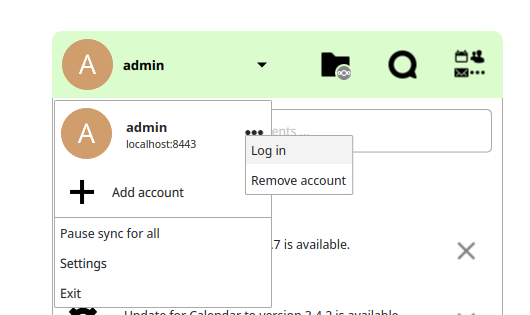
Do you see this option in the menu? Or you mean you need that option somewhere else?
