

 nextcloud
[Bug]: certificate error
⚠️ Before submitting, please verify the following: ⚠️
- [X] This is a bug, not a question or a configuration issue.
- [X] This issue is not already reported on Github (I've searched it).
- [X] Nextcloud Server and Desktop Client are up to date. See Server Maintenance and Release Schedule and Desktop Releases for supported versions.
- [X] I agree to follow Nextcloud's Code of Conduct
Bug description
certificate error without any reason
Steps to reproduce
don't know exactly the conditions to reproduce this bug, as it doesn't happen on my laptopµ same configuration : debian testing nextcloud-desktop package from the repo (3.5.1-2) accessing my nextcloud instance which uses a valid letsencrypt SSL cert
I've also seen this bug happenning under windows 10 with an older version the client (fixed after upgrading).
Expected behavior
connect without any error
Which files are affected by this bug
idk
Operating system
Linux
Which version of the operating system you are running.
debian testing
Package
Distro package manager
Nextcloud Server version
21.0.7
Nextcloud Desktop Client version
3.5.1-2
Is this bug present after an update or on a fresh install?
Fresh desktop client install
Are you using the Nextcloud Server Encryption module?
Encryption is Disabled
Are you using an external user-backend?
- [ ] Default internal user-backend
- [ ] LDAP/ Active Directory
- [ ] SSO - SAML
- [ ] Other
Nextcloud Server logs
No response
Additional info
No response

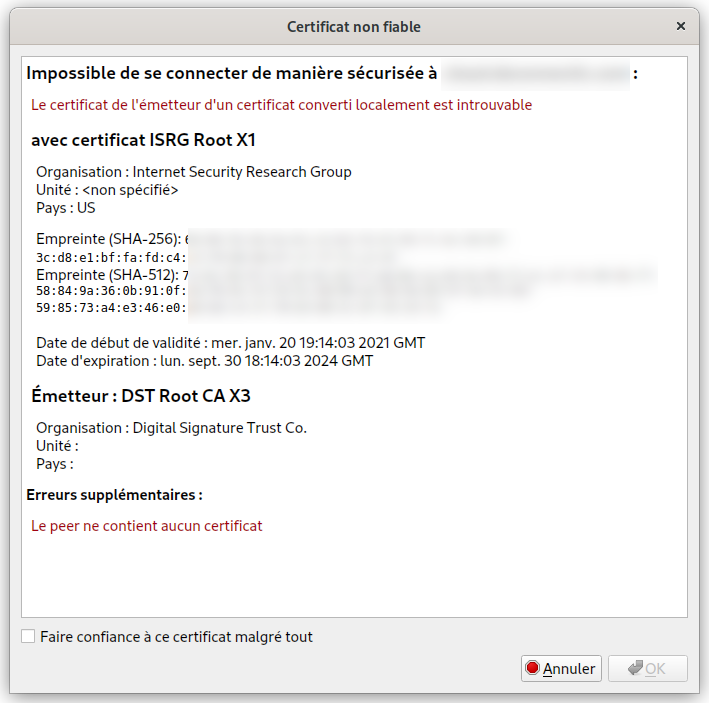
Also had similar issue which is now resolved. When I checked the client logs at ./.config/Nextcloud/logs/ I saw a bunch of warnings like:
cannot call unresolved function SSL_CTX_load_verify_dir
I had previously installed openssl 1.1 on my ubuntu 22.04 system which had placed itself as the primary ssl lib using symlik. After I deleted the /usr/local/lib/libssl.so which pointed at /usr/local/lib/libssl.so.1.1 instead of libssl.so.3 (which nextcloud expects) it started working. On my system I had libssl.so.3 installed at /usr/lib/ which is superseded by /usr/local/lib/.
Make sure you have openssl 3 installed.

I am experiencing the very same issue on Windows. This is constantly reproducible by doing the following:
- Install Windows 11 (you might want to create a VM for this)
- Install chocolatey using the following command:
Set-ExecutionPolicy Bypass -Scope Process -Force; [System.Net.ServicePointManager]::SecurityProtocol = [System.Net.ServicePointManager]::SecurityProtocol -bor 3072; iex ((New-Object System.Net.WebClient).DownloadString('https://community.chocolatey.org/install.ps1')) - Install Nextcloud Client using Chocolatey
choco install nextcloud-client - Start Nextcloud and try to log in
- Take note that the certificate is rejected with the error message shown in @olaulau's comment: https://github.com/nextcloud/desktop/issues/4761#issuecomment-1190634102
However, I found a workaround in the Nextcloud forum: https://help.nextcloud.com/t/nextcloud-app-untrusted-certificate-ok-in-browser/124532/8
After doing the following:
Invoke-WebRequest https://valid-isrgrootx1.letsencrypt.org/;
Or opening https://valid-isrgrootx1.letsencrypt.org/ in a web browser, it magically works.
I really don't know as to why this fixes the issue.

As noted, this is either a device specific certificate chain matter or broken device libssl/openssl.
Related: #3858
If still experiencing something like this, check previously closed issues with various solutions/workarounds or check the Nextcloud Help Forum - https://help.nextcloud.com
