

 nextcloud
Display bug
Hello,
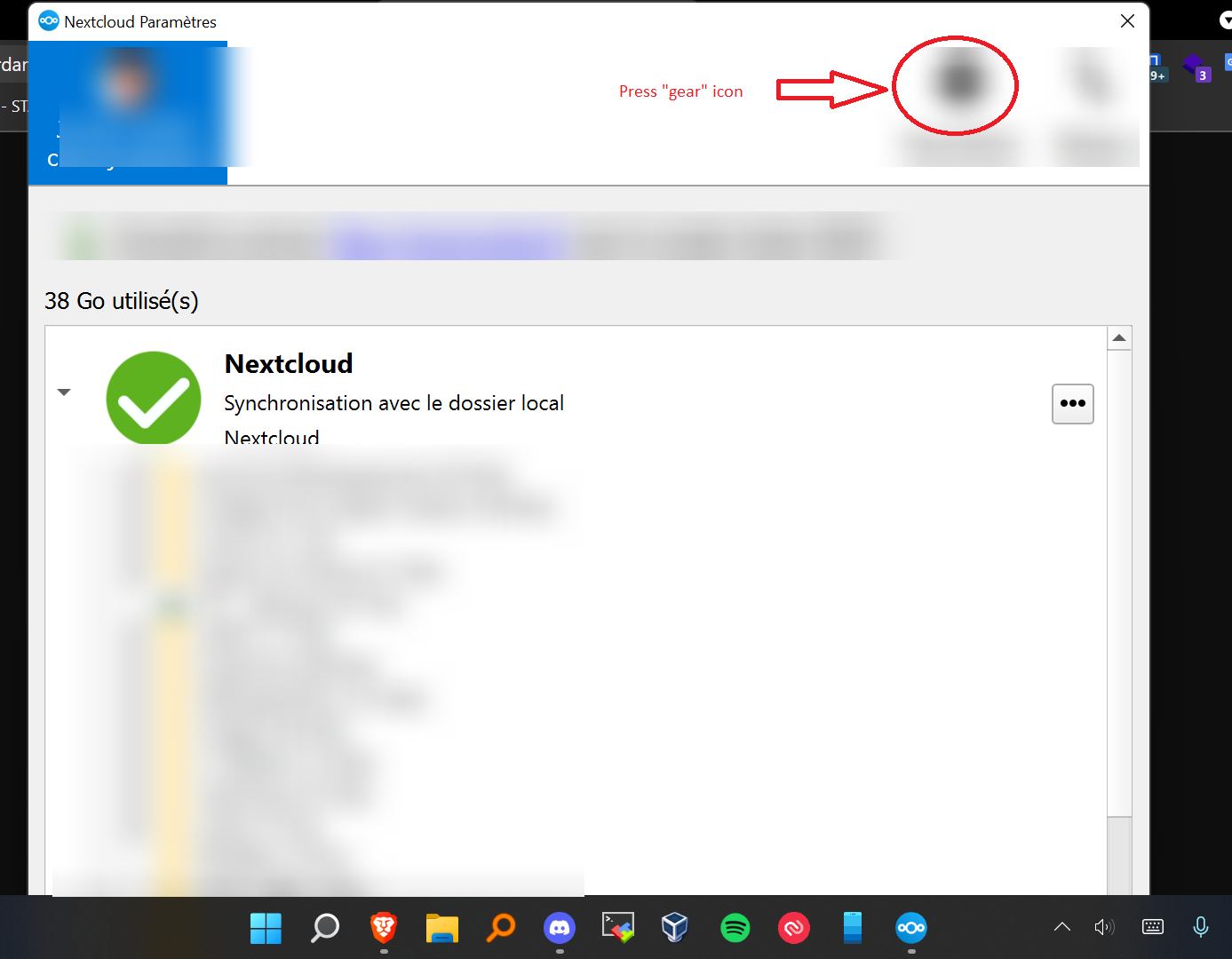
After updating my NextCloud client, I can no longer access the settings of my application, look what it does to me, I can't see the end of the window. https://s.jordand.fr/ATkj3v8Pw8.png

@JordanDIG I don't get what the issue is? You need to click the "gear" icon and Settings will get displayed.

@JordanDIG I don't get what the issue is? You need to click the "gear" icon and Settings will get displayed.
I wanted to say that I don't see the bottom of the window
@JordanDIG I have now upgraded my laptop to Windows 11 and can not reproduce the issue. Which device are you using? How big the screen is? Have you tried resizing the window to make it fit your screen?
@JordanDIG I have now upgraded my laptop to Windows 11 and can not reproduce the issue. Which device are you using? How big the screen is? Have you tried resizing the window to make it fit your screen?
I use my HP Pavilion x360 computer, its resolution is 1920 by 1080. I have already tried to resize the application but without success, the only way to display nextcloud completely is to lower the scaling from 150% to 100 but then the characters are really too small.
@JordanDIG So, 150% is not a standard scaling ratio. Recommended is 125% for most laptops with such screens. Restarting the app is fixing the problem, but, the dialog does look quite big.
I am not sure when one of us will be able to improve this. For now, the workaround is to switch scaling to 125% and restart the desktop client.
@JordanDIG So, 150% is not a standard scaling ratio. Recommended is 125% for most laptops with such screens. Restarting the app is fixing the problem, but, the dialog does look quite big.
I am not sure when one of us will be able to improve this. For now, the workaround is to switch scaling to 125% and restart the desktop client.
Yes, by doing this I don't have the problem anymore, but I can't read what's written on the screen
On my brand new laptop Windows 11 suggests a scale of 150% as "recommended" (resolution is 1920x1080). So it's not an unreasonable or rare scaling factor. With 150% the Nextcloud window is completely unusable, because the bottom is not visible.
It seems the Nextcloud window is sizable with the mouse, but it can't be sized any smaller. At least please make the minimum window height a little bit smaller, so that we can resize the Window until it fits the screen. Thank you!

A solution for users is to set a QT5 environmental variable which allows real values for scaling (in this case 1.5 instead of just 1 or 2), e.g. by a batch-file containing:
@echo off set QT_SCALE_FACTOR_ROUNDING_POLICY=PassThrough start C:\path\to\nextcloud.exe exit
and then starting that batch-file. (Of course you have to adapt the path to your actual nextcloud.exe location.)
If you want this to be run on startup, hti the keys windows and r , enter shell:startup and leave a link to your batchfile in the now opened folder. (Deactivate "run at startup" inside the Nextcloud-App to be sure the batchfile really runs.)

A solution for users is to set a QT5 environmental variable which allows real values for scaling (in this case 1.5 instead of just 1 or 2), e.g. by a batch-file containing:
@echo off set QT_SCALE_FACTOR_ROUNDING_POLICY=PassThrough start C:\path\to\nextcloud.exe exit
and then starting that batch-file. (Of course you have to adapt the path to your actual nextcloud.exe location.)
If you want this to be run on startup, hti the keys windows and r , enter shell:startup and leave a link to your batchfile in the now opened folder. (Deactivate "run at startup" inside the Nextcloud-App to be sure the batchfile really runs.)
Thanks for the solution, but I think it should be integrated in the client.
I found an even easier solution (which could be integratet in the client very easy):
setting a global enivronmental variable in Windows 10 called QT_SCALE_FACTOR_ROUNDING_POLICY with the value PassThrough (see here). You can do so by hitting the Windows-key and search for variables...
Our entire fleet of devices (just shy of 500) is suffering from this bug - 14" devices with running at 1080p
None of the bottom of any of the frst run wizard or the settings shown in the initial bug is visible.
We had been using the ownCloud client, but now the nextCloud server refuses to sync with it, so we can either have a client we can use all the buttons on )(that does not work) or a client that does work, but is missing half of the buttons. (so, functionally useless)

I just installed NextCloud on a Windows laptop with an external monitor. The 14" laptop screen is set to 150% (recommended by Windows) and the external monitor is set to 100% (also recommended by Windows). As I was trying to complete the installation, the final screen (where you choose the sync process etc.) the OK button was not visible. In order to compete the installation I had to tab around to the OK button which was apparently off the screen.
I opened a topic in the Help forum, where they directed me to GitHub for bug reports. I saw THIS bug which seems similar. My issue was regarding the installer. Should I open a separate bug for the bug referencing the installer?
Here's my topic in the Help forum
Frankly I have not seen this issue in the settings window yet, but it's not my PC so I might have to go there to see it. I'm currently creating a VM so I can test it without disrupting the active PC.
The first part of the installer with the "ordinary Windows" dialogs looked right; it was the final screen of Nextcloud (that more than filled the screen) that caused the issue.
For folks saying 150% isn't normal, as I said this is the Microsoft recommended setting for the 1 year old Lenovo laptop because the resolution on the screen would make the text difficult to read at 100%.

On my brand new laptop Windows 11 suggests a scale of 150% as "recommended" (resolution is 1920x1080). So it's not an unreasonable or rare scaling factor. With 150% the Nextcloud window is completely unusable, because the bottom is not visible.
It seems the Nextcloud window is sizable with the mouse, but it can't be sized any smaller. At least please make the minimum window height a little bit smaller, so that we can resize the Window until it fits the screen. Thank you!
Same here. On several Dells I use, and my colleagues too, 150% is recommended, and this is exactly the same issue. Not usable, cannot check for updates or press OK. :) Win10 x64.

This has to be one of the most annoying problems in Nextcloud right now. Difficult to recommend with this big of a showstopper.

don't set variables via batch. This affects all qt apps, so just go to Computer>System>System properties>Settings>Advanced sytem Settings, Enviroment Variables and add a new user variable called QT_SCALE_FACTOR_ROUNDING_POLICY with the Value PassThrough.
