

 nextcloud
ability to set default board on start
Currently, the default board when opening the Deck app is the 'overview board'. This becomes very frustrating, over time, when I navigate away from Deck and then go back expecting to see the board I was already working on but instead having to, yet again, navigate away from the overview board.
Describe the solution you'd like It would be nice to have options as to which board opens on start.
- [ ] Default to overview
- [ ] Default to last viewed
- [ ] Default to specified board [on click list of boards shown and user selects one]
Describe alternatives you've considered
I couldn't come up with a solution other than using direct links to the board I was working on - which is not very practical.

May I also suggest the ability to set up a group / global config for a specific view?
My users are confused when presented without the lateral bar and its lists and options: an admin setting would be super nice !

This issue has been automatically marked as stale because it has not had recent activity. It will be closed if no further activity occurs. Thank you for your contributions.
![stale[bot] avatar](https://avatars.githubusercontent.com/in/1724?v=4 "Published by a pub.dev verified publisher")
Totally relevant still.
Just so the comment isn't a plain bump, I got a 'workaround' someone might find useful.
I've used External Sites NC app to create a new icon in the top bar linking directly to my 'default' board.
Then I used AppOrder app to remove the default Deck icon.
I'm a sole user of my instance, but you can also use AppOrder per-user if needed.

Totally relevant still. Just so the comment isn't a plain bump, I got a 'workaround' someone might find useful.
I've used External Sites NC app to create a new icon in the top bar linking directly to my 'default' board. Then I used AppOrder app to remove the default Deck icon.
I'm a sole user of my instance, but you can also use AppOrder per-user if needed.
I did the same but External Sites also created the top bar instead of showing just the original bar. How did you manage to do it?
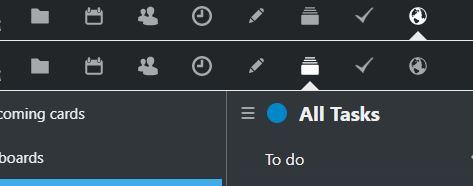

@mareekkk Make sure to check 'This site does not allow embedding' in the external site settings. It will prevent the 'infinite mirror' effect.
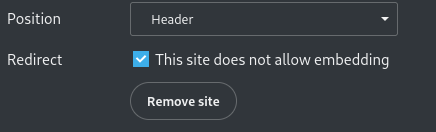
@mareekkk Make sure to check 'This site does not allow embedding' in the external site settings. It will prevent the 'infinite mirror' effect.
I have this option activated but still the mirror effekt. Dont know why.
i added "defaultapp -> external' to config.php and the top bar is doubled...

@tschombes Try cleaning the browser cache.
It is not a browser cache issue. The double only appears if i set the default app in config.php to "external". Is there any way to prevent this? Thanks
Hi again,
i have checked everything again but the issue still persists.
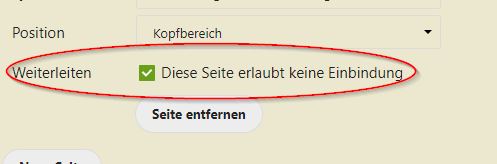
The configured external site is pointing to:

config.php 'defaultapp' => 'external',
Result:
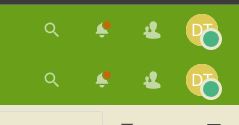
Problem occurs with every browser and in private mode. I had no more idea what could cause this.
Anyone?
@tschombes I'm sorry, I don't have an answer for you.
But I want to suggest to continue this as a separate issue over at the nextcloud/external repo. You're more likely to find help there, and it also keeps this issue on-topic. nextcloud/external #285 looks like it might be related to your issue.

I agree very much about that I would like to get my favorite board open by default.
I don't think, however, that a new configuration setting is needed. Why not simply reopen what was open last time? I think this would be a sensible thing to do overall in Nextcloud as it is user-oriented with separate users for every person. And as user I usually want to have my same view again, regardless on which device I open Deck or if I needed to relogin for whatever reason.
The workaround given by https://github.com/nextcloud/deck/issues/2840#issuecomment-884121430 works for me. What does not work is setting a bookmark to the correct deck: when a login is needed, I get redirected to Deck but not the specific Deck I would've liked.
