

 nextcloud
Upload fails due to out of memory
Hi all
Uploading a point never really worked in my setup. The process stops after a couple minutes. The upload during the background processing of nextcloud does not work too. As I found out today, its because of the PHP going out of memory. I started the upload process manually for example with the following parameters for php:
(I started it inside the docker container)
Limit to 4GB of memory
php --define apc.enable_cli=1 --define memory_limit=4096M /var/www/html/occ backup:point:upload 20220330174131-full-PRHhBIchcGk5AJl
Result:
...
  * Uploading data/data-9b2543e5-06cf-4140-a1cb-790b68c829be/00017-j2dPiFe6UoPaGAR: ok
  * Uploading data/data-9b2543e5-06cf-4140-a1cb-790b68c829be/00018-QAsOQFCZ4u3E5sd: PHP Fatal error:  Allowed memory size of 4294967296 bytes exhausted (tried to allocate 139810208 bytes) in /var/www/html/custom_apps/backup/lib/Service/PackService.php on line 606
No memory limit at all
php --define apc.enable_cli=1 --define memory_limit=-1 /var/www/html/occ backup:point:upload 20220330174131-full-PRHhBIchcGk5AJl
Result (because of the "unlimited" memory it used more than 8GB of memory):
...
  * Uploading data/data-3daeea38-1fc4-4a73-a076-4d48e4090fac/00018-L3NjJfWfK2fiLQV: ok
  * Uploading data/data-3daeea38-1fc4-4a73-a076-4d48e4090fac/00019-pNi5zxKK6LpRXME: ok
  * Uploading data/data-3daeea38-1fc4-4a73-a076-4d48e4090fac/00020-OvB968OSmGeU3BD: Killed
Is there a memory leak somewhere? How could I prevent this?
Thx for the support


I have the same issue with the Backup App (1.0.6) in my Nextcloud AIO (v1.5.0) setup. With my current configuration I am trying to upload to another machine via WebDAV. I have also tried it via SFTP before, having the same errors. The backup finishes locally, but does not upload to external storage.
I forced the upload with the cli php occ backup:point:upload <ID>, but as described by OP this results in just one chunk of 100MB being uploaded followed by this error:
PHP Fatal error: Allowed memory size of 536870912 bytes exhausted (tried to allocate 104858056 bytes) in /var/www/html/lib/private/Files/Storage/Common.php on line 208
I then have to unlock the restoring point php occ backup:point:unlock <ID> and then force the upload of the next chunk. This again, resulting in another 100MB chunk being uploaded followed by the memory exhaustion.
Soooo, I wrote a loop for i in {1..X}; do php occ backup:point:unlock <ID>; php occ backup:point:upload <ID>; done.
The php occ backup:point:upload <ID> starts with checking the external folder and processing a health check. Which returns in every iteration
- one more correct chunk,
- one missing chunk less, and
- one faulty chunk
There are exceptions though, when the last chunk of a block (3.9 GB) is uploaded, it might be way smaller then 100MB and therefor does not lead to the memory exhaustion itself. Instead the following first 100MB chunk of the next 3.9GB block will then run into an memory exhaustion, interestingly from a different file though:
PHP Fatal error: Allowed memory size of 536870912 bytes exhausted (tried to allocate 139810776 bytes) in /var/www/html/custom_apps/backup/lib/Service/PackService.php on line 606
In these cases the health check of the following upload has:
- two more correct chunks,
- two missing chunks less, and
- zero faulty chunks
The health check of the successfully uploaded chunks runs for every upload command. While uploading the 100MB chunks took between 8 to 10 seconds, the health check of the already uploaded chunks took quite a while.
With 50 correct chunks each health check took around 2 minutes,
with 90 chunks it was 3 and a half minutes,
and with 120 chunks the health check took 6 minutes.
Therefor the upload of the whole backup of merely 14GB took roughly 7 hours. SEVEN HOURS!
In the future I might try increasing the memory limit to allow for more uploaded chunks per health check. ANY suggested workaround will be appreciated.

set memory to -1 (unlimited) didn't fix it for me. triggering a manual upload uploads several files, but eventually the process stops with an event "Uploading Killed".
Any suggestions?
Uploading data/data-6bc4b442-d0d9-47d5-a979-85c2f74c3ce1/00010-BFx4FXwDTXFe7f2: ok Uploading data/data-6bc4b442-d0d9-47d5-a979-85c2f74c3ce1/00011-8PyRfYtdV4qdlKy: ok Uploading data/data-6bc4b442-d0d9-47d5-a979-85c2f74c3ce1/00012-Z86PNmryWJhS28j: ok Uploading data/data-6bc4b442-d0d9-47d5-a979-85c2f74c3ce1/00013-o9si1auaT7XrwF2: ok Uploading data/data-6bc4b442-d0d9-47d5-a979-85c2f74c3ce1/00014-bgVRndYRpr9m6dA: ok Uploading data/data-6bc4b442-d0d9-47d5-a979-85c2f74c3ce1/00015-TeWpZ6ZGqkqO5uM: ok Uploading data/data-6bc4b442-d0d9-47d5-a979-85c2f74c3ce1/00016-Ybzw1N63DLScwDc: ok Uploading data/data-6bc4b442-d0d9-47d5-a979-85c2f74c3ce1/00017-hqiTqXfZrI7rIPH: ok Uploading data/data-6bc4b442-d0d9-47d5-a979-85c2f74c3ce1/00018-RFT6XrIbyktKuYc: ok Uploading data/data-6bc4b442-d0d9-47d5-a979-85c2f74c3ce1/00019-k4mUeJ13M9sif6U: ok Uploading data/data-6bc4b442-d0d9-47d5-a979-85c2f74c3ce1/00020-L1rRdHLhOuzktjg: ok Uploading data/data-6bc4b442-d0d9-47d5-a979-85c2f74c3ce1/00021-NKnFECss8JIvRNx: ok Uploading data/data-6bc4b442-d0d9-47d5-a979-85c2f74c3ce1/00022-AWECeRYNX5M7COx: ok Uploading data/data-6bc4b442-d0d9-47d5-a979-85c2f74c3ce1/00023-CvbcCU2TYtKBEEo: ok Uploading data/data-6bc4b442-d0d9-47d5-a979-85c2f74c3ce1/00024-SDAoMYl3fXUR7t6: ok Uploading data/data-6bc4b442-d0d9-47d5-a979-85c2f74c3ce1/00025-GAC8BaRjjUla4MU: ok Uploading data/data-6bc4b442-d0d9-47d5-a979-85c2f74c3ce1/00026-XfPRZVGq5xULn3B: ok Uploading data/data-6bc4b442-d0d9-47d5-a979-85c2f74c3ce1/00027-Ug3GGPmyIIqUqev: ok Uploading data/data-6bc4b442-d0d9-47d5-a979-85c2f74c3ce1/00028-W1Vy2JbgYIyi9PI: ok Uploading data/data-6bc4b442-d0d9-47d5-a979-85c2f74c3ce1/00029-7UCLU52pU4lWene: ok Uploading data/data-6bc4b442-d0d9-47d5-a979-85c2f74c3ce1/00030-Jb5Z6RhyVFLZ2oC: ok Uploading data/data-6bc4b442-d0d9-47d5-a979-85c2f74c3ce1/00031-Uwa3SZLJMdOmaGo: ok Uploading data/data-6bc4b442-d0d9-47d5-a979-85c2f74c3ce1/00032-AuKPsN8cuV9nnz3: ok Uploading data/data-046daf57-4fdb-496f-ab0c-e789e518ee66/00001-vtBsU2EZqOe2X5G: ok Uploading data/data-046daf57-4fdb-496f-ab0c-e789e518ee66/00002-hAAtq41oES5pKlq: ok Uploading data/data-046daf57-4fdb-496f-ab0c-e789e518ee66/00003-xW98g1sMbyChn3s: ok Uploading data/data-046daf57-4fdb-496f-ab0c-e789e518ee66/00004-anE7OAhOjc3FOiK: ok Uploading data/data-046daf57-4fdb-496f-ab0c-e789e518ee66/00005-XBD1hHDH6bRrnAG: ok Uploading data/data-046daf57-4fdb-496f-ab0c-e789e518ee66/00006-PsxDixhChzPkkie: ok Uploading data/data-046daf57-4fdb-496f-ab0c-e789e518ee66/00007-nbQ9VT2olJdDszK: ok Uploading data/data-046daf57-4fdb-496f-ab0c-e789e518ee66/00008-wg3v1wIZVKdmSkr: ok Uploading data/data-046daf57-4fdb-496f-ab0c-e789e518ee66/00009-I4VkGzGViitl4QK: ok Uploading data/data-046daf57-4fdb-496f-ab0c-e789e518ee66/00010-ZVUtqGzg4qE4LNl: ok Uploading data/data-046daf57-4fdb-496f-ab0c-e789e518ee66/00011-QFbzv6z7dgxP5iZ: ok Uploading data/data-046daf57-4fdb-496f-ab0c-e789e518ee66/00012-ZE4h96fMjX1fvEi: ok Uploading data/data-046daf57-4fdb-496f-ab0c-e789e518ee66/00013-wrrsWBz15BnukpZ: ok Uploading data/data-046daf57-4fdb-496f-ab0c-e789e518ee66/00014-ALC8w1FP5nJ5b15: Killed

Same Problem here. Trying to upload a small Backup of 34 Chunks to external S3. Same error:
PHP Fatal error: Allowed memory size of 2147483648 bytes exhausted (tried to allocate 139811464 bytes) in /var/www/html/custom_apps/backup/lib/Service/PackService.php on line 606
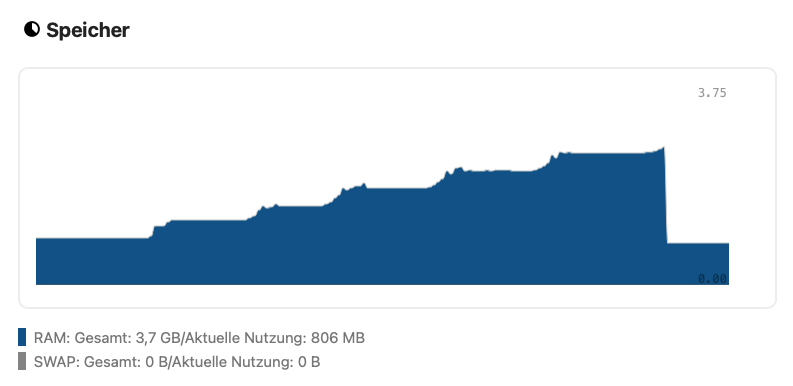
With every new chunk uploading you can see the Memory rising until the limit is reached:




In the interest of consolidating discussion, would you mind closing this and upvoting #308?
