

 nextcloud
Looping around login wizard and never get in the app
Steps to reproduce
- open nextcloud android app
- Enter server URL
- enter credentials
- login successful, screen with "grant access" button
- Pressing the button loops you to server URL page
Expected behaviour
- App should be open and nextcloud account should appear in Android "account" session and ready to sync
Actual behaviour
- No account created and not able to access the nextcloud app connected with the account. The device does appear in the nextcloud web page with all synced devices for that account, and each time we try to connect, another instance appear in the list. On the server, 4 or 5 different other devices logged in successfully, including other Xiaomi devices
Can you reproduce this problem on https://try.nextcloud.com? to be tested
- Please create a test demo account and see if this still happens there.
- If yes, please open up a bug report
- If not, please verify server setup and ask for help on forum Edit : Exact same behavior after double check
Environment data
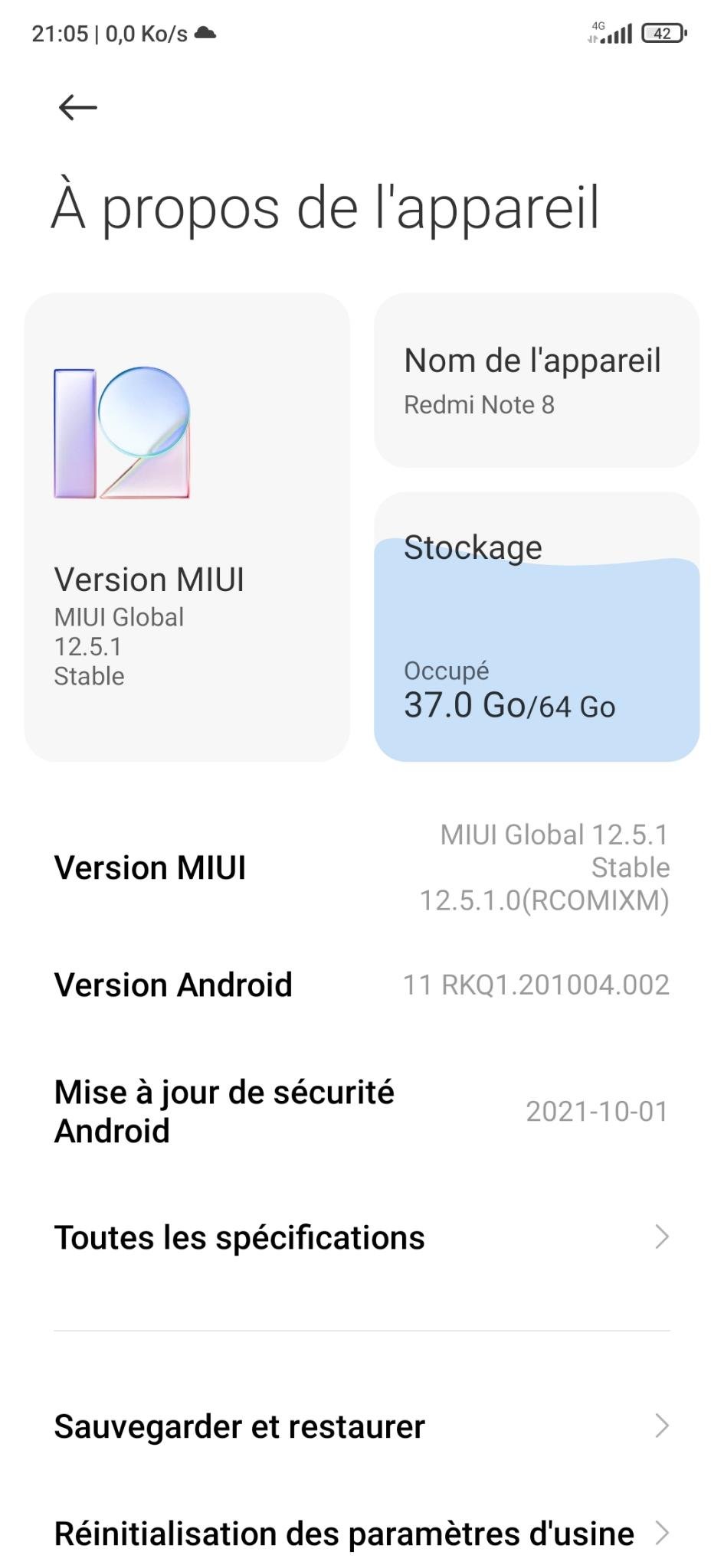
Android version: 11
Device model: Redmi Note 8
Stock or customized system: Stock MIUI 12.5.1
Nextcloud app version: 3.19.0
Nextcloud server version: self-hosted 22.2.5
Reverse proxy: linuxserver/swag docker using nginx and letsencrypt certificate
Logs
Web server error log
Insert your webserver log here
Nextcloud log (data/nextcloud.log)
Insert your Nextcloud log here
NOTE: Be super sure to remove sensitive data like passwords, note that everybody can look here! You can use the Issue Template application to prefill some of the required information: https://apps.nextcloud.com/apps/issuetemplate
************ CAUSE OF ERROR ************
java.lang.RuntimeException: Failure delivering result ResultInfo{who=null, request=1, result=-1, data=Intent { dat=content://com.android.providers.media.documents/document/image:1997 flg=0x1 }} to activity {com.nextcloud.client/com.owncloud.android.ui.activity.FileDisplayActivity}: java.lang.RuntimeException at android.app.ActivityThread.deliverResults(ActivityThread.java:5146) at android.app.ActivityThread.handleSendResult(ActivityThread.java:5187) at android.app.servertransaction.ActivityResultItem.execute(ActivityResultItem.java:51) at android.app.servertransaction.TransactionExecutor.executeCallbacks(TransactionExecutor.java:135) at android.app.servertransaction.TransactionExecutor.execute(TransactionExecutor.java:95) at android.app.ActivityThread$H.handleMessage(ActivityThread.java:2135) at android.os.Handler.dispatchMessage(Handler.java:106) at android.os.Looper.loop(Looper.java:236) at android.app.ActivityThread.main(ActivityThread.java:8037) at java.lang.reflect.Method.invoke(Native Method) at com.android.internal.os.RuntimeInit$MethodAndArgsCaller.run(RuntimeInit.java:656) at com.android.internal.os.ZygoteInit.main(ZygoteInit.java:967) Caused by: java.lang.RuntimeException at com.owncloud.android.ui.activities.ActivitiesActivity$$ExternalSyntheticLambda0.get(Unknown Source:2) at com.nextcloud.java.util.Optional.orElseThrow(Optional.java:309) at com.owncloud.android.ui.activity.FileDisplayActivity.requestUploadOfContentFromApps(FileDisplayActivity.java:1035) at com.owncloud.android.ui.activity.FileDisplayActivity.onActivityResult(FileDisplayActivity.java:878) at android.app.Activity.dispatchActivityResult(Activity.java:8531) at android.app.ActivityThread.deliverResults(ActivityThread.java:5139) ... 11 more
************ APP INFORMATION ************ ID: com.nextcloud.client Version: 30190090 Build flavor: gplay
************ DEVICE INFORMATION ************ Brand: xiaomi Device: ginkgo Model: Redmi Note 8 Id: RKQ1.201004.002 Product: ginkgo
************ FIRMWARE ************ SDK: 30 Release: 11 Incremental: V12.5.1.0.RCOMIXM
https://youtu.be/GmjCqLKZZw8

I am having the exact same problem here! Version of the app: 3.19 (f-droid) Running lineage-os 15.1-20200224-nightly-bullhead /android 8.1 Nextcloud version: 23.0.2 (not self hosted, so I doubt it's configuration issue on the server)
The login is successful, but then I need to clock on the button Grant access. I get the cicrle that keeps on spinning with the text When I tap somehere in the screen I get back to the fields for my username and password.
Below there is written that I attempted several times to login with invalid credentials and I will be blocked for 30 seconds (?!?!). If I retry it simply says "error. Acces forbidden. Invalid request".
Just to make this clear: I am definitely using the correct username and password. I have a password manager that fills it in and the credentials are working fine on the website. Initially I manage to login, otherwise the "Grant acces" button would not appear I guess.
I have been trying several times, doing the same thing (entering the domain, entering my credentials using the password manager, tapping on Grant access). And all of a sudden I got access? Feels a bit like a lottery. What info can I provide that would help you find out why this happens?

Strange then, as you are on Lineage, i would expect nothing "proprietary" to block you from using such apps. On the other side, i made a video as you can see at the very end of my post, strange thing is that if you hit the "back" button (which is a gesture in the video but it doesn't matter) you are redirected to the main app, i succeeded with try and fails to land in it without the login page anywhere, but everything is empty, you don't see anything at all besides the menu which aren't working if you tap on them.
The stack trace for this error looks odd. It references requestUploadOfContentFromApps, which definitely shouldn't be called during normal app startup, so I don't know what even is happening.
Do you have the same crash in a different device with the same server, or in a different server with the same device?

The stack trace for this error looks odd. It references
requestUploadOfContentFromApps, which definitely shouldn't be called during normal app startup, so I don't know what even is happening.Do you have the same crash in a different device with the same server, or in a different server with the same device?
Hi, thanks for your help. We tried as i mentioned in my initial post the tryout URI from Nextcloud, same issues that we can go over the grand access process, once login is established, either the app crashes or goes back to the intial login process, as nothing happened before. The server i am hosting already has different mobile sync with it without any issue. Only that one gives us a hard time, and as said, this device is a Redmi running MIUI, but i have another device running MIUI as well which doesn't have any issue at all so far.
The stack trace for this error looks odd. It references
requestUploadOfContentFromApps, which definitely shouldn't be called during normal app startup, so I don't know what even is happening. Do you have the same crash in a different device with the same server, or in a different server with the same device?Hi, thanks for your help. We tried as i mentioned in my initial post the tryout URI from Nextcloud, same issues that we can go over the grand access process, once login is established, either the app crashes or goes back to the intial login process, as nothing happened before. The server i am hosting already has different mobile sync with it without any issue. Only that one gives us a hard time, and as said, this device is a Redmi running MIUI, but i have another device running MIUI as well which doesn't have any issue at all so far.
So in summary, it happens only with that one particular device, but any server? That's going to be hard to debug :\
The stack trace for this error looks odd. It references
requestUploadOfContentFromApps, which definitely shouldn't be called during normal app startup, so I don't know what even is happening. Do you have the same crash in a different device with the same server, or in a different server with the same device?Hi, thanks for your help. We tried as i mentioned in my initial post the tryout URI from Nextcloud, same issues that we can go over the grand access process, once login is established, either the app crashes or goes back to the intial login process, as nothing happened before. The server i am hosting already has different mobile sync with it without any issue. Only that one gives us a hard time, and as said, this device is a Redmi running MIUI, but i have another device running MIUI as well which doesn't have any issue at all so far.
So in summary, it happens only with that one particular device, but any server? That's going to be hard to debug :\
Correct, isn't there anything we can extract with Android Studio for example while running the app that could help ?
Correct, isn't there anything we can extract with Android Studio for example while running the app that could help ?
A logcat could be helpful: https://github.com/nextcloud/android#getting-debug-info-via-logcat-mag
I am seeing the same problem, with app version 3.19.0 from F-Droid on my Samsung Galaxy S5 with Android 10 (LineageOS) and a server from a local club. Here's my logcatOutput.txt, created while trying to connect. Is there anything suspicious?
I will test another device for comparison.

My workaround: In a Nextcloud browser session, use Settings > Security > "Devices & sessions" > "Create new app password" to create a QR code, then use this QR code in the app to setup the connection.
Is this a duplicate of #3623?
Not sure, maybe, what i can tell is that the QR code workaround didn't worked for me, i tried also. I still need to produce the logcatoutput, but time is missing, and moreover this is the phone of my brother in law, i don't see him everyday.
This appears to be the same as #11575/#11584. That reporter says it's fixed for them. Can you confirm, @mauro2306?

Hi there, i am truly sorry, but i won't be able to confirm this, i don't have that phone any longer, and with the new Mi 11 i did not have the same issue at login. My apologies. I think we can close the bug without being sure sorry for that.