

 netdata
[Feat]: ability to customize chart y-axis min and max values
Problem
(making this feature request stemming from some user feedback: https://netdata-cloud.slack.com/archives/C02SR6RESQ1/p1686069582341879)
It would be useful to be able to manually set custom min and max values for the y-axis on a chart.
This would be useful when for whatever reason you want a different y-axis min and max than the default one.
Description
ability to add a custom min and max on the fly for a chart:
eg taking a random example - lets say i want to have the min be 12.00 and max be 20.00 so that i can "zoom in" in between the red lines below - i should be able to just dynamically type those min and max values into the FE on the fly in some way and have the y-axis adjust accordingly.
Importance
really want
Value proposition
- more flexibility on the y-axis to help when default ranges do not suit.
Proposed implementation
ability to just define a min and max on the fly in the FE as i am troubleshooting.

also maybe somewhat related could be this: https://github.com/netdata/netdata-cloud/issues/628
actually one thing i should add is that we do have the ability for a horizontal highlight that sort of does what i mention above
https://github.com/netdata/netdata-cloud/assets/2178292/6517f7ec-e6a2-4239-8654-190bd2bf7d8c
To be clear about another use case, it would be nice to be able to set the minimum/maximum Y value to something OUTSIDE the range of what is there by default. So if I have some statsd counter that hovering between 5-10, but I know the maximum is 20 and the minimum is 0, I should be able to look at the graph like that, instead of Netdata only showing me values between 5-10. This is largely to help with purely visual parsing of data. It would mean, without looking at any numbers, I can see at a glance if I'm near my predefined maximum and minimum values.
These values should also be saved as part of any dashboard I create so I don't have to set them every time I view the dashboards, but this is a stretch goal, just being able to customize the min/max values would be great on its own.

actually one thing i should add is that we do have the ability for a horizontal highlight that sort of does what i mention above
2023-06-06.19-20-22.mp4
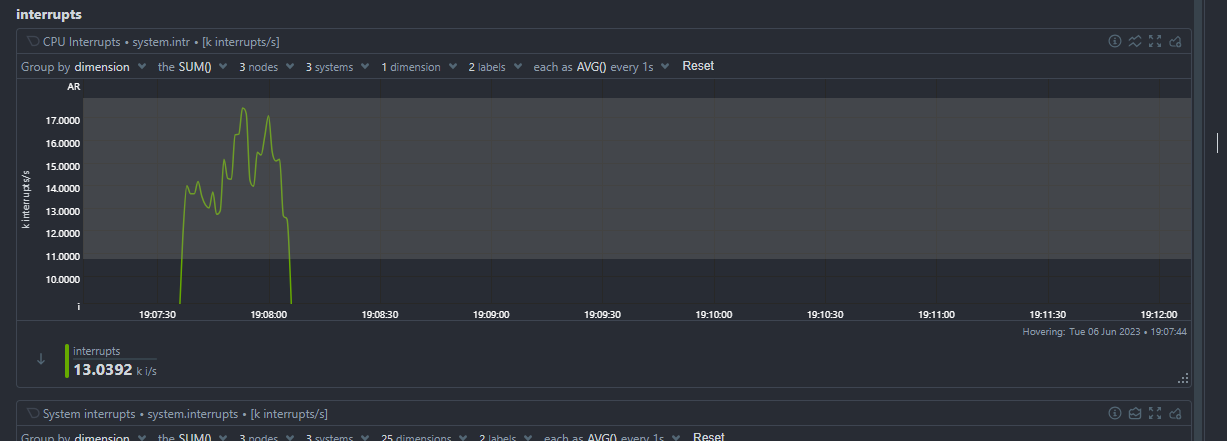
This doesn't account for the case where you want to see a LARGER range of values as I mentioned above, as opposed to a smaller range of values.
this request to set some on the fly or to save x and y ranges seems more related to this https://github.com/netdata/netdata-cloud/issues/845 for the original purpose of this ticket the vertical zoom achieves the result closing this and adding the "customize chart y-axis min and max values" to the other ticket

Let's get this done please. I am looking at a chart, wow, big jump. Then I look at numbers, it jumped from 950 to 990. Come on.

This issue has been mentioned on the Netdata Community Forums. There might be relevant details there:
https://community.netdata.cloud/t/can-i-set-the-min-and-max-value-of-gauge-and-circle-graphs-in-the-dashboard/5388/2

I am reopening this issue, as I don't think this need is met.
I think as part of the custom settings per chart, there should be an option for user to define min and max y-axis values and save this to preferred scope.
cc: @netdata/cloud-fe @sashwathn @ktsaou

This issue has been mentioned on the Netdata Community Forums. There might be relevant details there:
Another relevant discussion.
https://community.netdata.cloud/t/dynamic-y-axis-for-graph-total-cpu-utilisation/3115/4

Good Day guys,
Is this still planned to incorporate?
I used to be able to set the Y axis to a range a couple of years ago (Netdata has changed quite a bit since then). I used it before to catch my naughty local power cooperative who have a nasty habit of winding the supply voltage down, I used my UPS "line in" readings and netdata to generate daily graphs to then complain properly to the ombudsman in the capital (it worked). Sadly they are up to their old games again, but because the charts are all auto ranging, I can't lock in 0 - 250V like I did before, so the charts are difficult to follow - Example of what I had before:
There was mention in one post that a custom dashboard could do this but I cannot seem to find the details to range to a custom value.
This is now:
Unless I switch off the power once for about a minute during the day (this occasion was an unannounced power outage) I can't range it well.

I just installed on 6 nodes and also added business plan. But now I don't find a way to either automatically or manually set the y-axis on graphs to the min and max possible values (like 0% to 100% on mem.available). Doesn't this defeat the purpose of many graphs? If I look for example on mem.available I would expect to see it in relation to the total memory, especially when I have many nodes, where I don't want to look for the total memory of that node myself in order to classify the value I'm seeing... There are so many integrations, graphs etc and this seems such a basic setting.

Any news on this? While I'm sure the coding for such a feature is not simple, I can't stress enough how the lack of custom graph dimensions is as baffling as it is unheard of for monitoring systems. I was considering buying the business plan for my datacenter, but half the graphs are excessively annoying to use when the Y-axis is completely random at any given moment.


This exists for a long of time:

Absolutely not the same thing. The feature being discussed here is being able to set permanent Y-axis limits per graph, that persist with horizontal zoom and also with timeframe selection. Plus being able to manually set out of bound limits, like 0 and 100 for percentual graphs where values have yet to reach either 0 or 100.
@Andrei-Nitu explain a little more how you imagine this to work. Generally these things are easy to implement if we understand what needs to be done.
So, you are going to set manually a range for the y-axis. And you want this persisted, so that the graph should stay in that y-range while you pan it across time, and of course when you hit PLAY to auto-refresh.
The key question is this: what will happen if the graph gets partially or totally off the given range?
Example:
You have a single value chart that the value ranges between 80 to 90. You set the y-range 70 to 100. This is sticky now. So, no matter what you do, the chart stays there.
Then the chart starts getting values 50 to 60, outside the visible range.
Options:
-
The chart sticks to user defined limits (70 to 100), so the values that are outside the range are not visible. Even if the entire chart is outside the range, the chart still stays in the user defined limits, potentially showing a partially or totally empty chart.
-
The chart automatically adjusts so that all points are always visible. This is what we do today, which we are trying to improve.
-
something else?
The problem becomes a little more complex when there are multiple dimensions/lines on a chart. What if a dimension is within the range you provided, but the other dimension is not.
Today netdata zooms automatically to show all the selected dimensions. So you can just select any dimension and the chart changes y-axis automatically to the y-range of that dimension.
@Andrei-Nitu would it be better to do this:
- Leave Netdata's autoscaling as it is. This zooms automatically to show all points. You can temporarily zoom manually.
- Set 2 thresholds: lower, upper, which will be visible on the charts as 2 horizontal lines.
- If any point is outside these thresholds, automatically highlight the given range in time, to make it prominent.
This will eliminate the UX edge cases when values are off. You still have the ability to temporily zoom vertically to see detail. Points outside the given range will be strongly highlighted on the chart to make sure you don't miss them.
Will this work?
As far as I understand, this is particularly important for percentage values. I want to enter the dashboard and immediately see if the resources are running on their limits. Currently, when the resource was running in the last shown timeframe at maybe 90%, I see a flat graph, only if I look at the numbers itself, I see that it is running close to its maximum. If I see a graph that goes from 0 - 100% I would immediately see that I am running into a problem. Maybe I didn't look properly enough, but that was missing for me.
The main idea here would be to be able to effectively use Gauge-type graphs, and graphs with percentages or very definitive limits. Examples on the top of my head: CPU Core Frequency as guages (settings lower bound as 0 and upper bound as the max frequency), Temperature Graphs (setting lower bound as 0 and upper bound as 100 for example, since very few components exceed 100C) or RAM Usage graphs, where lower bound could be again 0, and upper bound be manually set to the known max physical RAM of the system.
As such, I would say the best approach here would be an option to disable auto-scaling on a per-graph basis, and have those graphs always scale with the manually configured lower and upper bounds. Any value below the lower bound would simply not be shown (or perhaps color the bottom line of the graph during that period with a certain warning color, like red), and any value above the upper bound would fill the entire graph to the top. As for Gauge-type graphs, simply have the left (lower) and right (upper) bounds of the graphs always set to the manually configured values, and any values below and above that simply not shown (lower) or fill the entire gauge (upper). Again, a warning could be set for those extreme cases, like the fill color of the gauge turning red during the periods it exceeds the upper bound.
Basically, being able to configure Gauge-graphs to act like actual real-life physical gauges, and line graphs regarding system resources to look like a hard-set graph with static dimensions.
Regarding graphs with multiple dimensions, maybe only enable this custom limit feature on graphs with two dimensions?
Ah! I get it now! The auto-scaling is the problem! You want to see the full scale all the time. Like the system.cpu chart does (this does not zoom-in to show the detail, it keep scaled at 0-100% all the time).
ok. Let us think of a solution to be able to do the same anywhere.
Yes, but it's also important to be able to manually set those scale-out bounds, because for some graphs, Netdata has no way to actually know what the maximum is, like maximum RAM or maximum CPU core clocks, or even temperature for that matter, some components do exceed 100C. So for example, it would be useful to be able to set a CPU Frequency Gauge-graph from 0 to whatever the maximum clock on that CPU core is.
Either way, thanks for taking the time to clarify the topic!