

 ndeadly
[Bug Report]: Previously Working Controller Crashing Switch
Switch Firmware Version
13.2.0 (Latest)
Atmosphère Version
1.2.5 (Latest)
Mission Control Version
0.6.3 (Latest)
Boot Method
Hekate
Issue Description
I recently updated from the firmware version 13.0.0 to 13.2.0 and upgraded all necessary things alongside it. I used MissionControl for two Dualshock 4 controllers and one of the controllers leads to a system crash. When trying to pair, the controller is shortly shown as paired before an error screen triggers due to std::abort.
Error Report
No response
Additional Context
No response

Any known difference between the two controllers?
Please post the error report

The controllers' PCB version slightly differ but both of them only are able to charge via USB and not transfer data (Gen1 so to say)
I dug out a broken DS4 with a good PCB and it shows a similar behaviour. Initially it is able to connect and eventually shows paired but it is not shown in the list. After resetting the controller trying to connect it to the Switch it crashes the console. Should I upload dump file?
Odd, do you know if the problematic controllers are authentic ones from Sony and not bootlegs?
Yes, please upload the report as it may help pinpoint what is actually responsible for the crash.
Odd, do you know if the problematic controllers are authentic ones from Sony and not bootlegs?
The controllers are all genuine Sony controllers.
Yes, please upload the report as it may help pinpoint what is actually responsible for the crash.
I uploaded them to a git repository:
https://github.com/TheFrozenDuck/switch-crash-dumps
You seem to be getting an error result when Mission Control calls btdrvGetPairedDeviceInfo to fetch the controller info after it connects. I have no idea why this function would be returning an error, as the info for the device should have been stored upon successful pairing. I suggest you try wiping the pairing database (see last dot point here if you are unsure how to do this) and see if the issue goes away. Maybe something has become corrupted.
I just noticed that there's another possible failure route. If the above doesn't solve your issue, please try running this build and post the error report. MissionControl-0.6.3-ds4-fatal-d2c2669.zip
I have the same problem,I'll upload the file for you to see

@zf021600 was this report made with the version I posted above? Any other version isn't of much use to me, as I have already seen the reports from @TheFrozenDuck
@zf021600 was this report made with the version I posted above? Any other version isn't of much use to me, as I have already seen the reports from @TheFrozenDuck
yes,this version:MissionControl-0.6.3-ds4-fatal-d2c2669.zip
Ok great, thanks. I will try to take a look at them later today when I have time.
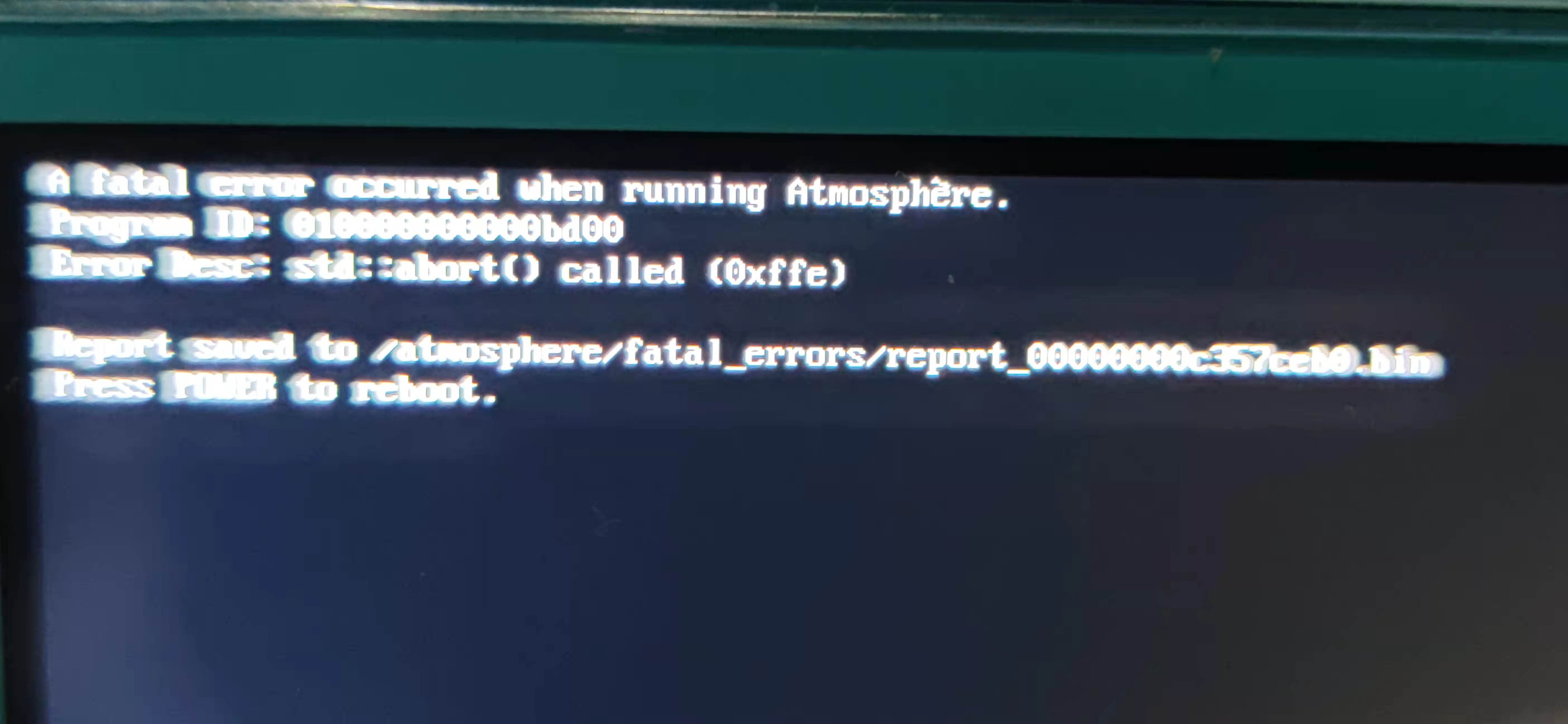
Another error file and screenshot
I use atmosphere 1.2 5 (fsso) and 13.2.0
Sorry for getting back so late. Clearing the database of paired devices helped to remove the issue. I was not able to check out the build you suggested as clearing the database already worked and I had no further problems.
Sorry for getting back so late. Clearing the database of paired devices helped to remove the issue. I was not able to check out the build you suggested as clearing the database already worked and I had no further problems.
I've tried to clear the database, but it doesn't work, and this is the first time I've paired DS4 handles. I've never connected any handles before
@zf021600 your reports indicate that one of the fs functions used when initialising the virtual spi flash memory file for the controller is returning error 0x202 (Path does not exist). This is strange, because I do a number of checks to ensure the file and it's parent directories exist before trying to access it. I wonder if it's a problem with your sd card. Have you had any issues with it before? Which filesystem is it formatted with?
@zf021600 your reports indicate that one of the fs functions used when initialising the virtual spi flash memory file for the controller is returning error
0x202(Path does not exist). This is strange, because I do a number of checks to ensure the file and it's parent directories exist before trying to access it. I wonder if it's a problem with your sd card. Have you had any issues with it before? Which filesystem is it formatted with?
I use the switch system to format the memory card directly,exFAT format
exFAT is known to have issues with corruption that can lead to all sorts of strange behaviour. It's highly recommended you use FAT instead (this is general advice, not Mission Control related). I would suggest reformatting your card to FAT if possible, or otherwise formatting a spare card for testing's sake. It's also possible that it's an archive bit issue too, so you could try running Hekate's archive bit fixer and see if that helps. In any case I strongly suggest trying to move away from exFAT, as you will get bitten by corruption eventually.
Hello, I get similar, I get lockup total freeze in the OS of switch when I sync my PS Dualshock 4 Controller. The controller doesn't respond but it's lit up blue. The sync cause the default joycons to lock up as well. The crashed sync shows up a picture of the controller.
The only way out is to press the Home button on the joycons. As far as I know it's an original Dualshock v.2. I don't know the version of Middle but it's the one I download from Homebrew so I assume it's latest


Closing, as I believe any connectivity issues not involving sd card corruption are resolved as of the latest release.