

 nadbm
nadbm
Performance is horrendous
I wish I knew this before pouring hours into this.
But if you're planning on using this in production with a potentially large datasheet (300 rows x 10 columns = 3000 cells), you will run into massive performance issues and it's very challenging to fix them.
This library is cool, but it's for toy apps.
Are there any good alternatives?

hey @patwalls, this is currently used in production with a similar dataset size. However, it definitely is not optimized for performance out of the box. This is especially true when editing data, as if you trigger the wrong state changes, all of your 3000 cells will re-render.
There's a few alternatives that implement a virtualized grid that you might want to look into: https://blueprintjs.com/docs/#table https://github.com/handsontable/react-handsontable

There's a few alternatives that implement a virtualized grid that you might want to look into: https://blueprintjs.com/docs/#table https://github.com/handsontable/react-handsontable
@nadbm The handsontable looks good but it's commercial. Is it possible to implement react-virtualized into this lib?

For any users that lands in this spot.
I've experienced a few performance issues in the past year of using this library. However, most of them were due to user error and were addressable with proper understanding of React.
If using custom renderers, monitoring re-renders across the different components will help identify unnecessary renders. For me, implementing React.memo on some of functional components drastically improved performance.


@ririvas
I've experienced a few performance issues in the past year of using this library. However, most of them were due to user error and were addressable with proper understanding of React.
Do you have any advice? I'm using a custom renderer for the sheet, for rows, and for cells. The issue is that the library is based on passing children through these renderers, so I can't use memo.
Even if I only use a 10x30 table, just selecting a cell (which updates its state) feels very laggy.

Could you share some code with showcasing your issue? I could take a look if I have had any shared issues.
I wouldn't say i'm and expert. I worked through my issues by identifying areas that re-rendered constantly. To avoid re-render:
- I used React.memo on in-line component definitions. For example, defining a dynamic parameterized value renderer inside a react render body caused that value renderer to assume a new identity each render. The new identity causes a render even if it's the same.
- I also found that class react components rendered less by default. I figured this was because of callback handlers kept their identity if passed down (assuming it's a class method). My custom renders are mostly classes components
- Outside of the datasheet component, I had code that caused the data prop often to change and thus led to an entire re-render of the sheet. I used React.useMemo and React.useCallback here to return the same data value (i.e. same identity) and prevent unnecessary renders.
One idea i had as well that I haven't had to use yet was to have the individual cells pull their data instead of passing it via the root data prop on the datasheet. Because it's an array of arrays, you're bound to have identity references change even if most of the values are the same. This would not be intuitive and only work in special cases
Sure, I'll paste some snippets:
<ReactDataSheet
className={styles.canvasSpreadsheetContent}
data={this.state.grid}
valueRenderer={this.valueRenderer}
dataRenderer={this.dataRenderer}
onCellsChanged={this.onCellsChanged}
onSelect={this.onSelect}
sheetRenderer={this.renderSheet}
rowRenderer={this.renderRow}
cellRenderer={this.renderCell}
valueViewer={ValueViewer}
/>
public renderSheet = (
props: ReactDataSheet.SheetRendererProps<GridElement, string>
) => {
return <SheetRenderer columns={this.state.columns} {...props} />;
};
public renderRow = (
props: ReactDataSheet.RowRendererProps<GridElement, string>
) => {
const nodeId = props.cells[0].id;
return (
<RowRenderer
isSelected={
nodeId !== undefined && this.props.selectedNodeIds.includes(nodeId)
}
{...props}
/>
);
};
public renderCell = (
props: ReactDataSheet.CellRendererProps<GridElement, string>
) => {
return <CellRenderer selection={this.state.selection} {...props} />;
};
interface SheetRendererProps
extends ReactDataSheet.SheetRendererProps<GridElement, string> {
columns: string[];
}
class SheetRenderer extends React.PureComponent<SheetRendererProps> {
public componentDidUpdate() {
updateTooltipsLinking();
}
public render() {
const { columns, className, children } = this.props;
return (
<table className={className}>
<thead>
<tr>
<th
className={classNames(
styles.spreadsheetCell,
styles.spreadsheetHeaderCell
)}
>
<span className={styles.spreadsheetValue}> </span>
</th>
{columns.map((column, index) => (
<th
className={classNames(
styles.spreadsheetCell,
styles.spreadsheetHeaderCell
)}
key={index}
>
<span className={styles.spreadsheetValue}>{column}</span>
</th>
))}
</tr>
</thead>
<tbody>{children}</tbody>
</table>
);
}
}
interface RowRendererProps
extends ReactDataSheet.RowRendererProps<GridElement, string> {
isSelected: boolean;
}
class RowRenderer extends React.Component<RowRendererProps> {
public isSelected(props: Readonly<RowRendererProps> = this.props) {
return props.isSelected;
}
public render() {
const { children } = this.props;
const selected = this.isSelected();
return (
<tr className={classNames(selected && styles.spreadsheetRowSelected)}>
{children}
</tr>
);
}
}
interface Selection {
startIndex: number;
cells: number;
}
class CellRenderer extends React.PureComponent<
ReactDataSheet.CellRendererProps<GridElement, string> & {
selection: Selection | null;
}
> {
public render() {
const {
className,
onContextMenu,
onDoubleClick,
onMouseDown,
onMouseOver,
cell,
children,
editing,
col,
selection,
} = this.props;
let colSpan: number | undefined;
let hideEditingSibling = false;
if (col !== 0 && editing && selection !== null) {
hideEditingSibling = selection.startIndex !== 0;
colSpan = hideEditingSibling ? selection.cells : undefined;
}
return (
<td
colSpan={colSpan}
onContextMenu={onContextMenu}
onDoubleClick={e => (cell.editable ? onDoubleClick(e) : null)}
onMouseDown={onMouseDown}
onMouseOver={onMouseOver}
className={classNames(
className,
styles.spreadsheetCell,
hideEditingSibling && styles.spreadsheetCellHideSiblings,
cell.strong === true && styles.spreadsheetCellHighlighted,
cell.isGroupStart && styles.spreadsheetCellGroupStart,
cell.isGroupEnd && styles.spreadsheetCellGroupEnd,
cell.startSegment !== false && styles.spreadsheetCellSegmentStart,
cell.endSegment !== false && styles.spreadsheetCellSegmentEnd
)}
>
{children}
{cell.formatSymbol !== undefined ? (
<span className={styles.spreadsheetCellFormat}>
{cell.formatSymbol}
</span>
) : null}
</td>
);
}
}
This is what my profiler looks like after selecting a cell:

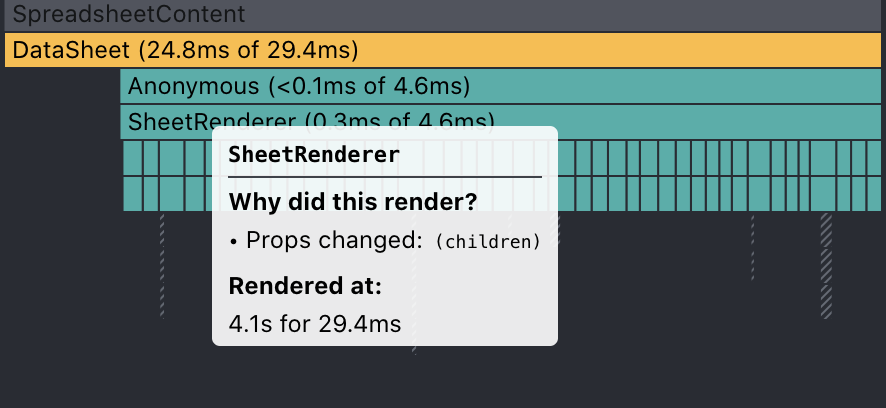
Looks like by selecting a cell every single row rerenders:
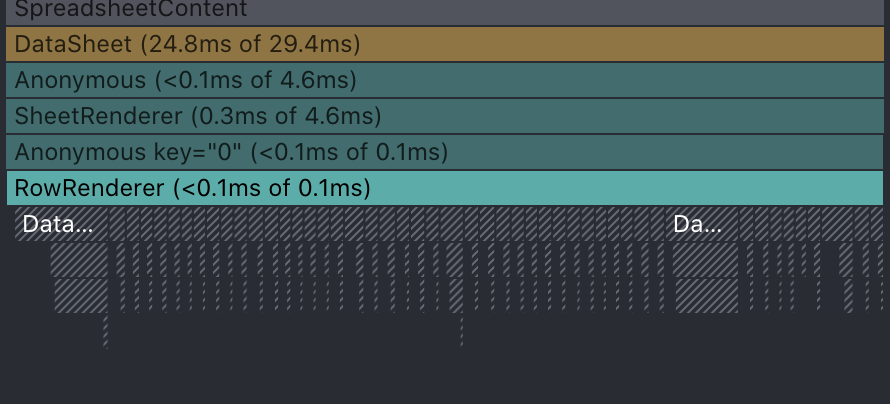
@lukas1994 , I spun up a simple project and I see what you mean about all rows re-rendering by default on the default renders provided. I'll reference my usage for insight (quite large) as I replaced all the renderers.
Will circle back
@lukas1994, apologies looks like the sheetrenderer, rowrenderer, and cellrenderer re-render no matter what when the datasheet state's changes (i.e. editing a value). I can replicate this in the sample project I spun up.
- selecting (not edit mode) a cell re-renders the entire row re-renders the row
- editing a cell re-renders the entire table
The 30x10 sample lags up to a couple seconds on cell editing. Cell selection is much more responsive.
Sorry I could not be of help, but I don't see anything off with your code off the bat.
@nadbm do you have any ideas? If there's no way to fix this I would need to implement this with a different library. Do you have any suggestions? I've heard good things about Handsontable.
@ririvas @nadbm I'm happy to help somehow. Do you know what is causing the rerenders?
In the worst case we have to write our own spreadsheet implementation :/
I'll revisit this weekend, I forked the library to dig deeper. The lag I see is about a second for 30x10 but I also use this extensively and would love faster performance
On Thu, Apr 30, 2020, 7:57 AM Lukas Köbis [email protected] wrote:
@ririvas https://github.com/ririvas @nadbm https://github.com/nadbm I'm happy to help somehow. Do you know what is causing the rerenders?
In the worst case we have to write our own spreadsheet implementation :/
— You are receiving this because you were mentioned. Reply to this email directly, view it on GitHub https://github.com/nadbm/react-datasheet/issues/163#issuecomment-621817387, or unsubscribe https://github.com/notifications/unsubscribe-auth/ABFAZ5DAMUJI4KPY64UYGBLRPFYT5ANCNFSM4IKKTKBQ .
@lukas1994 Sorry have not been actively maintaining this repo. I'll look into it this weekend as well. In the meantime, would you have a JSfiddle I can use.
@ririvas you said "I can replicate this in the sample project I spun up." Can you post the sample project here?
Here is the sample project I was using to debug https://github.com/ririvas/debug-datasheet
However this only confirms the re-render inherent from the project. The assumption is that the re-rendering the entire sheet on any cell change leads to performance degradation for large enough sheets.
@lukas1994, we're assuming this is the same performance issue your facing, but ultimately this won't be confirmed unless you post a sample with your codebase.
@lukas1994 , I'm still working on further improvements, but you could try running the following fork with your project. https://github.com/ririvas/react-datasheet
- Note I modified the package.json scripts:build command to update my local sample project node_modules folder. You can clone the repo, run npm install, modify the build script and/or manually copy over the lib folder
- I developed in windows and this package was done in linux, you might run into issues.
This improved rendering when selecting cells and editing a cell value. There is still a performance hit when the data prop updates as a result of usage. I'm not sure if this could be improved
export const Datasheet: React.SFC<Props> = props => {
    const { data } = props;
    const [storedData, setStoredData] = React.useState(data);

    const handleCellsChanged: ReactDatasheet.CellsChangedHandler<GridElement> = changes => {
        const newData = storedData.map(s => s.map(v => v));
        changes.forEach(change => {
            newData[change.row][change.col] = {
                ...change.cell,
                value: parseFloat(change.value as string)
            }
        });

        if (changes.length > 0) {
            console.log('updating sheet state');
            setStoredData(newData);
        }
    };

    return (
        <ReactDatasheet
            data={storedData}
            onCellsChanged={handleCellsChanged}
// ... other code
@ririvas Thanks a lot! This is much better. Looks like you fixed the rerender issue and the perf is much better. However, I think I found a bug. There seem to be rerender issues with the first column, check out this video: https://share.getcloudapp.com/YEu1PmyK The blue dot, in the beginning, should only appear for "selected" rows. So only for rows with a selected cell. Apart from that, it's looking great :)
@lukas1994, thanks for the video and checking it out. I will work on fixing that bug and potentially improving performance on updates to the prop data. Again may not get around to it till this weekend. But I hope to create a pull request by then.
@lukas1994 I can't replicate the bug easily without your setup, but deducing from the video and the code you pasted previously, I think it's because of your react components defined as class methods.
This fork prevents re-renders if ReactDatasheet props and internal state changes don't change for a given row. I presume your code updates external state from the onSelect prop. This then feeds down to the renderers below.
 public renderRow = (
    props: ReactDataSheet.RowRendererProps<GridElement, string>
  ) => {
    const nodeId = props.cells[0].id;
    return (
      <RowRenderer
        isSelected={
          nodeId !== undefined && this.props.selectedNodeIds.includes(nodeId)
        }
        {...props}
      />
    );
  };

  public renderCell = (
    props: ReactDataSheet.CellRendererProps<GridElement, string>
  ) => {
    return <CellRenderer selection={this.state.selection} {...props} />;
  };
The issue is that this.renderCell and this.renderRow don't change their reference, but the custom props you pass into the custom renderers do. The datasheet doesn't re-render rows when you want it to because its props don't change.
The changes below might fix your issue
<ReactDataSheet
          className={styles.canvasSpreadsheetContent}
          data={this.state.grid}
          valueRenderer={this.valueRenderer}
          dataRenderer={this.dataRenderer}
          onCellsChanged={this.onCellsChanged}
          onSelect={this.onSelect}
          sheetRenderer={this.renderSheet}
          rowRenderer={this.renderRow} // same required here as below
          cellRenderer={this.renderCell} // cellRenderer={props => <CellRenderer selection={this.state.selection} {...props} />}
          valueViewer={ValueViewer}
        />
The problem is that this would take you back to your original re-render problem, as the desired updates might lead to the custom renderers getting new references and cause every cell to re-render.
Let me know if this is the case and/or make sense.
@ririvas, thanks for your work and suggestions, it solves the re-renader issue but now keyboard events doesn't work - https://share.getcloudapp.com/DOuQrLkl (here I try to navigate via keyboard and press enter to edit cells), what can it be related with? Thank you again!

@a-pachkov , @lukas1994 If the changes I suggested above solved your issue with the first column render. Then I don't think there will be an easy fix nor do I think it's an issue with the library. Again, appreciate the videos but without a codepen project to reference, some of this is conjecture.
I assume your issue is because the following code causes all cells to re-render when anything changes in the sheet. This takes you back to step 1. This re-render might cause "keyboard events don't work"
rowRenderer={this.renderRow} // same required here as below
cellRenderer={this.renderCell} // cellRenderer={props => <CellRenderer selection={this.state.selection} {...props} />}
I think what you're trying to implement is a redux-style pattern and condition dependent re-rendering. For example, giving CellRenderer components access to a root state (selection). But for performance reasons, changes to the root state should only trigger cell re-renders based off conditions. A potential option would be to use react context to provide custom cell renderers with this data.
A sample is in the following repo. This is a quick and dirty implementation. And it did impact performance a bit. https://github.com/ririvas/debug-datasheet/blob/master/src/Datasheet/SheetContext.tsx Usage here: https://github.com/ririvas/debug-datasheet/blob/master/src/Datasheet/Datasheet.tsx
As for the fork I created, I'm still looking at improving update perf for my use cases
Sorry for the late reply @lukas1994, I had some time to look into this but only at a surface level.
See the following branch and let me know if this solves your issues somewhat: https://github.com/nadbm/react-datasheet/pull/213
See the following commit to see how I changed the customer render example: https://github.com/nadbm/react-datasheet/pull/213/commits/204dc0b379a2e26a56023e692defb9b3ae88d664
@nadbm , thanks for looking at this. Let me know if I can help in anyway. I use this library too and appreciate the simple and flexible api. I forked to investigate improving performance as well.
Thank you for the suggestion @nadbm, this is my simple example that I based on your fix As you can see in video example - it will re-render all cells sometimes in my case of use
@nadbm , thanks for looking at this. Let me know if I can help in anyway. I use this library too and appreciate the simple and flexible api. I forked to investigate improving performance as well.
Thanks @ririvas, if you find any fixes feel free to make a PR, I have limited time to dedicate to this repo unfortunately.
Thank you for the suggestion @nadbm, this is my simple example that I based on your fix As you can see in video example - it will re-render all cells sometimes in my case of use
Thanks for the example @a-pachkov I will debug using this.
@a-pachkov Your example had a simple fix: valueRenderer was using dynamic function so memorization wasn't happening. Here's a fixed version I uploaded https://github.com/nadbm/perf-test-rd
And here's the commit that changed from the initial code: https://github.com/nadbm/perf-test-rd/commit/0d225db6468be8e020d85cb68e284503bbe7ebd3
@nadbm cool, thank you! Just checked your fix - https://share.getcloudapp.com/ApujlEKz and now it doesn't re-render cells but it it still re-render rows, and it cause performance issues for larger tables - https://share.getcloudapp.com/jkul64PG How to avoid this extra render for rows on select?
@a-pachkov I think that will require a little bit more rework on the library's end. I will investigate further this weekend