

 mysteriumnetwork
Connection Failed status in "my nodes" list - Myst node running on docker
I have been running a node since march. Love this project i think it's amazing. First node is running on a headless laptop, running on pop OS. Haven't had an issue with it so far.
Tried setting up my second node since i have another internet connection i can use.
My home server is running debian 11. I could not ,for unknown reasons, install the myst node via official PPA. And since i've started learning - using docker for over an year now - i've installed the node via https://docs.mysterium.network/for-node-runners/docker-guide.
Followed the exact steps, all good. First few minutes after activating the node (or registering it on the network) everything looks ok. Node status is "active" and accepting "most connections". That's ok.
After about 5 minutes it's status changed to "Connection failed" in the "my nodes" section. In the node UI the status changed to "test failed". Thing i think is very weird is that myst verification agents have no trouble connecting, or so it seems. Everytime i perform the node test from the "my nodes" interface, an agent connects to my node for about 30 secs.
To Reproduce Steps to reproduce the behavior:
- Fresh Debian 11 install
- Install docker
- Follow the steps provided here: https://docs.mysterium.network/for-node-runners/docker-guide (for linux)
- Container is up, connect to it via my-home-server-ip:4449
- Register the node
- Wait 5 minutes
- Check "my nodes list"(https://mystnodes.com/nodes) to see status changed to "Connection Failed"
- Check Node ui via my-home-server-ip:4449 to see status changed to "test failed"
Expected behavior Expected everything to work
Screenshots I will post some if needed...
Environment (please complete the following information):
-
Node version: 1.12.1
-
OS: Debian 11 - Linux kernel 5.10.0-16-amd64
-
Docker (if applicable): 20.10.17
-
Your identity (if applicable): 0x3bab56b69782cc74885ff324f61c0d5ab489c344
-
Payment (top-op) reference (if applicable): [e.g. 1118e94e-27fc-4fd2-b604-fd26008fb709]
Additional context Add any other context about the problem here. comment: This definitely brings back some memories of when i was a QA tester 10 years ag Attached logs: _myst_logs(1).txt
o

Same problem here,
First local node running flawlessly, on both my racknerd VPS I have the same issue

Same for me. I'm trying to run my first node, I started the service with myst daemon (plus parameters) on Arch Linux and I'm having this issue. I enabled port forwarding on my router and moved upnp up in the webui settings page, rebooted service and router, still getting the same error. I don't know if I have some misconfiguration in my setup, I didn't find any well-written guide on how to setup on Arch so it could be a different cause, but this is the error I'm seeing. Conversely, starting with myst service does nothing at all, it just spams my logs with stuff and the node is just reported as offline.

Hi, I'm getting a similar issue connection failed. I started my node a few days ago and did port forwarding. After doing the port forwarding, I noticed that in the mystnode.com/nodes, the Operating system went from MacOS 12.5.1 to darwin. Not sure what that means, and I'm not sure what to do from here.

@djcrawleravp If you are running a node on Racknerd VPS, please check if TUN/TAP support is included (OpenVZ). Currently, node service is blocked by:
2022-08-23T16:59:44.151 ERR ../../p2p/channel.go:425 > Handler "p2p-session-create" internal error error="cannot start session: : cannot get provider config for session 658d2d41-94fe-4821-b6b3-03e290a02883: could not start new connection: could not start provider wg connection endpoint: could not configure device: failed to create TUN device: failed to create TUN device: CreateTUN(\"myst0\") failed; /dev/net/tun does not exist"
@srcfvz It looks like DNS/firewall issue. Can you please submit a full node log output?

@djcrawleravp If you are running a node on Racknerd VPS, please check if TUN/TAP support is included (OpenVZ). Currently, node service is blocked by:
2022-08-23T16:59:44.151 ERR ../../p2p/channel.go:425 > Handler "p2p-session-create" internal error error="cannot start session: : cannot get provider config for session 658d2d41-94fe-4821-b6b3-03e290a02883: could not start new connection: could not start provider wg connection endpoint: could not configure device: failed to create TUN device: failed to create TUN device: CreateTUN(\"myst0\") failed; /dev/net/tun does not exist"@srcfvz It looks like DNS/firewall issue. Can you please submit a full node log output?
Hi, I'm fairly new here and I'm not sure if I'm running on Racknerd VPS. And I'm not sure how to get the full node log output?
Thanks for helping
@djcrawleravp If you are running a node on Racknerd VPS, please check if TUN/TAP support is included (OpenVZ). Currently, node service is blocked by:
2022-08-23T16:59:44.151 ERR ../../p2p/channel.go:425 > Handler "p2p-session-create" internal error error="cannot start session: : cannot get provider config for session 658d2d41-94fe-4821-b6b3-03e290a02883: could not start new connection: could not start provider wg connection endpoint: could not configure device: failed to create TUN device: failed to create TUN device: CreateTUN(\"myst0\") failed; /dev/net/tun does not exist"@srcfvz It looks like DNS/firewall issue. Can you please submit a full node log output?
Thanks for the reply!, Where can I find that option?
@etherunit Are these ok? i've updated debian and it seemed to work for a few mins... :( _myst_logs(3).txt
@djcrawleravp Login to your NodeUI console and navigate to the bug report window and submit it from there. thanks
Thanks for submitting node logs @srcfvz
More detailed review shows that your node is behind the firewall'd network thus preventing node service to establish connections. The output below shows multiple failed attempts to transmit data with tag "internet_failed".
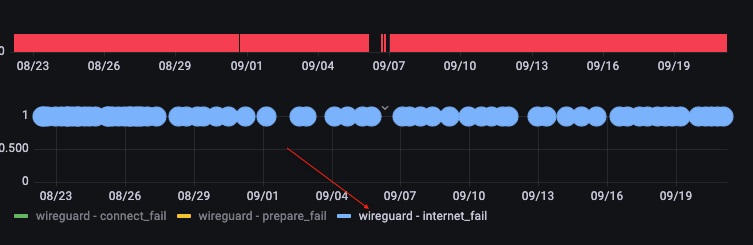
Please try to doublecheck your network firewall settings/rules or DNS configuration.
Hello guys, I have the same issue. The support Isaac want that I post it here. I am glad to see that I am not alone ;). Debian 11, Docker 20.10.21, Node version: 1.19.4
My Myst-Docker never had a connection, but says most can connect. Dashboard says "connection failed" (0x66b864a675c478a7a5b8980c33b91a4db8f808d6). I tried everything like mapping ports or something... Is there a solution?
Greetings
