

 mykeels
INTEROP_FILE can't be found
I updated my slack on my macbook today, and the script now cannot find the INTEROP_FILE. An update would be awesome. Thanks
Joshuas-MBP-2:slack-theme joshuaking$ ./slack-theme midnight-blue
sh: /Users/joshuaking/.bash_profile
file does not exist

Could you try running slack-theme day?
Or uninstalling, then re-installing slack-theme?

I have tried both and then looked at the bash script, it's looking for a file at the path /Applications/Slack.app/Contents/Resources/app.asar.unpacked/src/static/ssb-interop.js but it does not exist starting at /Applications/Slack.app/Contents/Resources/app.asar.unpacked/src. I'm afraid Slack has updated the way their app is built.
Interesting.
Could you take a screenshot of the contents of /Applications/Slack.app/Contents/Resources/app.asar.unpacked/src?
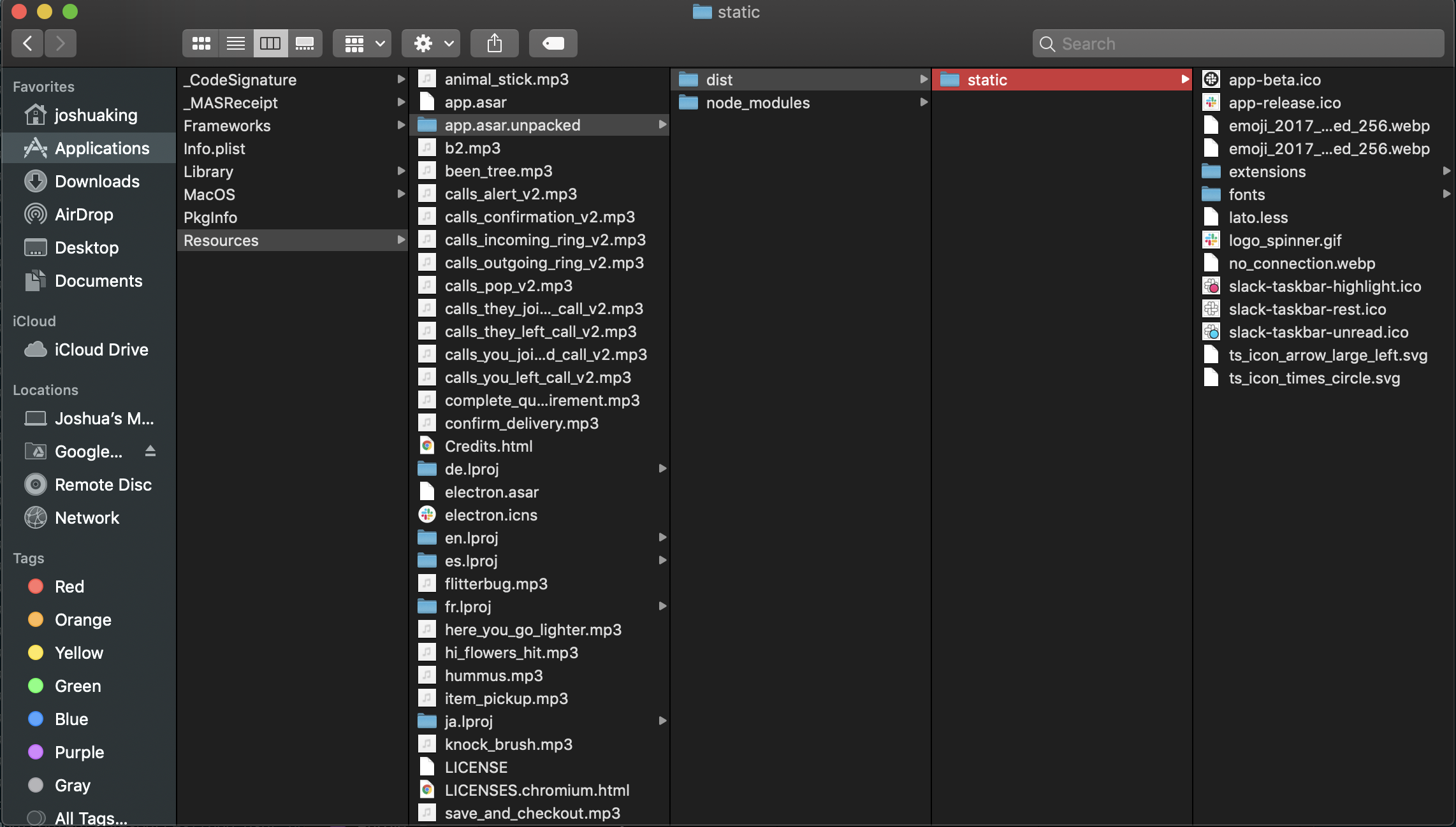
It was changed in 4.0.0, I have reverted back to 3.4.2 until people figure out how to modify the new node configuration.
They are looking at the issue here too: https://github.com/widget-/slack-black-theme/issues/98

Can confirm, same file structure, same bug.
The thread that @derekjbernard referenced has a workaround script - https://github.com/LanikSJ/slack-dark-mode/blob/slack-4.0/slack-dark-mode.sh
Will use this until slack-theme gets a patch. Then re-install slack-theme.

Seen!
I noticed the work-around script has a dependency on npx, to run Electron's asar for compressing and de-compressing the app.asar file.
I wouldn't want to introduce such a dependency.
I've compiled asar as native binaries, that we can curl, to do the same thing.
Does anyone want to make a PR? If not, I should get to it sometime this week.
Should be fixed for Mac OS.
Please run slack-theme uninstall, then run the installation script in the README and indicate with 👍 when you confirm it works.
I reinstalled as indicated, and it's still not working. Here's my terminal. The failure to find my .bash_profile file has been consistent if I don't run with sudo (which has always been required in my case). The file does exist where it's looking, and the permissions are OK.
mchester@local:~ # slack-theme night sh: /Users/mchester/.bash_profile
(still white background)
mchester@local:~ # slack-theme uninstall sh: /Users/mchester/.bash_profile sudo: asar: command not found uninstalled successfully
mchester@local:~ # sudo slack-theme uninstall sudo: slack-theme: command not found
mchester@local:~ # curl https://raw.githubusercontent.com/mykeels/slack-theme-cli/master/slack-theme -O && bash slack-theme install && . ~/.bash_profile % Total % Received % Xferd Average Speed Time Time Time Current Dload Upload Total Spent Left Speed 100 12910 100 12910 0 0 37206 0 --:--:-- --:--:-- --:--:-- 37312 sh: /Users/mchester/.bash_profile sh: /Users/mchester/.bash_profile % Total % Received % Xferd Average Speed Time Time Time Current Dload Upload Total Spent Left Speed 100 34.2M 100 34.2M 0 0 7502k 0 0:00:04 0:00:04 --:--:-- 7849k % Total % Received % Xferd Average Speed Time Time Time Current Dload Upload Total Spent Left Speed 100 2268 100 2268 0 0 9507 0 --:--:-- --:--:-- --:--:-- 9529 % Total % Received % Xferd Average Speed Time Time Time Current Dload Upload Total Spent Left Speed 100 104 100 104 0 0 416 0 --:--:-- --:--:-- --:--:-- 416 % Total % Received % Xferd Average Speed Time Time Time Current Dload Upload Total Spent Left Speed 100 207k 100 207k 0 0 603k 0 --:--:-- --:--:-- --:--:-- 604k % Total % Received % Xferd Average Speed Time Time Time Current Dload Upload Total Spent Left Speed 100 207k 100 207k 0 0 636k 0 --:--:-- --:--:-- --:--:-- 637k % Total % Received % Xferd Average Speed Time Time Time Current Dload Upload Total Spent Left Speed 100 209k 100 209k 0 0 677k 0 --:--:-- --:--:-- --:--:-- 676k % Total % Received % Xferd Average Speed Time Time Time Current Dload Upload Total Spent Left Speed 100 206k 100 206k 0 0 645k 0 --:--:-- --:--:-- --:--:-- 645k % Total % Received % Xferd Average Speed Time Time Time Current Dload Upload Total Spent Left Speed 100 207k 100 207k 0 0 601k 0 --:--:-- --:--:-- --:--:-- 602k % Total % Received % Xferd Average Speed Time Time Time Current Dload Upload Total Spent Left Speed 100 207k 100 207k 0 0 597k 0 --:--:-- --:--:-- --:--:-- 596k % Total % Received % Xferd Average Speed Time Time Time Current Dload Upload Total Spent Left Speed 100 208k 100 208k 0 0 637k 0 --:--:-- --:--:-- --:--:-- 638k % Total % Received % Xferd Average Speed Time Time Time Current Dload Upload Total Spent Left Speed 100 207k 100 207k 0 0 682k 0 --:--:-- --:--:-- --:--:-- 683k % Total % Received % Xferd Average Speed Time Time Time Current Dload Upload Total Spent Left Speed 100 208k 100 208k 0 0 593k 0 --:--:-- --:--:-- --:--:-- 592k installed successfully
mchester@local:~ # slack-theme night sh: /Users/mchester/.bash_profile backup file not found
mchester@local:~ # slack-theme night sh: /Users/mchester/.bash_profile backup file not found
mchester@local:~ # sudo slack-theme night backup file not found

Seen the problem! I'm so sorry about that.
Please run the installation script again.
Then try running:
sudo curl https://raw.githubusercontent.com/mykeels/slack-v40-app-asar/master/app.asar -o /Applications/Slack.app/Contents/Resources/app.asar
It'll replace your app.asar file with a valid, unedited one, in case it's compromised by the bug. (You'll only have to run this once, and only if you re-installed within the last 18 hours).
Let me know if the slack-theme day and night commands work after this.
@mykeels i just tried the posted commands in https://github.com/mykeels/slack-theme-cli/issues/32#issuecomment-511720684 but it didn't worked out for me

Which commands did you try, and what was your experience in detail? @qabbasi
Can you confirm you're running v4.0 of slack? You can check the version in "About Slack".
👋 these were the commands which i was runnning. i am on slack 4.0, OSX 10.14.5 (18F132) and i am using ZSH.
runnning
slack-theme  install

sudo curl https://raw.githubusercontent.com/mykeels/slack-v40-app-asar/master/app.asar -o /Applications/Slack.app/Contents/Resources/app.asar
leads to
slack-theme night
sh: /Users/qaiserabbasi/.zshrc
asar exec not found
Can you confirm that an asar file exists at ~/bin/slack-theme/bin by running ls ~/bin/slack-theme/bin ?
@qabbasi please uninstall, then re-install using the appropriate command in the README.
If anyone else is still having this issue? I'd be happy to get on a call to resolve it.
In my case, this is injecting the correct javascript but the script looks like is not loaded when Slack is launched

I was looking at the ~/bin/slack-theme/files/app.asar.unpacked/dist/ssb-interop.bundle.js file that is generated in my home directory, the scripts are injected well.
Okay, does slack-theme night or similar complete successfully? Did it request that you enter your password (it uses sudo)?
It completes successfully (this requested me admin rights) and if I look on the app.asar in the Slack.app this is updated according to the added date. I don't know if this is not loading correctly because the app is from App Store
Interesting ... I got the App Store version.
I'm glad it works for you. It would have been awesome to know what happened then. @Ardrete