

 musescore
Muse Hub helper service is not running
Describe the bug When I open Muse Hub, a message pops up on the bottom of the tab that reads "muse hub helper service is not running." I had previously opened Muse Hub 1 time before and had downloaded all soundfonts except for Choir. I have deleted Muse Hub and reinstalled it and even restart my pc but nothing has worked.
To Reproduce Steps to reproduce the behavior:
- Install Muse Hub
- Open the application
- Bug occurs after application is launched
Expected behavior A clear and concise description of what you expected to happen.
Screenshots

Platform information
- Windows 10
Additional context Add any other context about the problem here.

Did you set the Hub to not open itself at startup? This happens to me when I do that. You can try doing the following:
- Press the Windows key + R, this will open the "Run" Dialog
- Type "services.msc" and press enter, this will open the services window
- Look for the Muse Hub service, right click it and either start it if it's stopped or restart it if it's already running, this should solve your issue
Hope this helps! ^^

Alright, so I tried your method and it responded with "Windows could not start the Muse Hub service on a local computer. Error 15612: The application cannot be started. Try reinstalling the application to fix the problem ." I reinstalled Muse Hub multiple times to no avail. Is there a way to work around this error?
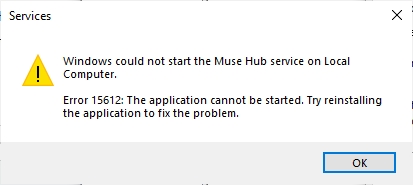
Alright, so I tried your method and it responded with "Windows could not start the Muse Hub service on a local computer. Error 15612: The application cannot be started. Try reinstalling the application to fix the problem ." I reinstalled Muse Hub multiple times to no avail. Is there a way to work around this error?
I ran into the exact same problem: Same message in the Muse Hub and same error message when trying to start the Muse Hub Service. Any help is much appreciated!

I'm kind of glad I'm not the only one with this problem. I had originally thought that there was something wrong with my pc drivers or something like that, but if more people are experiencing the same issue then (hopefully) it's just a problem with Musesounds itself that could be possibly patched in the future.
Muse Hub issues are now being handled elsewhere, so will be closed here. If this issue is still valid, please raise it here. You can link to this GitHub issue if it provides useful context or discussion.
