

 musescore
[MU4 Issue] When the score file from explorer, MU shows a whole path instead of just a file name and after re-saving it makes the score corrupted and unreadable (Windows)
To Reproduce
- Open score from Explorer (not from MU or via drag'n'drop)
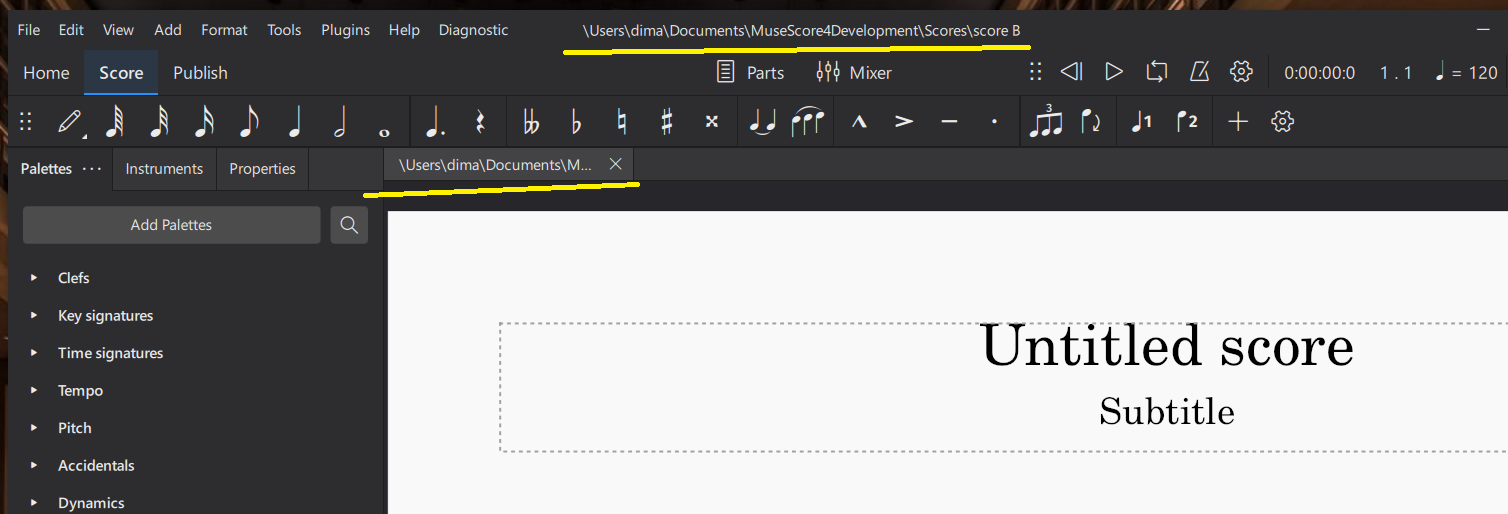
https://user-images.githubusercontent.com/90187801/183473980-8cb6bf4d-c98f-450a-85cc-d33362ded24f.mp4
- Then make some changes
- Close and save score
- Reopen score - it makes the score corrupted and unreadable
Platform information Windows10

This is more critical then I though... If to open score from Explorer, make some changes and then reopen score - the score becomes corrupted without chance to open
https://user-images.githubusercontent.com/90187801/184178027-7bc459e0-3cda-4927-a842-38455a84f8ad.mp4
(will edit the summary)

Same thing happened for me...
@Skelbti This is fixed now in master. But you should use MuseScore Installer and not regular unpacked builds when open scores from explorer.
You can use this build - https://github.com/musescore/MuseScore/actions/runs/2912758835 , it's installer. (better to uninstall Alpha2 build before)
Thanks!