

 musescore
[MU4 Issue] Regression: tempo override control missing (formerly in Play Panel)
Previous versions of MuseScore had a slider to override the tempo of a piece, allowing you to play it back faster or slow than the marked tempo. This was used very extensively by people wanting to practice along with the playback, or by people wanting to listen more closely to each chord of the playback to be sure there are not wrong notes etc. You could even turn it down to a ridiculous low and then use the arrow keys during playback to achieve a "scrubbing" effect.
Merely changing the initial tempo marking is not the same thing at all, since that won't affect any subsequent tempo changes. The tempo slider worked across the entire piece.


I have put together this suggested solution. It's handy that this panel gets bigger when undocked. Makes it quite easy to expand. I'm not sure if we can get this in for 4.0 but I'll keep the issue open for now. Since our playback system is completely new, it will almost certainly not be a case of porting over the MS3 functionality.
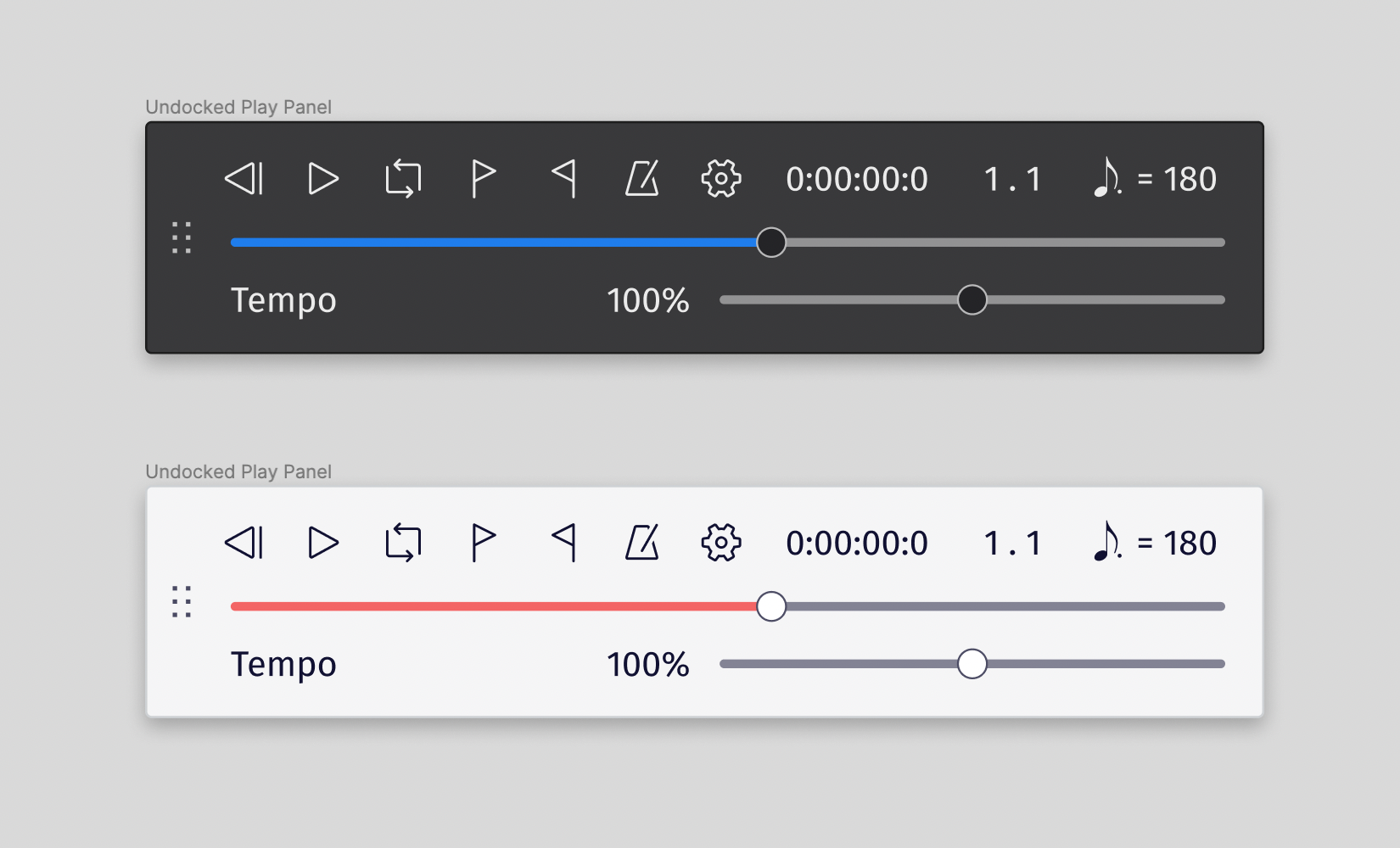

This addresses: https://musescore.org/en/node/331538 - Good to see this is in scope. Useful for composition but also for people who use MuseScore for practice and want to play along at slower to written tempo.
The current design recalculates the tempo when you move the slider / change the percentage. I believe this is based on the initial tempo of the piece and shows a fraction of that. With proposed design the tempo indicator might want to track changes made via the slider or - if this wouldn't be too fussy - the altered tempo could be indicated elsewhere (adjacent to the percentage perhaps). In any case something to look out for as there's scope for confusion.

Fixed in #12803
(please notice the tempo slider doesn't work on Windows - #12817)

Ive just downloaded musescore 4 on mac and the playback tempo slider is missing from the controls. any update?

It's not missing, just hiding within the playback toolbar. Undock it to display. See the comment and screenshot above.
Thanks Marc. I have re-booted the programme several times. The slider has appeared. Which is great. thank you. However, the playback is extremely problematical. It is skipping, jumping, different parts at different points. I'm not sure why this is happening. This also happened in the Beta versions I loaded previously. The files this is happening on work perfectly well in 3.6.2. Is this reported elsewhere? Can you guide me please if other people are experiencing this? should I post a recording here?
If you are havinh with playback on a specific score, best to open a new issue, attach the score,e and give precise steps to reproduce the problem. Also mention system specs - what OS, CPU, RAM, etc.