

 munyabe
Empty line not commented
Hi, this a feature request. If there is empty space, can you also add a comment e.g.
Instead of this,
	// public void		ouseMove (int deltaX, int deltaY)
	// {

	// }
becomes
	// public void		ouseMove (int deltaX, int deltaY)
	// {
        //
	// }

In SSMS and most other apps with a "toggle comment" feature, white space is ignored. I wouldn't want to deviate from this standard behavior. the image I have is Visual Studio vs VS Code vs SSMS with commenting via Ctrl+K, Ctrl+C
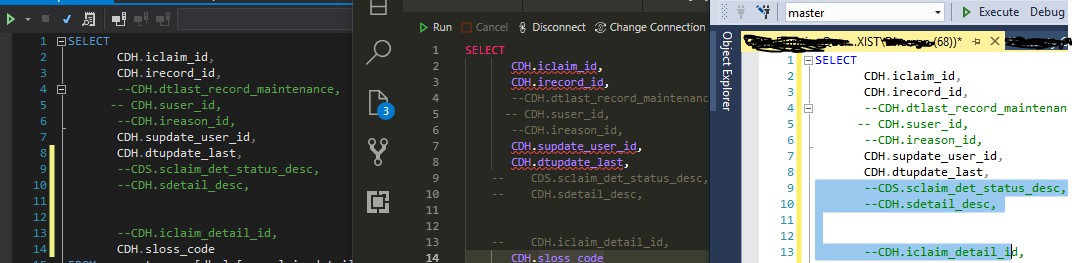

yes, I agree that is what other tools do. I can't agree that's the best way (after 20 over years programming experience) because with white space, one cannot determine which piece of code it comments belongs to, when commented code is further commented
 // this is 2nd block code
 // this is 2nd block code
//
////  this is 1st block code
////
////  this is 1st block code
//
// this is 2nd block code

As you see  I comment the 1st block code , and later I comment out more of the block code. It's easy to undo the 2nd blockbecause it is removes everything with //. If it has spaces, then it's hard to follow which code section was actually removed
There is a tool which does the way I describing.
https://docs.wholetomato.com/default.asp?W169
The plugin description at https://marketplace.visualstudio.com/items?itemName=munyabe.ToggleComment does state 'This is the same feature as "Ctrl + /" works in Eclipse.'.
But Eclipse does NOT ignore whitespace (which is always used for structuring, indentation, documentation, debugging, ...)! It keeps the comment blocks intact! There are no ignored empty lines nor ignored whitespace at the beginning of the line. The commented lines do look like before (and are readable like before), except for the "//" at the beginning.
Example:
    [...]

    private int someFunction()
    {
        for (...)
        {
            //some human readable comment
            //part 1: do this
            some code

//TODO: ugly debugging code I just threw in without indentation:
code to output some stuff
            //part 2: do that
            some more code
        }
        //result should be ...
        some code

        return result;
    }
}
If I wanted to get rid of the for-loop, this would be the result:
    [...]

    private int someFunction()
    {
//        for (...)
//        {
//            //some human readable comment
//            //part 1: do this
//            some code
//
////TODO: ugly debugging code I just threw in without indentation:
//code to output some stuff
//            //part 2: do that
//            some more code
//        }
        //result should be ...
        some code

        return result;
    }
}
And if I afterwards decide to disable the whole method, this would be the result:
    [...]

//    private int someFunction()
//    {
////        for (...)
////        {
////            //some human readable comment
////            //part 1: do this
////            some code
////
//////TODO: ugly debugging code I just threw in without indentation:
////code to output some stuff
////            //part 2: do that
////            some more code
////        }
//        //result should be ...
//        some code
//
//        return result;
//    }
}
I could even add more levels of comments (to comment out a whole region in C#, an arbitrary collection of consecutive methods, a whole class, ...) --- and it still would be visible what steps I took, what are the blocks I considered to be consecutive and so on. And of course I can uncomment the blocks step-by-step to restore the previous state using the same shortcut (and without writing down line numbers to remember consecutive blocks!?).
(Hint: You can simply ignore the ugly debugging code. The feature makes perfectly sense without it. I just wanted to add some more indentation disruption.)
