
MaterialFox

MaterialFox copied to clipboard
 muckSponge
Customize > Toolbars > Bookmarks Toolbar doesn't have an icon
Sanity checks (must complete)
- [x] I have read and followed the installation instructions in the README
- [x] I have not modified the userChrome.css file
- [x] I have tested the latest release for my Firefox version, or commit on master/beta branch (beta is for Firefox Beta only)
Note that I'm using Firefox Developer Edition
Describe the bug 3-dot menu > Customize > Toolbars > Bookmarks Toolbar doesn't have an icon
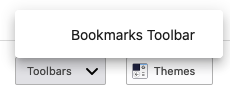
You can use the icon from 3-dot menu > Library > Bookmarks

To Reproduce Steps to reproduce the behavior:
- Open 3-dot menu
- Click "Customize"
- Click on "Toolbars"
- See issue
Screenshots In description
System info
- OS: macOS 10.15.6
- Firefox version: 80.0b4
