

 mozilla
Room not working with hubs cloud in Chrome or Edge - works fine in Firefox and on Mozilla Hub
Discussed in https://github.com/mozilla/hubs/discussions/4403
Originally posted by m-zainkhawaja July 11, 2021 I have created a simple test room with basic geometry - all fields are green (textures, polygon count etc). After adding a few polygons, the room fails to load on Hubs cloud running in Digital Ocean and gets stuck in a loading loop for Chrome or Edge. The same room with no modifications works fine in Firefox. If the exact same room is deployed to the Mozilla Hubs page, it works great across all browsers.
Specifically, I noticed that when the room loades correctly, the following statement is printed in the consosle: physics-utils.js:59 traverseMeshesAndAddShapes console.js:35 heightfield or trimesh found on scene console.js:35 Successfully connected to the networked scene.
However, when it fails to load, the above statements are not printed, and the following errors are shown: Releasing uncached gltf ..../files/36c9457f-6f91-4ee7-adab-e6e91f238d2c.bin Failed to load glTF model Releasing uncached gltf ..../files/36c9457f-6f91-4ee7-adab-e6e91f238d2c.bin eleasing uncached gltf /WKT3QPA/objects.gltf gltf-model-plus.js:42 Releasing uncached gltf #spawn-point GET.../files/36c9457f-6f91-4ee7-adab-e6e91f238d2c.bin net::ERR_CONNECTION_CLOSED 200
Any help would be greatly appreciated Thanks and best wishes
┆Issue is synchronized with this Jira Task

Can confirm this behaviour. It feels like this happens, when the overall file size of the scenery is a bit bigger, but this is just a guess. I can investigate further if needed.

I did some testing, as this happened with my newest scenery again. The situation for me is, that I do almost everything in Blender and therefor mostly have one single .glb file.
I could not load my scenery with chrome-based Browsers when Spoke stated these stats:
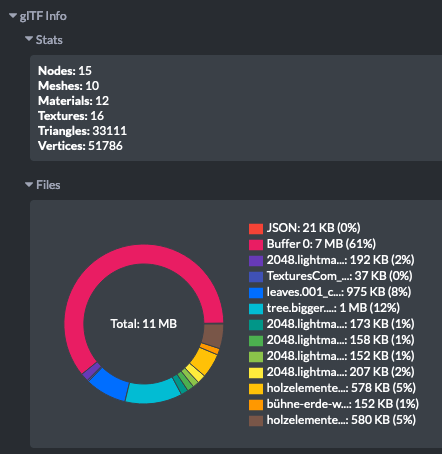
It seems that chrome-based Browsers are unable to obtain the scenery file in these cases:

Afterwards I manually compressed some textures, which resulted in the following:
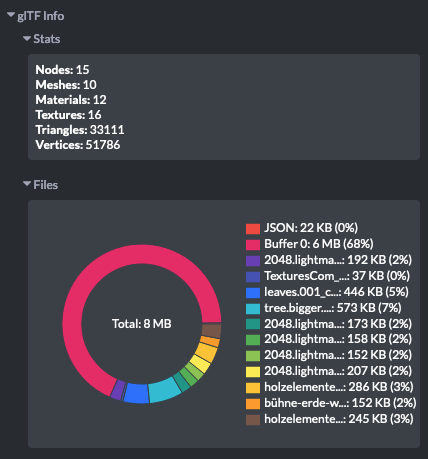
Now I am able to load my scenery in chrome-based browsers.
This has been resolved for me with: https://github.com/mozilla/reticulum/pull/574 At least the thing when the scenery is too big in Chrome based Browsers.