blurts-server

blurts-server copied to clipboard
 mozilla
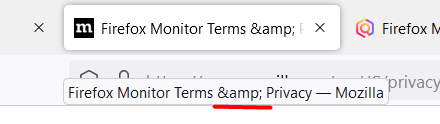
“Firefox Monitor Terms & Privacy” page tab displays a wrong name/title
Testing site:
- Stage: https://stage.firefoxmonitor.nonprod.cloudops.mozgcp.net/ ;
- Production;
Platforms affected:
- Windows 10, 64-bit;
Browsers tested on:
- Firefox, latest version;
Prerequisites:
- N/A;
Steps to reproduce:
- Navigate to the Monitor Home page;
- Scroll down to the bottom of the page;
- In the page footer, click on the “Terms & Privacy” link;
- Hover the cursor over the freshly opened link and observe its name and tooltip;
Expected result:
- The tab and tooltip should display “Firefox Monitor Terms & Privacy — Mozilla”;
Actual result:
- The tab and tooltip displays “Firefox Monitor Terms & Privacy — Mozilla”;
Notes:
- This is present on Production as well;
- See attached media: