
focus-android

focus-android copied to clipboard
 mozilla-mobile
On Tips, it is not clear how to "Add a shortcut"
Steps to reproduce
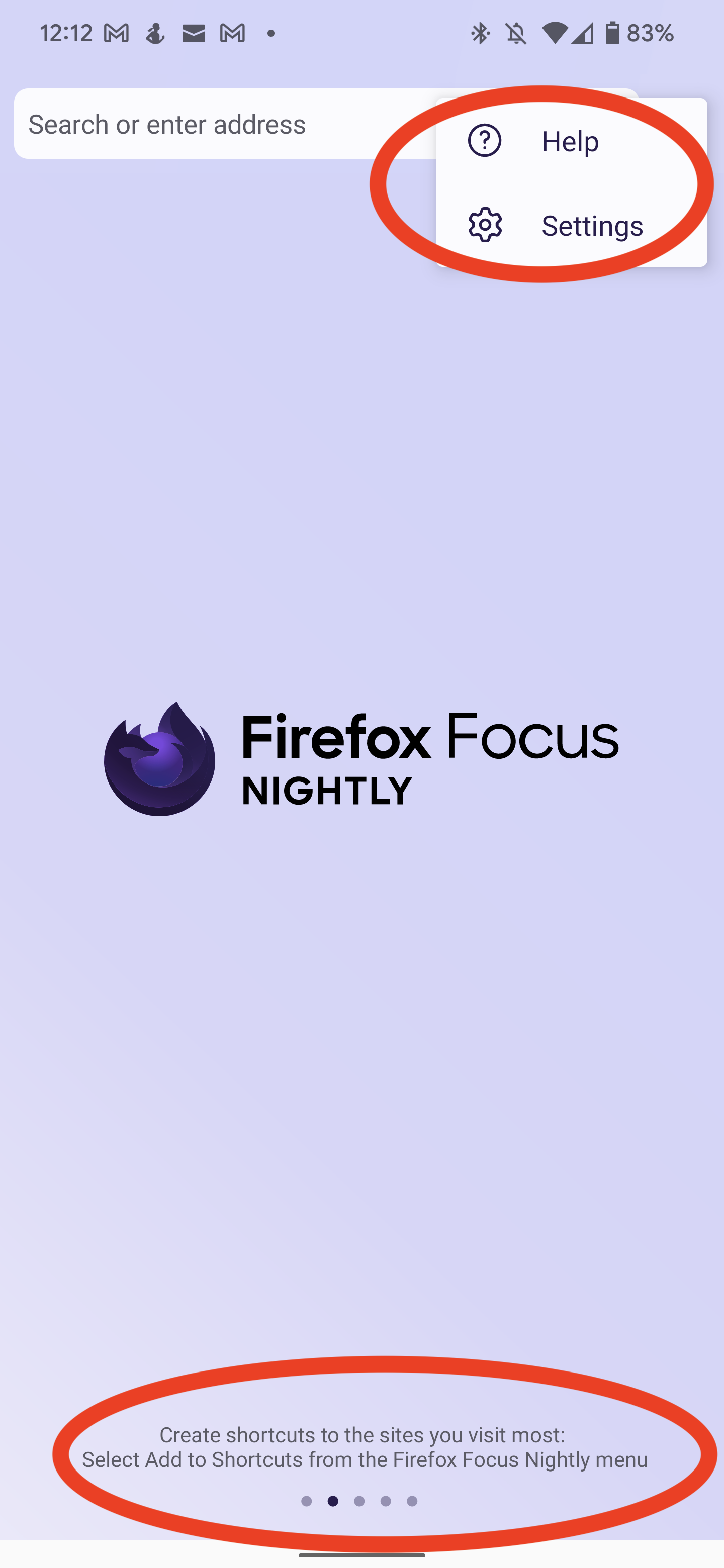
- On the Focus Homepage, on the "Tips" section, scroll to the second tip.
- The string on the Tip says "Create shortcuts to the sites you visit most: Select Add to Shortcuts from the Firefox Focus menu"
- Click on the three-dot menu
Expected behavior
Should be clearer to the user what prerequisite steps are before they can add items to SHortcuts
Actual behavior
No "Add to shortcut" option on the Menu
Device information
- Android device: Pixel 6
- Focus version: Focus Nightly v105.0a1, but this is also same behavior on Focus v103.2.0

Moved to bugzilla: https://bugzilla.mozilla.org/show_bug.cgi?id=1802248
Change performed by the Move to Bugzilla add-on.
