

 mooltipass
Contact Support 011
I just got a "Contact Support 011" message and then the mooltipass hung and had to be restarted with a long press of the jog wheel
I wasn't doing anything different that normal. my device details are Aux MCU 0.70 Main MCU 0.80 Bundle version: 8
I was connected to a Linux (Pop_os) installation using Vivaldi browser
Moolticute v0.55.0

Hmmm that's interesting... Could you maybe update to the latest beta bundle at beta-updates.themooltipass.com?
On Tue, Aug 2, 2022, 21:46 Richard Thomas @.***> wrote:
I just got a "Contact Support 011" message and then the mooltipass hung and had to be restarted with a long press of the jog wheel
I wasn't doing anything different that normal. my device details are Aux MCU 0.70 Main MCU 0.80 Bundle version: 8
I was connected to a Linux (Pop_os) installation using Vivaldi browser
Moolticute v0.55.0
— Reply to this email directly, view it on GitHub https://github.com/mooltipass/minible/issues/349, or unsubscribe https://github.com/notifications/unsubscribe-auth/ABPCNM2YGSWQUXSD4OVZ2NTVXGCKJANCNFSM55MQEENQ . You are receiving this because you are subscribed to this thread.Message ID: @.***>

hi there. I have updated without issue, I will report back if it happens again. :)
Hello. I've now noted I'm getting "contact support 002"
I can't be 100% sure this wasn't happening before as my BLE sits out of my direct sight on my desk. there doesn't seem to be any trigger for it, sometimes after a few min after starting to use it, sometimes hours.
Starting a couple of minutes ago my miniBLE also shows the message #011 Contact Support.
Context:
- my miniBLE is always connected to my (arch)linux computer
- everyday when I start my computer, I unlock the miniBLE and let it type my unlock password (to decrypt my disk)
- I use the
knockfeature for second factor (mainly for ssh pushes) - the card is always inserted
- bluetooth is disabled
- I have the device in sight (below my screen)
- I don't have the moolticute daemon running normally
What happens:
- the message
#011 Contact Supportis shown for a couple of seconds - and then disappears
- everything still works fine
- about 30 seconds later, the message is shown again
Moolticute output:
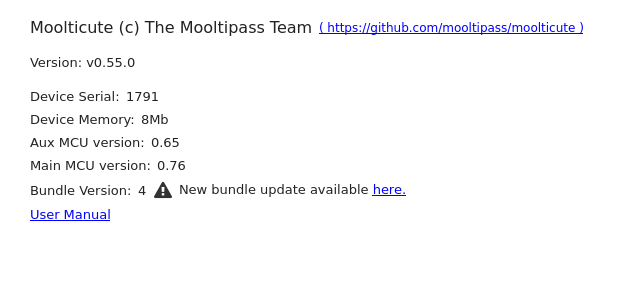
I will try to update to the latest bundle (8) and let you know if it happens again.
The update of update_1791_from_bundle_4_to_8_******.img fails:
Upload bundle finished with error.
DEBUG: (2022-08-17T16:08:29.332) :0 - New message:  {"data":{"success":false},"msg":"upload_bundle"}

#011 Contact Support also appears regularly when the card is inserted the wrong way around.
hello, when trying to update, did you correclty insert the card the wrong way around? can you double check the serial in the about tab matches the one on the device?
Hi, thanks for the quick reply.
- the serial is correct (it matches the one on the back on the minBLE)
- after about 15 minute, I didn't get the
#011 Contact Supportanymore (but I did a bunch of manipulations, like taking a backup of my credentials - so can't say if I did something that "solved" this "pseudo-issue")
So for me the message disappeared (haven't seen it in like 30 minute).
However I still can't update the bundle to version 8. Should I open a new issue about this?
thanks for your reply! I meant: to update your device, you first need to insert the card the wrong way around. did you do it before selecting the update file?
I've been away so I've not been using my mooltipass as much it has happened a few more times, it is set up to connect to my phone. but it doesn't always happen and when I get the error message I've been unable to check on the miniBLE as to the status of bluetooth and my phone says it was disconnected
I've noticed something new "error 003" I created a different bug #351 as I didn't want to have two maybe different issues on one report.
@limpkin Can you explain what this message actually means? Is this indicating some kind of hardware issue?
I ask because this morning I started getting this message on one of my MPBLE's, the one whose battery has never been able to hold a charge. (I had asked about this a few years ago but never followed up, and now it's been so long I don't expect any kind of warranty replacement. Plus I use them "wired" anyway, I don't really need the battery/bluetooth functionality to begin with. Serial 1754 if you're keeping a list.)

@jms1voalte : it means that the accelerometer didn't issue an interrupt to let the main MCU know that it has data to fetch. when this happens, we simply retrigger data fetching. Regarding your battery issue, could you maybe install the latest moolticute beta from betas.themooltipass.com and perform a continuous reconditioning?
@limpkin Is it normal for the "continuous reconditioning" process to run for over 24 hours, charging and discharging over and over? Should it stop on its own, or am I supposed to stop it by hand? If so, how? Is it safe to just unplug the cable while it's in the "resting" phase?

In some cases it can indeed be normal. I've had a few units with severely depleted batteries that took 2-3 days. If it gets too long, feel free to disconnect the device when it is in the charging phase
I left it for about 52 hours, then unplugged it.
Looks like that fixed it, it's been unplugged and playing the screensaver for the past ten minutes. Thanks!