

 mltframework
'melt color:red' Does not work in v6.16.0: black video
I have issues on kdenlive with its gpu accelaration. This depends on mlt and movit.
While testing mlt on my Manjaro Deepin x64 I found that running melt color:red open up a window but it shows no red, only black (maybe black because I have a dark theme on my OS).
Also, when I try to run melt video.mp4 it show up a black window, with no video.
I seems to be playing because Current Position: number is going up and it stops, because of video length. But on the window it only shows a black image.
Help please.
melt version: 6.16.0
$ pacman -Qi mlt
Name            : mlt
Version         : 6.16.0-1
Description     : An open source multimedia framework
Architecture    : x86_64
URL             : https://www.mltframework.org
Licenses        : GPL
Groups          : None
Provides        : None
Depends On      : libebur128
Optional Deps   : sdl_image: SDL1 plugin [installed]
                  sdl2: SDL2 plugin [installed]
                  libsamplerate: libavresample plugin [installed]
                  sox: SOX (Audio Swiss Army Knife) plugin [installed]
                  ffmpeg: ffmpeg plugin [installed]
                  vid.stab: video stabilize plugin [installed]
                  gtk2: Gtk plugin [installed]
                  qt5-svg: Qt5 plugins [installed]
                  jack: JACK sound output plugin [installed]
                  ladspa: LADSPA plugins [installed]
                  libexif: auto rotate plugin [installed]
                  frei0r-plugins: for additional effects [installed]
                  movit: opengl plugin [installed]
                  opencv: openCV plugin [installed]
Required By     : kdenlive
Optional For    : None
Conflicts With  : None
Replaces        : None
Installed Size  : 257.30 MiB
Packager        : Antonio Rojas <[email protected]>
Build Date      : Wed May 8 07:39:26 2019
Install Date    : Fri May 24 11:15:42 2019
Install Reason  : Installed as a dependency for another package
Install Script  : No
Validated By    : Signature

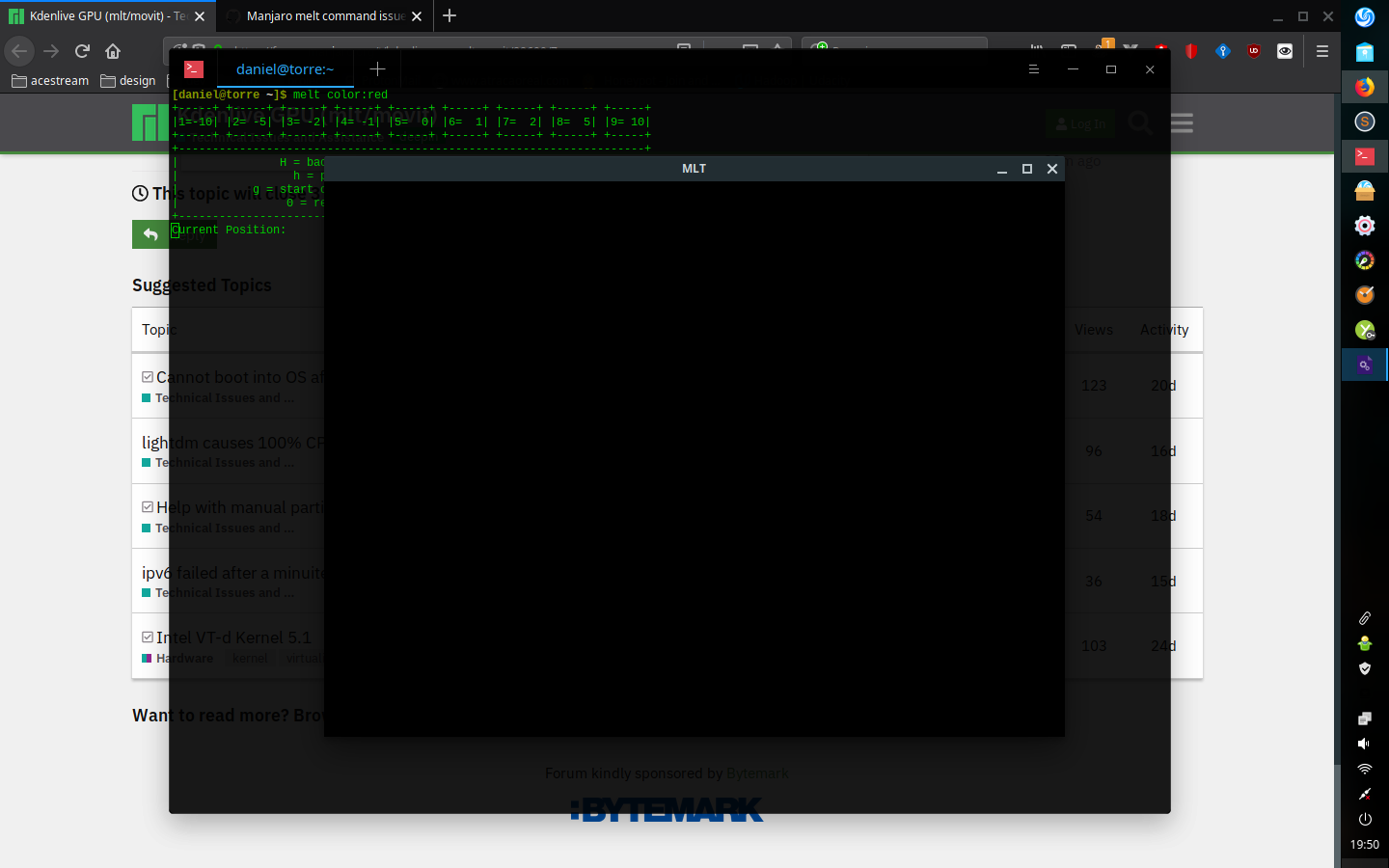
I have issues on kdenlive with its gpu accelaration. This depends on mlt and movit.
This is known to be unstable. Use at your own risk. Kdenlive should warn you about this, but I do not know for certain as I type this on macOS.
Another person in #445 reported a problem with melt color:red showing black, but I do not know why as I do not reproduce it on Ubuntu 18.04 or macOS or Windows. I only suspect it is problem with SDL2 on your system, distro, or SDL2 version. You can try melt noise: just to see if it makes a difference.

You can try running LIBGL_ALWAYS_SOFTWARE=1 melt ... to see if it makes a difference.

Does this problem affect kdenlive video display?
No, monitors in Kdenlive work as expected.
You can try melt noise: just to see if it makes a difference.
This gives me a static noise on my system audio
You can try running LIBGL_ALWAYS_SOFTWARE=1 melt ... to see if it makes a difference.
LIBGL_ALWAYS_SOFTWARE=1 melt color:red gives me same result - black window
Same issue here. mlt-6.20.0-1.fc30.i686
mlt-melt color:red
mlt-melt noise:
LIBGL_ALWAYS_SOFTWARE=1 mlt-melt color:red
All give me black box. "noise" gives me static on my speakers. "Current position" increases speedily. This same black box appears when I try to render something on kdenlive, it plays the audio of what I am trying to render, but no file is generated, and the rendering task is not marked as completed until the window is closed, after which it is marked as having completed successfully.
(Fedora renamed the executables to mlt-melt, btw).
If it is relevant, I am running on nvidia proprietary drivers 390.129.

Just tried it with an mp4, the audio plays, but the window captures the content of whatever was in that box (in my case the terminal with text), rolling up the window and back down turns it black. No video to be seen at either time.
Downgraded to:
mlt-6.12.0-7.fc30.i686.rpm
mlt-freeworld-6.12.0-2.fc30.i686.rpm
and the red square appears. Playing an mp4 via mlt commandline works without problems. Rendering works fine in kdenlive too (which I also had to downgrade, due to dependencies)
I have this issue as well on Arch 5.5.8-arch1-1 with mlt 6.20.0-2. Running melt noise: or melt color:red both give a window that contains what was on the screen at the time of creation. Noise does play static though and the frames are playing. Kdenlive is working fine however.
I manually downloaded and ran melt 6.12.0 as per @insaner's suggestion to no avail. I'll be digging into this more tomorrow but it's very odd right now because 6.20.0-2 is working fine on my Mac running MacOS 10.14.4.

Update, I don't think it's an SDL issue. I'm getting basically a screenshot in the window when running all 3 commands:
melt -profile sdl2 color:red
melt -profile movit color:red
melt -profile avformat color:red
Any ideas as to why this would be happening @ddennedy?
Those commands are not doing what you expect. All of them are using SDL. The problem is definitely SDL related and possibly due to your build including both SDL version 1 & 2 MLT modules.
I did have sdl1 installed and removed it but still have the same issue. Mlt wasn't built against sdl1 anyway and didn't have access to sdl1 consumers. I was digging more into the sdl side of it but ffplay runs videos fine. Using melt with ffmpeg however, melt avformat:video.mp4, gives the same issue as with the default consumer, sdl2.
@ddennedy If you can create a patch for the source used by mlt-6.20.0-1.fc30.i686 I could compile the rpm and try it out and let you know. (Or recompiling against a specific version of SDL, or something like that).
So what's the verdict on this? I would love to upgrade my kdenlive, but I can't if mlt is broken.
6.20 seems to be the latest in the repos. Has anyone done anything that worked to resolve this? I don't mind testing patches against the fedora rpm sources if it helps
I'm on archlinux with [email protected] and I can't play any video using melt video.mp4, it just displays a black screen.

I think I hit this problem too:
- Archlinux
- Nvidia proprietary drivers
All three commands mentioned before produce a black screen.
kdenlive works fine on my system but this is because I am using the AppImage version, so I think the issue is not related with the GPU.

I own a Lenovo laptop with a NVidia RTX3060. If I go into the BIOS menu I can select between "Switchable Graphics" and "Discrete Graphics". When I use "switchable graphics" it works when I run:
$ melt color:red
and I get a black screen when using "discrete graphics".
I don't know if this could help to troubleshot the problem.
Fixed in cb0ff75 I confirmed on my system with nvidia driver that reproduced the problem.