

 mitre-attack
Option to disable the gradient color
Is it possible to add a feature to disable the gradient color?
If we now don't provide a gradient object, Navigator uses default colors. And if we provide a gradient object with the color of white, this won't work in the new dark mode.
The reason is that we color the (sub) techniques ourselves (via our DeTT&CT tool) and also want to use the aggregate-sum function, so that the sort is working properly. But we don't want the aggregated techniques to have a color.

Hi @rubinatorz,
You're right that the "white" color doesn't work well on the dark mode. One possible alternative is to use transparent instead, although this has a bug with the text color in the dark theme (which I will be opening an issue for in a moment).
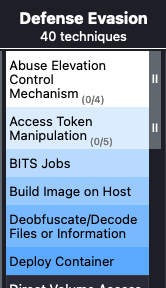
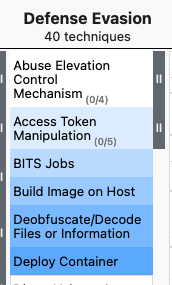
Here's the "white to blue" gradient in dark and light themes:
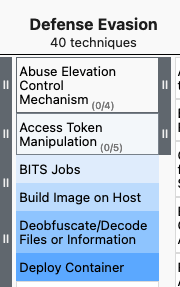
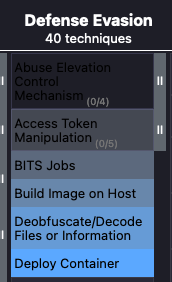
Here's the same objects with a "transparent to blue" gradient in dark and light themes:
I think your improvement (allowing the different color options to be disabled using the "create a customized navigator" feature) is also good. In particular, I think the following options would probably be useful:
- Enable/disable displaying colors for aggregate scores
- Enable/disable displaying colors for non-aggregate scores
- Enable/disable displaying manually assigned colors

Hi @isaisabel
Thanks for your reply! Good to have #372 for the transparency color issue. And your suggestions for disabling the color options are nice, this will give us a lot of flexibility.