

 minio
minio
Add `od` command
od mimics the dd command in linux terminals. It copies a given local file to a given remote location in a specified number of parts and part sizes, and returns the time it took to upload the file.
This screenshot shows different ways to use mc od on a 92MiB file.
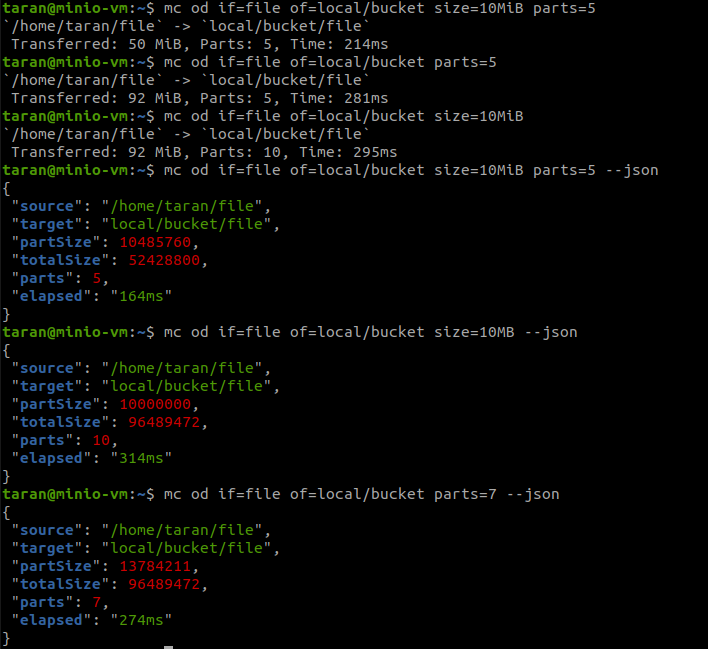

Some issues
Issue1: Not allowing non-multipart uploads
~ mc od if=/etc/hosts of=play/testbucket/hosts parts=1
mc: <ERROR> Unable to put target stream. Input part size is smaller than allowed minimum of 5MiB.
This is not correct a single part upload will work < 5MiB - this error is premature - you shouldn't be setting the PartSize here because we didn't provide the size and it must not be set.
Size must be honored only if it's set.
Issue2:
~ mc od if=play/testbucket/hosts of=bigfile1 parts=1
mc: <ERROR> Unable to get source and target URLs: invalid target path bigfile1.
We need to support copy back from the server and parts when specified would download N parts from a file if not specified it downloads the entire object from Object Storage to the local disk.
If the part is specified GetObject() actually as PartNumber configuration to get individual parts.

This is still not working:
$ ./mc od if=/etc/issue of=play/bucket/test
mc: <ERROR> Unable to put object. Input part size is smaller than allowed minimum of 5MiB.
I checked the server->server (same server), server->local, local->local and local->server. All seem to work fine.
Output looks like this:
Transferred: 23 MiB, Parts: 1, Time: 9.15s
We can add an MiB/s to show the speed here.
