
MiniExcel

MiniExcel copied to clipboard
 mini-software
How do I make this sample code faster for large dataset
Excel Type
- [X] XLSX
- [ ] XLSM
- [ ] CSV
- [ ] OTHER
MiniExcel Version
1.26.3
Description
I have the following sample in order to evaluate performance for large dataset generation:
using BenchmarkDotNet.Attributes;
using BenchmarkDotNet.Running;
using MiniExcelLibs;
using System;
using System.Collections.Generic;
using System.IO;
using System.Linq;

namespace LargeDataSet
{
	class Program
	{
		static void Main(string[] args)
		{
			var summary = BenchmarkRunner.Run<Scenario1>();
		}
	}

	public class Scenario1
	{
		static Random Randy = new Random(Environment.TickCount);

		[Params(100, 10000, 100000)]
		public int RowCount;

		[Benchmark]
		public void GenerateLargeExcelInMemory()
		{
			var content = new byte[0];
			using (var ms = new MemoryStream())
			{
				ms.SaveAs(Enumerable.Range(1, RowCount).Select(_ => getRowData()));
				content = ms.ToArray();
			}

			IDictionary<string, object> getRowData()
			{
				return Enumerable.Range(1, 50).Select(i => (
						Header: $"Column{i}",
						Value: (object)Guid.NewGuid().ToString()))
					.Concat(Enumerable.Range(51, 200).Select(i => (
						Header: $"Column{i}",
						Value: (object)Randy.Next(100, 100000))))
					.ToDictionary(p => p.Header, p => p.Value);
			}
		}
	}
}
With this pattern, I get the following benchmarks:
// * Summary *

BenchmarkDotNet=v0.13.1, OS=Windows 10.0.14393.5125 (1607/AnniversaryUpdate/Redstone1)
Intel Core i7-10700 CPU 2.90GHz, 1 CPU, 16 logical and 8 physical cores
Frequency=2835934 Hz, Resolution=352.6175 ns, Timer=TSC
.NET SDK=5.0.408
  [Host]     : .NET Core 2.2.4 (CoreCLR 4.6.27521.02, CoreFX 4.6.27521.01), X64 RyuJIT
  DefaultJob : .NET Core 2.2.4 (CoreCLR 4.6.27521.02, CoreFX 4.6.27521.01), X64 RyuJIT


|                     Method | RowCount |         Mean |      Error |    StdDev |
|--------------------------- |--------- |-------------:|-----------:|----------:|
| GenerateLargeExcelInMemory |      100 |     41.12 ms |   0.151 ms |  0.126 ms |
| GenerateLargeExcelInMemory |    10000 |  4,050.00 ms |  13.781 ms | 11.507 ms |
| GenerateLargeExcelInMemory |   100000 | 40,938.56 ms | 115.084 ms | 89.850 ms |

// * Hints *
Outliers
  Scenario1.GenerateLargeExcelInMemory: Default -> 2 outliers were removed (41.91 ms, 41.94 ms)
  Scenario1.GenerateLargeExcelInMemory: Default -> 2 outliers were removed (4.23 s, 4.25 s)
  Scenario1.GenerateLargeExcelInMemory: Default -> 3 outliers were removed (41.70 s..41.97 s)
Any advice on how to make this faster?
Cheers,


I have updated the benchmark code:
[GlobalSetup]
public void Setup()
{
	var randy = new Random(Environment.TickCount);

	_aepRow = Enumerable.Range(1, 50).Select(i => (
			Header: $"Column #{i}",
			Value: (object)Guid.NewGuid()))
		.Concat(Enumerable.Range(51, 200).Select(i => (
			Header: $"Column #{i}",
			Value: (object)(randy.Next(10000, 100000) * 0.01m))))
		.ToDictionary(p => p.Header, p => p.Value);
}
Now I am using the same row data. Also, I have updated the code to generate a temp file instead of writing to a stream:
[Benchmark]
public void GenerateLargeExcel()
{
	var value = GetValues();
	var path = Path.Combine(Path.GetTempPath(), $"{Guid.NewGuid().ToString()}.xlsx");
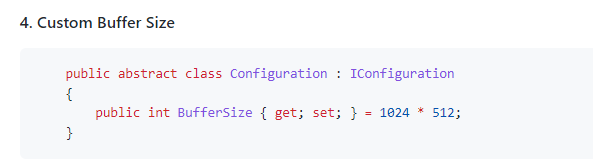
	MiniExcel.SaveAs(path, value, configuration: BufferSize > 0 ? new LargeBufferConfiguration(BufferSize) : null);
	File.Delete(path);
}

private IEnumerable<Dictionary<string, object>> GetValues()
{
	foreach (var rowIdx in Enumerable.Range(1, RowCount))
	{
		yield return _aepRow;
	}
}
And here is the result I get for the respective buffer size and row count:
BenchmarkDotNet=v0.13.1, OS=Windows 10.0.14393.5125 (1607/AnniversaryUpdate/Redstone1)
Intel Core i7-10700 CPU 2.90GHz, 1 CPU, 16 logical and 8 physical cores
Frequency=2835934 Hz, Resolution=352.6175 ns, Timer=TSC
.NET SDK=5.0.408
  [Host]     : .NET Core 2.2.4 (CoreCLR 4.6.27521.02, CoreFX 4.6.27521.01), X64 RyuJIT
  DefaultJob : .NET Core 2.2.4 (CoreCLR 4.6.27521.02, CoreFX 4.6.27521.01), X64 RyuJIT


|             Method | RowCount | BufferSize |     Mean |    Error |   StdDev |
|------------------- |--------- |----------- |---------:|---------:|---------:|
| GenerateLargeExcel |    10000 |          0 |  2.577 s | 0.0061 s | 0.0051 s |
| GenerateLargeExcel |    10000 |     524288 |  2.669 s | 0.0055 s | 0.0052 s |
| GenerateLargeExcel |    10000 |    1048576 |  2.675 s | 0.0062 s | 0.0055 s |
| GenerateLargeExcel |   100000 |          0 | 26.029 s | 0.4755 s | 0.4448 s |
| GenerateLargeExcel |   100000 |     524288 | 26.185 s | 0.5087 s | 0.4996 s |
| GenerateLargeExcel |   100000 |    1048576 | 26.049 s | 0.2008 s | 0.1780 s |

// * Hints *
Outliers
  Scenario1.GenerateLargeExcel: Default -> 2 outliers were removed (2.81 s, 2.86 s)
  Scenario1.GenerateLargeExcel: Default -> 1 outlier  was  removed (2.93 s)
  Scenario1.GenerateLargeExcel: Default -> 1 outlier  was  removed (26.92 s)
The size of the buffer seems to have no impact. Am I doing it right?