
dotfiles
 dotfiles copied to clipboard
 miikanissi
My configuration files (dotfiles) for a custom Debian Desktop Environment.

My Dotfiles
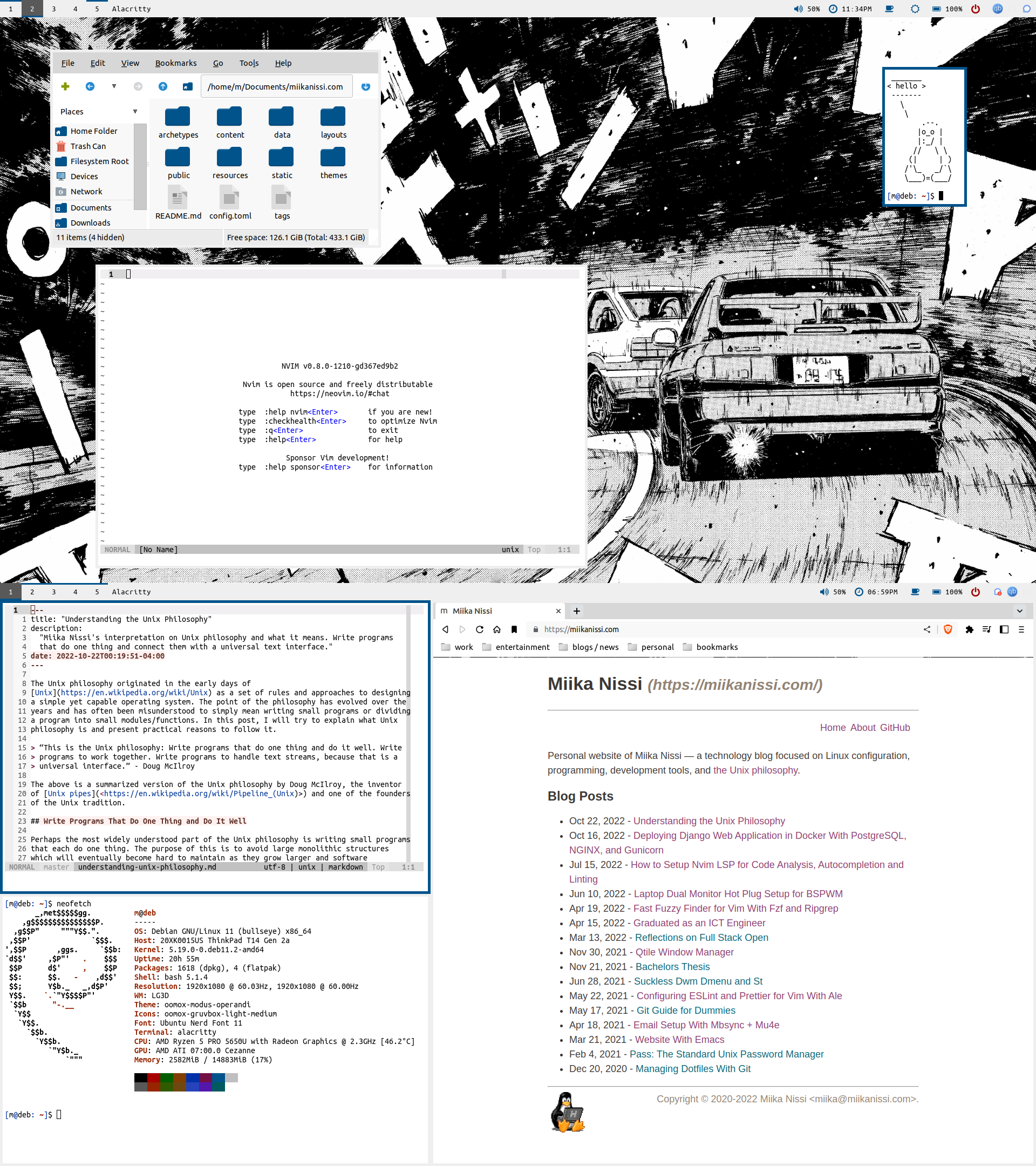
This is my personal configuration for a custom Debian Desktop Environment, including useful scripts, a list of all the programs I use and installation instructions, and my personal color scheme. This mainly works as a reference for myself, but anyone else is also welcome to enjoy and extend upon my configurations. Here are the details of my setup:
- Distro: Debian - Stable and reliable
- WM: BSPWM - A tiling window manager
- DM: LightDM - A simple and beautiful display/login manager
- Shell: Bash
- Terminal: Alacritty - A fast terminal emulator
- Bar: Polybar - A fast and easy-to-use status bar
- Compositor: Picom - Helps remove screen tearing
- Notifications: Dunst - A simple notification manager
- Launcher: Rofi - An application launcher used for many of my scripts
- File Manager: PCManFM - A basic graphical file manager
- Hotkeys: SXHKD
- Text Editors: Neovim, Vim, Emacs - Programming and text editing
- Music Player: MPD, NCMPCPP - Polybar integration
Scripts
Most of my useful shell scripts are included in ~/.local/bin/.
Here are some example scripts:
- rofi_dman.sh is a script to manage devices with rofi/dmenu. Features include mounting, unmounting, ejecting and listing devices.
- ff.sh is a script that uses FZF to find files by name, file type and/or content.
- bspwm_setup_monitors.sh is a script that allows hot plugging external monitors for BSPWM and Polybar.
- rofi_killprocess.sh is a script to kill running processes with rofi/dmenu.
Colors
Modus Themes
Modus Operandi

Modus Vivendi

Installation
To install and integrate with your system, you need to checkout the master branch and initialize included submodules.
git --work-tree $HOME --git-dir $HOME/dotfiles init
git --work-tree $HOME --git-dir $HOME/dotfiles remote add -t \* -f origin [email protected]:miikanissi/dotfiles.git
git --work-tree $HOME --git-dir $HOME/dotfiles checkout master
git --work-tree $HOME --git-dir $HOME/dotfiles submodule update --init
git --work-tree $HOME --git-dir $HOME/dotfiles config --local status.showUntrackedFiles no
Alternatively, you can clone the repository with submodules and move the files manually.
To install all of my packages, you can run my installation script:
./.local/bin/install_programs.sh
I use Ubuntu Mono Nerd Font as my main font. You can use my script to download and install it for your system:
chmod +x ~/.local/bin/install_nerd_fonts_ubuntu_mono.sh
~/.local/bin/install_nerd_fonts_ubuntu_mono.sh
Elementary cursor theme requires moving icons to their correct location:
cp -R ~/.icons/elementary-cursors/elementary/ ~/.icons/
Suckless program installation:
sudo echo "[Desktop Entry]
Encoding=UTF-8
Name=dwm
Comment=Dynamic window manager
Exec=dwm
Icon=dwm
Type=XSession" > /usr/share/xsessions/dwm.desktop
cd .local/src/suckless/dwm && sudo make clean install
cd .local/src/suckless/dmenu && sudo make clean install
cd .local/src/suckless/dwmblocks && sudo make clean install
cd .local/src/suckless/st && sudo make clean install
To automatically run my keyboard setup script when keyboard is attached, we need to
create a udev rule in /etc/udev/rules.d/99-keyboard.rules. You can find the vendor and
model ID for all USB devices by running the command lsusb:
ACTION=="bind", SUBSYSTEM=="usb", ENV{ID_VENDOR_ID}=="04b4", ENV{ID_MODEL_ID}=="0510" RUN+="/bin/su m --command='/home/m/.local/bin/keyboard.sh'"
Text Editors
Currently, I have configurations for Neovim (~/.config/nvim/), Vim (~/.vim/) and Emacs (~/.emacs.d/). At this moment I am only using Neovim and that is the only configuration I am maintaining. My Emacs configuration is written as a self documenting Org file for easier understanding.
Light / Dark Mode Toggle
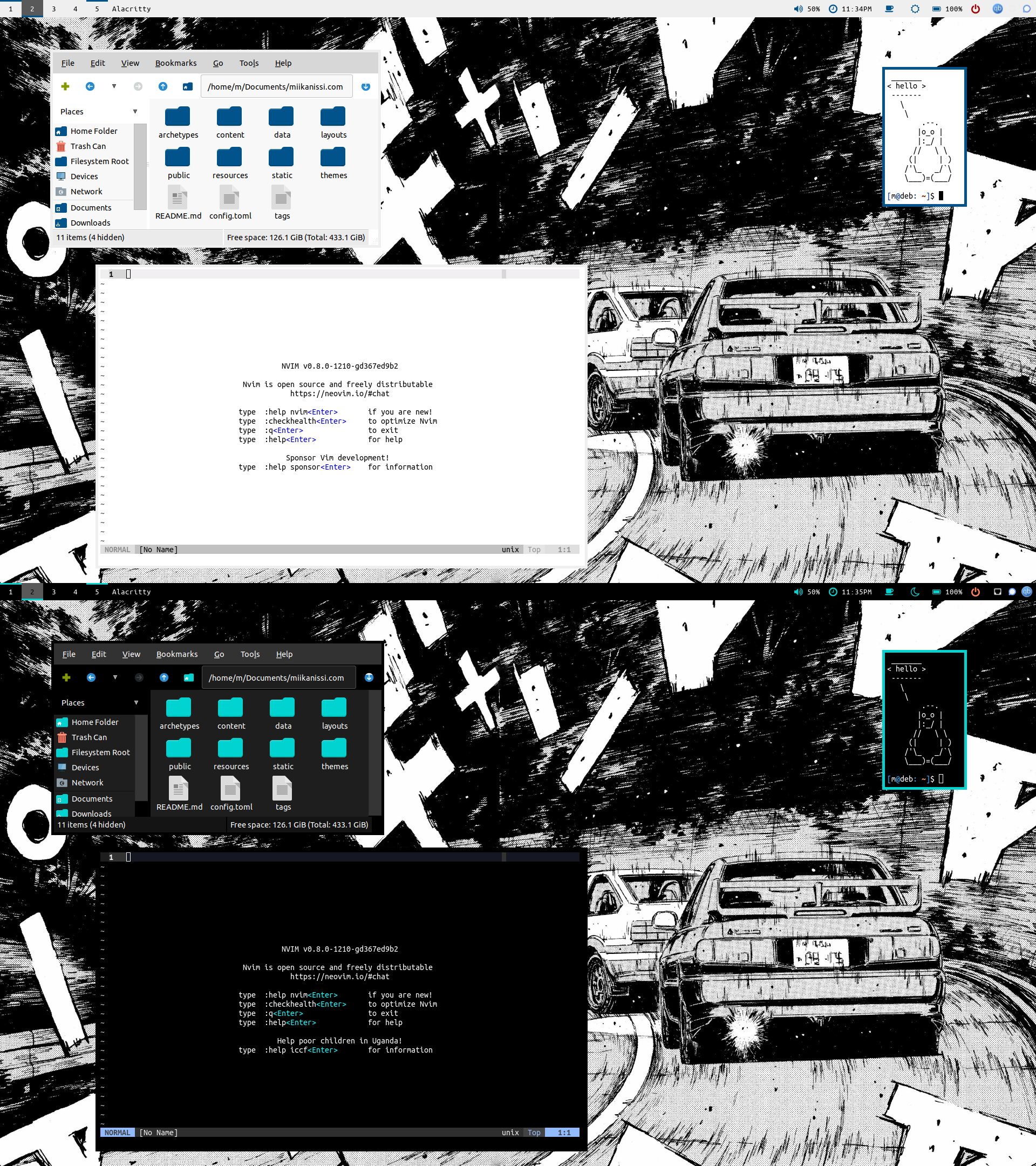
I switch between dark and light mode depending on the ambient light conditions. In order to do that conveniently I have created a script toggle-theme.sh, which automatically changes the color theme on my most used applications (i.e. Neovim, Alacritty, Polybar, GTK).
Links / Credits
To stay up to date with me, visit my website. Useful Links:
- Arch Wiki — A great Linux resource for almost anything
- kickstart.nvim — A great starting point for a Neovim "IDE" configuration
- Uncle Dave — Great YouTube series on configuring Emacs from scratch
- Protesilaos Stavrou — In-depth Emacs content, awesome color themes modus-operandi & modus-vivendi
Metadata
Owner
 miikanissi
Metadata
My configuration files (dotfiles) for a custom Debian Desktop Environment.