

 microsoft
winget upgrade --all is not working
Brief description of your issue
I am trying to upgrade all of my packages using winget. Also I am trying to display all upgradeable packages But when running the command its not working
I am using winget v1.5.101-preview I also tried a different version ( also a not-preview one)
Steps to reproduce
winget upgrade
or
winget upgrade --all
Expected behavior
It should show me all packages which can be upgraded or upgrade all.
Actual behavior
PS C:\Windows\system32> winget upgrade --all Es wurde kein installiertes Paket gefunden, das den Eingabekriterien entspricht.
PS C:\Windows\system32> winget upgrade Es wurde kein installiertes Paket gefunden, das den Eingabekriterien entspricht.
(No installed package matching the input criteria was found.)
Environment
Windows-Paket-Manager (Vorschau) v1.5.101-preview
Copyright (c) Microsoft Corporation. Alle Rechte vorbehalten.

Windows: Windows.Desktop v10.0.22621.1105
Systemarchitektur: X64
Paket: Microsoft.DesktopAppInstaller v1.20.101.0

Protokolle: %LOCALAPPDATA%\Packages\Microsoft.DesktopAppInstaller_8wekyb3d8bbwe\LocalState\DiagOutputDir

Benutzereinstellungen: %LOCALAPPDATA%\Packages\Microsoft.DesktopAppInstaller_8wekyb3d8bbwe\LocalState\settings.json
Get-AppxPackage microsoft.desktopappinstaller

Name              : Microsoft.DesktopAppInstaller
Publisher         : CN=Microsoft Corporation, O=Microsoft Corporation, L=Redmond, S=Washington, C=US
Architecture      : X64
ResourceId        :
Version           : 1.20.101.0
PackageFullName   : Microsoft.DesktopAppInstaller_1.20.101.0_x64__8wekyb3d8bbwe
InstallLocation   : C:\Program Files\WindowsApps\Microsoft.DesktopAppInstaller_1.20.101.0_x64__8wekyb3d8bbwe
IsFramework       : False
PackageFamilyName : Microsoft.DesktopAppInstaller_8wekyb3d8bbwe
PublisherId       : 8wekyb3d8bbwe
IsResourcePackage : False
IsBundle          : False
IsDevelopmentMode : False
NonRemovable      : True
Dependencies      : {Microsoft.UI.Xaml.2.7_7.2208.15002.0_x64__8wekyb3d8bbwe, Microsoft.VCLibs.140.00.UWPDesktop_14.0.30704.0_x64__8wekyb3d8bbwe, Microsoft.DesktopAppInstaller_1.20.101.0_neutral_split.language-de_8wekyb3d8bbwe,
                    Microsoft.DesktopAppInstaller_1.20.101.0_neutral_split.scale-100_8wekyb3d8bbwe...}
IsPartiallyStaged : False
SignatureKind     : Store
Status            : Ok

If you run winget list, are you seeing any packages mapped to the "winget" source showing a new version available?

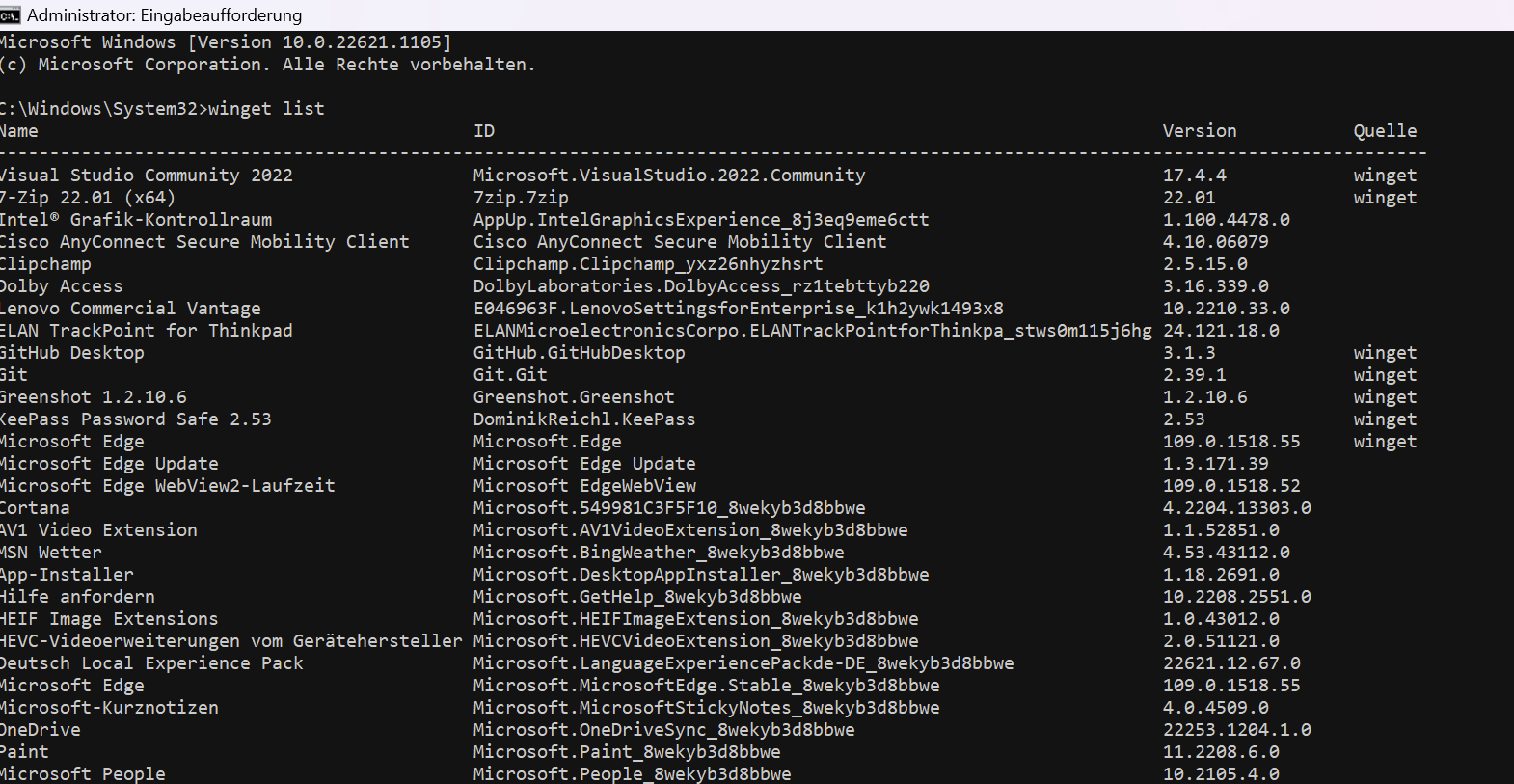 You mean this?
If you run
winget list, are you seeing any packages mapped to the "winget" source showing a new version available?
Yes, when an upgrade is available, an additional "Available" column is added displaying newer available versions.

Note: Cura installs side by side so the earlier versions I have display the "latest" available version.
You may actually have the latest version of all packages mapping to manifests in the "winget" source. You could test by intentionally installing an earlier version of a package to verify winget upgrade and winget list are behaving correctly.
You can use winget show <package> --versions to view all available versions for a package. Then you can use winget install <package> --version <an earlier version> to install something other than the latest version of a package. After that, running winget upgrade or winget list should display the latest version for that package.
Yes, when an upgrade is available, an additional "Available" column is added displaying newer available versions.
Note: Cura installs side by side so the earlier versions I have display the "latest" available version.
You may actually have the latest version of all packages mapping to manifests in the "winget" source. You could test by intentionally installing an earlier version of a package to verify
winget upgradeandwinget listare behaving correctly.You can use
winget show <package> --versionsto view all available versions for a package. Then you can usewinget install <package> --version <an earlier version>to install something other than the latest version of a package. After that, runningwinget upgradeorwinget listshould display the latest version for that package.
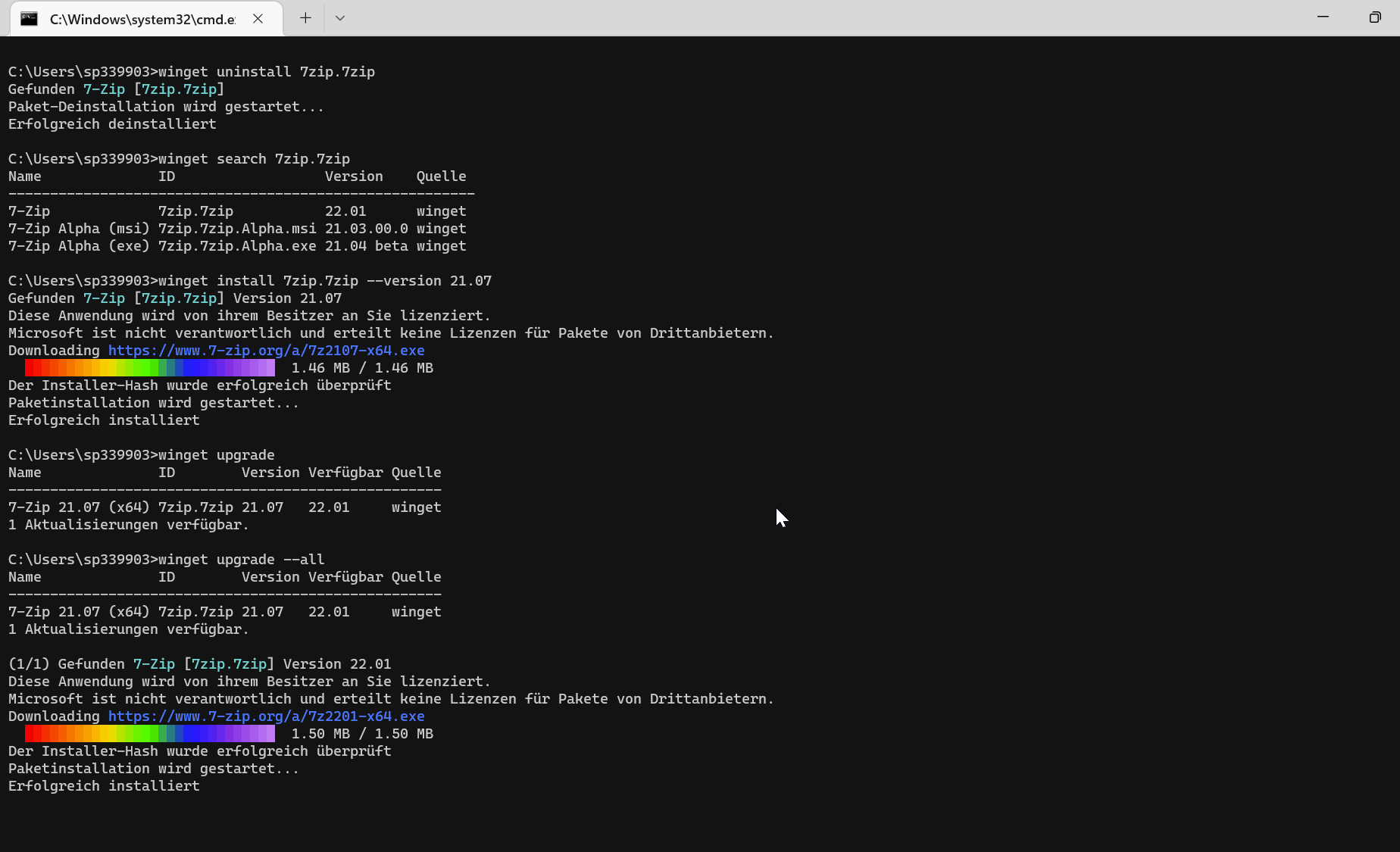
It seems to work, I am sorry. I was wondering about the message: "No installed package matching the input criteria was found". So I thought my installed software wasnt recognized by winget. I expected something like "No updates available" or something else.
I also got a message this morning, that a new nextcloud (Nextcloud.NextcloudDesktop) update was available. So I opened up cmd, typed in winget upgrade -all cause I wanted to update all of my packages and I received the message above.
I also got a message this morning, that a new nextcloud (Nextcloud.NextcloudDesktop) update was available. So I opened up cmd, typed in winget upgrade -all cause I wanted to update all of my packages and I received the message above.
This happens because when new versions of an application are published, a user or automation has to create the manifest and submit it to the winget-pkgs repository, where it is tested and validated before being made available to the winget cli

Something has broken for sure. "winget update --all would just update all my apps but now its not working.

I'm experiencing the same issue on my machine since last Friday. winget upgrade --all shows multiple apps that can be upgraded, but does not invoke the upgrade process.
It's seems that only the --all parameter no longer works, I can target specific updates by using winget upgrade <packageName> and that works fine.
Apparently I am now running winget v.1.8.532-preview, while I never deliberately installed a preview version.
I had a look on the releases page and noticed Windows Package Manager 1.7.10582, as latest version and no listing for 1.8.532-preview.
I've downgraded manually to the 1.7.10582, version but the issue is still there.
My environment:
- Windows 11 Enterprise 23H2 (22631.3155)
- Windows Package Manager v1.7.10582 (manually downgraded from v.1.8.532-preview)
- Windows Feature Experience Pack 1000.22684.1000.0
- Running Winget from PowerShell 7 in Windows Terminal


Same problem here, worked in the past, now it shows the list of available upgrades. Updating Winget fixed it for me.

I'm running v1.7.10582, winget upgrade --all does not do anything but list upgradeable software.

For everyone commenting on this issue - it was closed over a year ago. If you are having issues with the latest version, you should open a new issue and include all the relevant information including what is being output from the command, the environment you’re running in, as well as any log files (verbose logs preferred - they help a lot). Commenting "me too" on a closed issue like this doesn't bring the issue to the attention of the Microsoft developers, as it has already been closed.
@verzada @seppeduwe @xodotLBO @MarcoJanse @invokinsteve
In the Windows search,
type powershell, right-click it, and choose run as administrator.
Execute this command and the issue should be resolved.
Get-AppxPackage -Name 'Microsoft.DesktopAppInstaller' | Reset-AppxPackage
Hope that helps, and rely on us for any further inquiries. All the best.

In the Windows search,
type powershell, right-click it, and choose run as administrator.
Execute this command and the issue should be resolved.
Get-AppxPackage -Name 'Microsoft.DesktopAppInstaller' | Reset-AppxPackageHope that helps, and rely on us for any further inquiries. All the best.
This worked, thank you

In the Windows search,
type powershell, right-click it, and choose run as administrator.
Execute this command and the issue should be resolved.
Get-AppxPackage -Name 'Microsoft.DesktopAppInstaller' | Reset-AppxPackageHope that helps, and rely on us for any further inquiries. All the best.
I don't know if it depends by me having W10, but if I try to run what you suggested:
Get-AppxPackage: The 'Get-AppxPackage' command was found in the module 'Appx', but the module could not be loaded due to the following error: [Operation is not supported on this platform. (0x80131539)]
For more information, run 'Import-Module Appx'.
If I do Import-Module Appx
Import-Module: Operation is not supported on this platform. (0x80131539)
