

 microsoft
Git credentials popup show directly password instead of username
Does this issue occur when all extensions are disabled?: Yes
- VS Code Version: 1.71.1 (user setup)
- OS Version: Windows 11 21H2
Steps to Reproduce:
- Create a NodeJS project
- Add 2 dependencies from git+https in the package.json (don't install them one by one and be sure they are private)
- execute
npm installand wait for them to ask the credencials
What you should have:
VSCode should ask you for you name first
Workaround:
For people who have the bug, simply remove every git dependencies and install them one by one in the terminal
Picture:
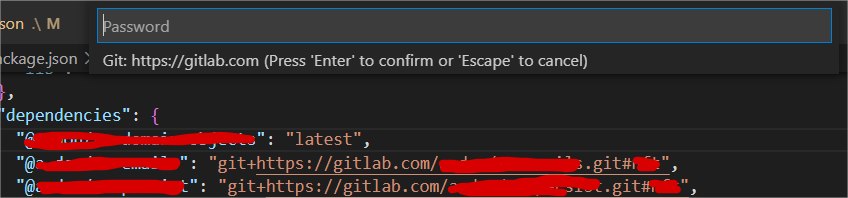

Thanks for creating this issue! It looks like you may be using an old version of VS Code, the latest stable release is 1.71.2. Please try upgrading to the latest version and checking whether this issue remains.
Happy Coding!

Thanks for telling me Mr.BOT but it does not fix the issue. I tried in case it will work after this update but no
Hello, Just to have informations, Did you recreate the issue by yourself or it works on your side ? If yes did you start fixing the bug or it's still in progress ?
I am still getting this pop up. Till yesterday It was working. I update to latest version of vscode. From then it started this problem. So i am using terminal and entering the personal access token everytime i push the changes which is actually a pain 😥.

I am still getting this pop up. Till yesterday It was working. I update to latest version of vscode. From then it started this problem. So i am using terminal and entering the personal access token everytime i push the changes which is actually a pain 😥.
Don't worry i still have the problem so it's not fixed.
If you need to install multiple private repo from git (github, gitlab or other) remove them from your package.json then install them with the CLI npm i git+..... one by one