

 microsoft
scoping lookaheads prevents scoping same region when consumed
In the following rule, I am trying to apply two scopes to the same character in the text. Other ways I have attempted to use do not seem to be supported by all editors that support TextMate grammars. I get inconsistent results between editors with this approach as well.
The text is:
$( some text )
The goal is to apply two scopes to the $.
This is the rule I tried, using a look-ahead that is captured to apply a scope, and then a consuming capture to scope it a second time.
		{
			"begin": "(?=(\\$)\\()",
			"beginCaptures": {
				"1": {
					"name": "punctuation.definition.subexpression.powershell"
				}
			},
			"comment": "TODO: move to repo; make recursive.",
			"end": "\\)",
			"endCaptures": {
				"0": {
					"name": "punctuation.section.group.end.powershell"
				}
			},
			"patterns": [
				{
					"begin": "\\G(\\$)(\\()",
					"beginCaptures": {
						"1": {
							"name": "keyword.other.substatement.powershell"
						},
						"2": {
							"name": "punctuation.section.group.begin.powershell"
						}
					},
					"comment": "TODO: move to repo; make recursive.",
					"end": "(?=\\))",
					"name": "meta.group.complex.subexpression.powershell",
					"patterns": [
						{
							"include": "$self"
						}
					]
				}
			]
		},
In VSCode-TextMate, the first scope (applied by the look-ahead) is the result, and the scope applied by the inner rule which consumes the text is ignored.
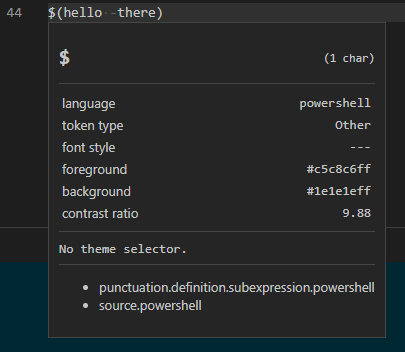
In Atom, its the other way around. The last applied scope seems to stick.
Atom also does not support assigning multiple scopes, separated by spaces, to a single capture. I cannot confirm is this is supported by TextMate, but it definitely is supposed by VSCode-TextMate.
I would like to have thought that I can add as many scopes to a given region, through what ever capturing means possible. I do not know if TextMate supports this either, though.

I did find a dirty hack for getting consistent results between Atom and VSCode-TextMate. It requires wrapping as many capture groups around the text to capture, as there are scopes that need to be applied, applying one scope per capture. However, I don't understand why this specific issue I call out above, isn't the same thing as wrapping multiple captures around it.
I am not 100% sure if it works everywhere and if it is what you're looking for, but I think you can just have a <space> (space character) in the scope and that means you are adding two scopes. I'm pretty sure I had to implemented that at some point -- https://github.com/microsoft/vscode-textmate/blob/d7c7996115a4d104cd738afa118fe616a7c08ef9/src/grammar.ts#L1117-L1120

Correct, spaces works well in VS Code, but it does not work in Atom. Atom seems to treat the scope as one single entity when selections are made by themes, so only the first scope gets selected, which is not the intended result. The last scope specified is supposed to be the preferred scope (which it is in VS Code).
@msftrncs Have you been able to test this in TextMate itself? I think not handling spaces might be a bug in Atom.