

 microsoft
where is the notify?how to find the notify? how to clear notify? and where is the information?
版本: 1.71.0-insider (system setup) 提交: 35b971c92d210face8c446a1c6f1e470ad2bcb54 日期: 2022-08-26T05:19:46.020Z Electron: 19.0.12 Chromium: 102.0.5005.167 Node.js: 16.14.2 V8: 10.2.154.15-electron.0 OS: Windows_NT x64 10.0.25188 沙盒化: Yes
名称: GitHub Pull Requests and Issues ID: GitHub.vscode-pull-request-github 说明: Pull Request and Issue Provider for GitHub 版本: 0.49.2022082909 发布者: GitHub VS Marketplace 链接: https://marketplace.visualstudio.com/items?itemName=GitHub.vscode-pull-request-github
Steps to Reproduce:
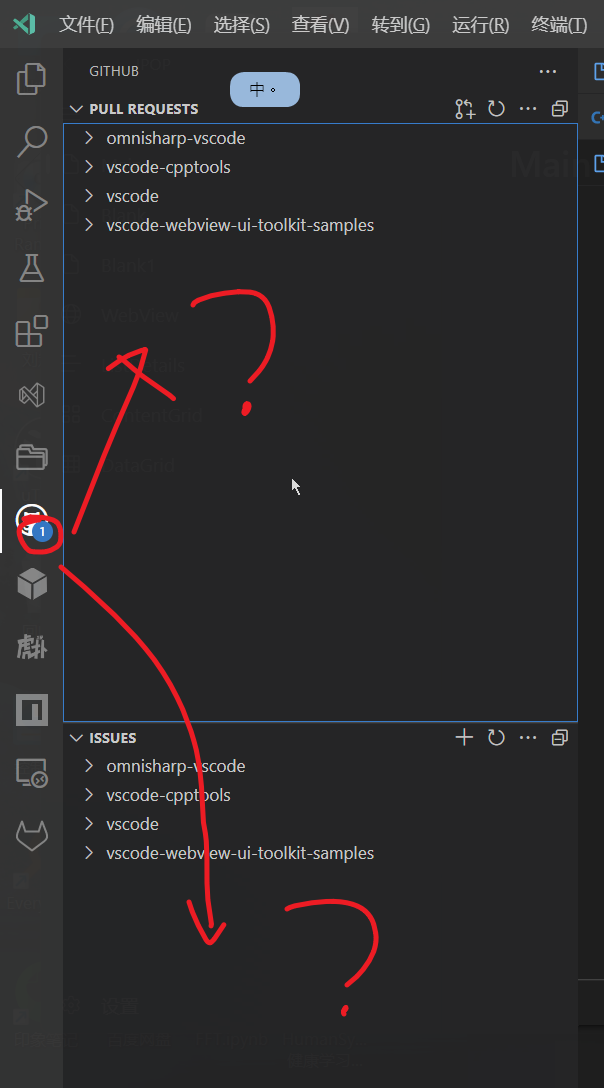

@heartacker notifications are only available for Pull Requests currently. We also don't show them on the repository level if there is a notification at the moment, we might add this during the next month. If you expand the repositories, you should be able to see a PR highlighted indicating that it has a notification.
We are going to release this feature this month with the setting by default set to off. During the next month we will be making improvements on making it easier to find the notifications.

Duplicate of https://github.com/microsoft/vscode-pull-request-github/issues/3863
