

 microsoft
"Show Dependencies" does not resolve sibling module
Describe the bug In a multi-module project, executing "Show Dependencies" on a module that requires a sibling module throws an error
To Reproduce Steps to reproduce the behavior:
- Clone https://github.com/baincd/maven-multi-module-example which has the module layout
gs-multi-module
└── library
└── application
- Open in VS Code
- Once projects are imported, right-click on multi-module-application and choose "Show Dependencies"
- See error "Command "maven.project.showDependencies" fails. Output displays
[ERROR] Failed to execute goal org.apache.maven.plugins:maven-dependency-plugin:3.1.2:tree (default-cli) on project multi-module-application: Cannot build project dependency graph: Could not resolve nor collect following dependencies: [com.example:library:jar:0.0.1-SNAPSHOT (compile)]: Could not resolve dependencies for project com.example:multi-module-application:jar:0.0.1-SNAPSHOT: Could not find artifact com.example:library:jar:0.0.1-SNAPSHOT -> [Help 1]
Expected behavior Display the resolved dependencies for multi-module-application, including multi-module-library
Environments (please complete the following information as much as possible):
- OS: WIndows 10 and Linux
- VS Code version: 1.55.2
- Extension version 0.30.1
Additional context Other IDEs, such as Eclipse, are able to resolve dependencies of a module that depend on a sibling module. This is extremely useful functionality for being able to see the dependencies of a project

Currently we directly parse output from mvn dependency:tree. The command failed because you didn't have the dependency (multi-module-library) installed into local maven repository. And the workaround is to run mvn install against the library first.
BTW we are working on a better visualization of the dependencies. It looks like below, and if you have any feedback/feature request, please let us know.
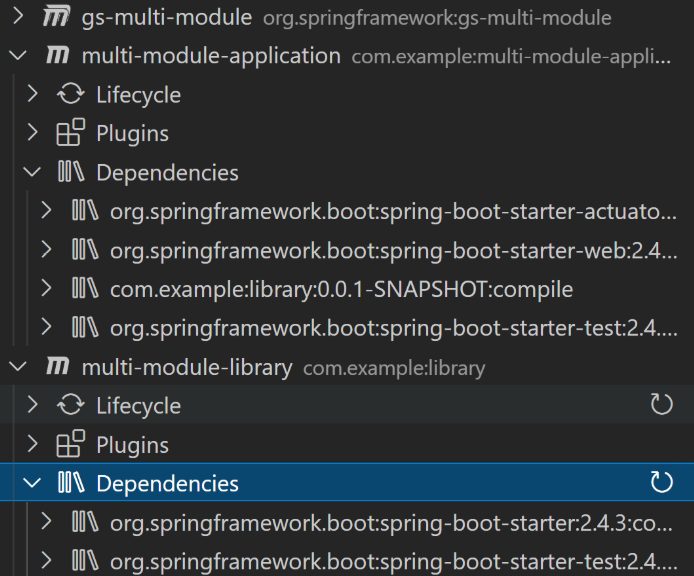

Although running mvn install first would work, I prefer not to do that because it's easy to forget to do. For example, if I previously had run mvn install but today forget to run it before running mvn dependency:tree on the application module, then my dependency tree will use the older version of library that is installed in the local repo rather than the version in the workspace. This is easy to do and can be really confusing, so in general I try to avoid running mvn install so I can be sure my maven commands are using the version in my working copy.
The new dependency visualization does look nice. I definitely like how it would be built into the explorer sidebar. A couple of thoughts/questions
- Would that show all the transitive dependencies as a tree?
- Would it display when a version of a dependency is overridden (because of another dependency declaration taking precedent, or because the version of the dependency is managed)?
- It would be helpful if there was a way to filter (or search) dependencies within the dependency tree
Thank you for all the hard work on this extension!
I prefer not to do that because it's easy to forget to do..
I totally agree. We are looking for any efficiently way to calculate dependencies or your working copy.
Would that show all the transitive dependencies as a tree?
Yes. The data for visualization is from output of a plugin https://github.com/ferstl/depgraph-maven-plugin
Would it display when a version of a dependency is overridden.
Yes. See screenshot in https://github.com/microsoft/vscode-maven/pull/647#issue-678664155 . The final UI can be slightly different, and we are working on shortcuts to resolve conflicts, like setting specific version using dependencyManagement or exclude a dependency... etc.
It would be helpful if there was a way to filter (or search) dependencies..
VS Code actually provides filtering on every explorer. When you focus on Maven explorer, you can type keywords directly to filter all items. But that's neither easy to be found, nor handy to use (due to fuzzy matching). We are thinking whether to provide a switch to filter items (e.g. show conflict items only). Please let us know if you have further thoughts. //cc @Melody618 who is working on this.
@Eskibear @Melody618 ,
It would be helpful if there was a way to filter (or search) dependencies..
VS Code actually provides filtering on every explorer. When you focus on Maven explorer, you can type keywords directly to filter all items. But that's neither easy to be found, nor handy to use (due to fuzzy matching). We are thinking whether to provide a switch to filter items (e.g. show conflict items only). Please let us know if you have further thoughts. //cc @Melody618 who is working on this.
I've started using the new version, and one thing I noticed is that the sidebar filtering only filters on dependencies that have been displayed in the tree. For example, see the screenshot below. If I expand "Maven dependencies" and filter on "hamcrest", the hamcrest dependency is not found. However, once I have expanded the spring-boot-starter-test dependency so the transitive "hamcrest" dependency has been displayed, then the filter finds the "hamcrest" dependency (even if spring-boot-starter-test is collapsed):

If there is a way to have the filter find items that have not been expanded yet, that would be great. If this is not an option or is too complicated to do, then could there be an option added to the "Dependencies" node to expand all dependencies? Then at least a dev could click that first to display all transitive dependencies, and then use the filter.
And note that this visualization is nice, but the original issue reported is still an issue - modules with a dependency on sibling modules fail when displaying dependencies.
could there be an option added to the "Dependencies" node to expand all dependencies?
At the moment you expand "Dependencies" menu, it already has information of all dependencies. But the nodes are incrementally rendered in vscode when you expand parent node.
About the API to expand all nodes, unfortunately I don't find a perfect one. Existing API has limitation of the depth to expand (which also makes sense to avoid performance deterioration caused by API abuse). See: https://github.com/microsoft/vscode/blob/0c5cdcfc97dac88c808f57c8e0a99348af8fbc0f/src/vs/vscode.d.ts#L9401-L9406
modules with a dependency on sibling modules fail when displaying dependencies.
As far as I know, the data for visualization is from output of a plugin https://github.com/ferstl/depgraph-maven-plugin . To address this issue, we have two options:
- a) see if we can pass some parameters to depgraph plugin to fetch the information.
- b) find another way to get information about dependencies.
About the API to expand all nodes, unfortunately I don't find a perfect one. Existing API has limitation of the depth to expand (which also makes sense to avoid performance deterioration caused by API abuse). See: https://github.com/microsoft/vscode/blob/0c5cdcfc97dac88c808f57c8e0a99348af8fbc0f/src/vs/vscode.d.ts#L9401-L9406
That's unfortunate, but not much you can do about that. :shrug:
modules with a dependency on sibling modules fail when displaying dependencies.
As far as I know, the data for visualization is from output of a plugin https://github.com/ferstl/depgraph-maven-plugin . To address this issue, we have two options:
* a) see if we can pass some parameters to depgraph plugin to fetch the information.

* b) find another way to get information about dependencies.
if it was possible, I was going to suggest to detect if a module has an ancestor module within the workspace, to run the dependency plugin on the ancestor module (using a relative path for the output file rather than an absolute path). This would generate the dependency tree for all child modules, and the extension could just read the output for the module originally selected.
I think that would work with the maven dependency:tree plugin, but the depgraph plugin doesn't seem to work the correctly with multi-module projects. And since the depgraph plugin provides other useful information, I assume you wouldn't want to change from it.
All that to say, I don't know there is a solution for this that doesn't break or change other functionality. So maybe this issue should just be closed at this time. I can run mvn dependency:tree myself from the parent module when I need to see the dependency tree of a child module (or give in to using mvn install :wink: - though probably not )