

 microsoft
I had enabled the "Debug JavaExec tasks" feature, but can not find the debug icon on tasks.
Extension Name: vscode-gradle Extension Version: 3.5.2 OS Version: windows 10 VSCode version: 1.15.1
Describe the bug I had enabled the "Debug JavaExec tasks" feature, but can not find the debug icon on tasks.
To Reproduce I had added the following code in settings.json
    "gradle.javaDebug": {
        "clean": true,
        "tasks": [
            "run",
            "runBoot",
            "test",
            "intTest",
            "integration"
        ]
    },
Expected behavior There should be a debug icon on tasks (such as run).
But there is nothing happened.


same expectations. does not work. Java plugin even does not run Spring Boot application. Gradle Tasks plugin is able start bootRun task. However I cannot debug. Expected debug icon does not appear?
https://stackoverflow.com/questions/58175607/how-to-debug-bootrun-with-vscode


hi @ugurlu The debug icon is displayed in that screenshot. It's the bug icon. Can you confirm, that after adding a breakpoint in your code, and clicking on the bug icon, the breakpoint is not hit?
actually this is the expected behavior. My ide does not show bug icon. Only play icon exists. Here is the actualy snapshot
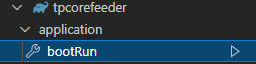
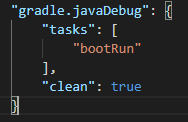
I think I found possible explanation. my gradle project is multi module project. If "submodule:bootRun" is used instead of "bootRun" debug icon is displayed. Maybe a wildcard can be used? Or search tasks in child projects.
Sorry I wasn't able to look at this over the weekend. Thanks for letting me know about this @ugurlu. I should be able to make it greedy quite easily, and I think it makes sense for that to be the default behaviour. I'll look into making this change at some point.
This issue may be relevant: https://github.com/microsoft/vscode-gradle/issues/1118
