microsoft
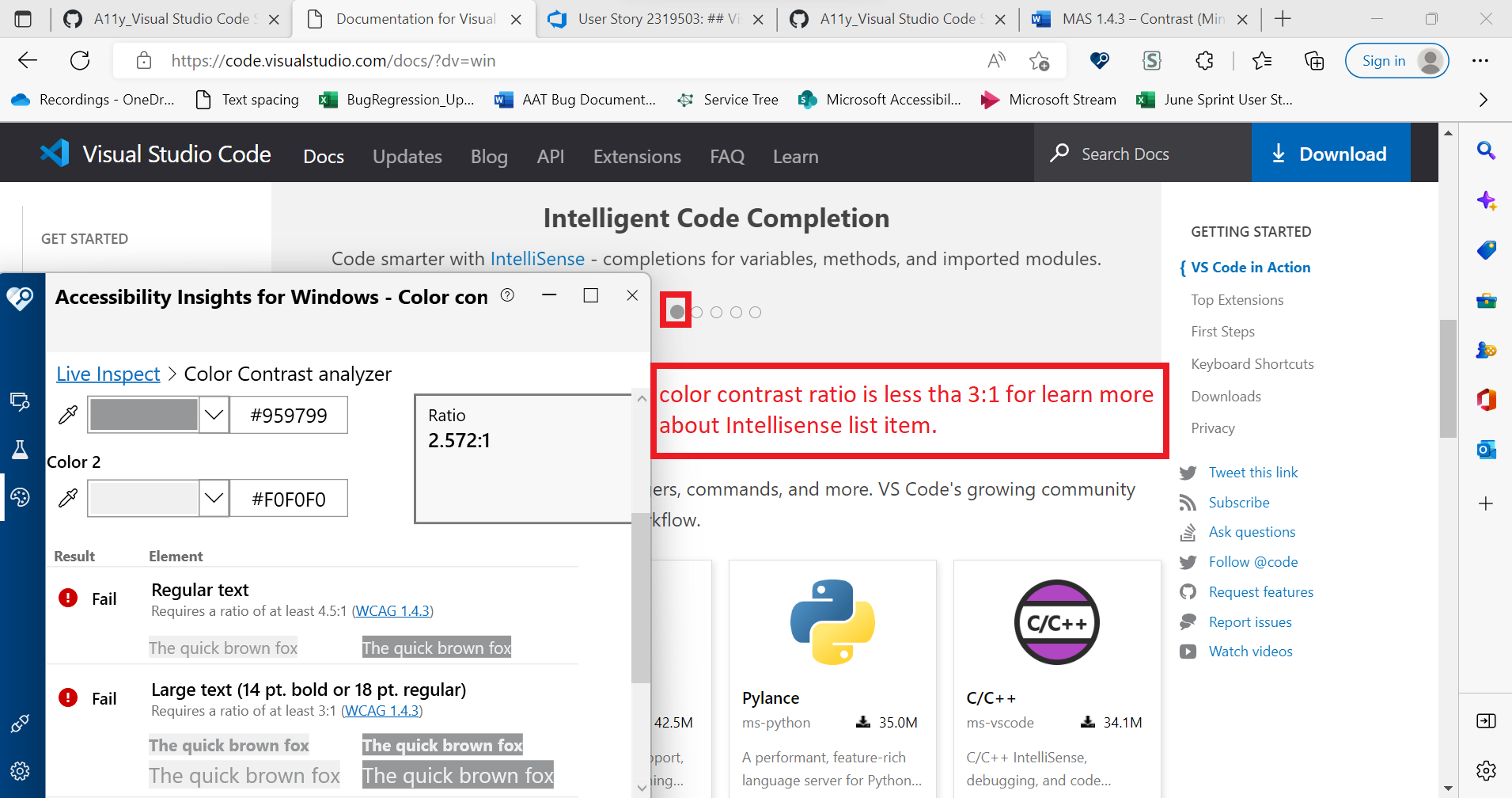
A11y_Visual Studio Code Services_Download_Platform Specific_Color contrast:Color contrast ratio of the circular list items present in the carousel under heading "Visual Studio Code in Action" is less than 3:1
“Check out Accessibility Insights! - Identify accessibility bugs before check-in and make bug fixing faster and easier.”
GitHubTags:#A11yMAS;#A11yTCS;#BM_Visual Studio Code Services_Aug2022;#Visual Studio Code Services;#Win11;#FTP;#DesktopWeb;#A11ySev2;#WCAG1.4.11;#ColorContrast;#ChromiumEdge;#A11yWCAG2.1;
Environment Details:
Application Name: Visual Studio Code Services URL: https://code.visualstudio.com/ Windows Version: Win11 Version 21H2(OS Build 22000.795) Chromium Edge Version: Version 104.0.1293.54 (Official build) (64-bit)
Repro Steps:
- Please do not close this bug. This bug should only be closed by TCS, C+AI Accessibility tester after verification of the fix
- Launch the application Url : https://code.visualstudio.com/
- Navigate to "Download" button.
- Hit on any of the platform(Windows/Linux/MacOS) links or any installer type(*64 and *32).
- Thanks for downloading VS code for windows screen will open.
- Tab to the list items under heading "Visual studio code in action".
- Observe that color contrast ratio for circular list items is 2.572:1 which is less than 3:1.
Actual:
Color contrast ratio of the circular list items present in the carousel under heading "Visual Studio Code in Action" is less than 3:1.
Expected:
Color contrast ratio of the circular list items present in the carousel under heading "Visual Studio Code in Action" should be equal to or greater than 3:1.
User Impact:
Low Vision users will face difficulty in viewing the selected list items.
Attachment: