microsoft
A11y_Visual Studio Code Services_Blog Posts_Extension Bisect_Resize: At 200% zoom Text and links in the page are getting overlapped when navigated using "shift + tab" key
“Check out Accessibility Insights! - Identify accessibility bugs before check-in and make bug fixing faster and easier.”
GitHubTags:#A11yMAS;#A11yTCS;#BM_Visual Studio Code Services_Aug2022;#Visual Studio Code Services;#Win11;#FTP;#DesktopWeb;#A11ySev2;#Chrome;#WCAG1.4.4;#Resize;
Environment Details:
Application Name: Visual Studio Code Services URL: https://code.visualstudio.com/ Windows Version: Win11 Chrome Version: Version 103.0.5060.134 (Official Build) (64-bit)
Pre-requisite:
- Go to Settings > System > Display
- To ensure consistent testing, set the machine’s target resolution to 1280*768 mid-range resolution (resolution). And scaling should be at 100%.
- Zoom the page to 200% and Refresh the page.
Repro Steps:
- Please do not close this bug. This bug should only be closed by TCS, C+AI Accessibility tester after verification of the fix
- Launch the application Url : https://code.visualstudio.com/
- Tab Navigate to "Blog" link.
- Tab Navigate to "Extension Bisect" link in left Navigation and hit enter
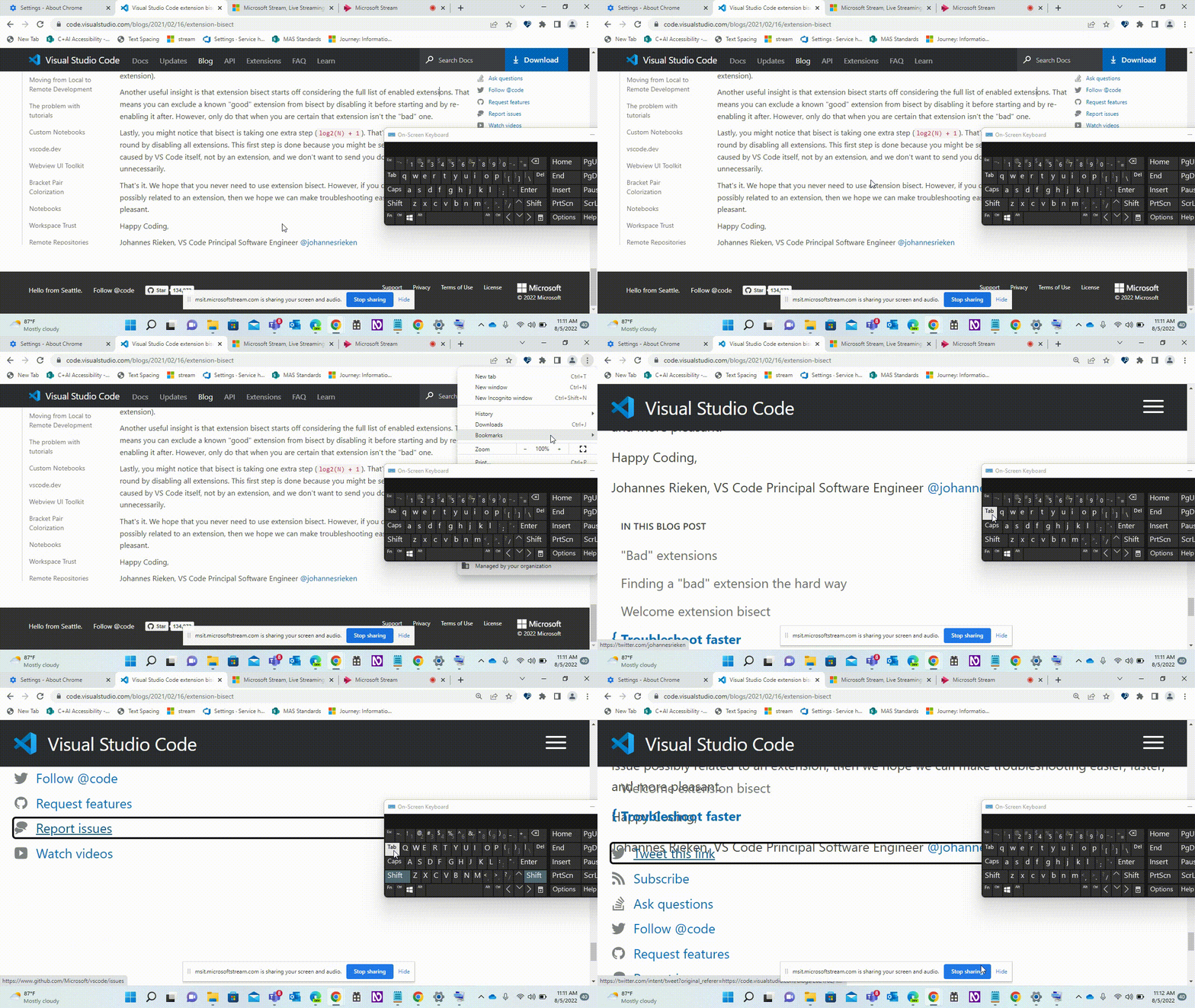
- Observe that Text and links are getting overlapped when we apply resize configuration and navigating from bottom to top using "shift + Tab"
Actual:
Text and links are getting overlapped when we zoom to 200% and navigating from bottom to top of the page using "shift + Tab" key Note: Issue is observed throughout the application
Expected:
When we apply 200% zoom text and links should not be overlapped also on navigating using tab/shift + tab at 200% there should be no overlap of data
User Impact:
Low vision users who zoom the page for better vision will find it difficult if Text and links are getting overlapped when we apply resize configuration and navigating from bottom to top using "shift + Tab" key
Attachment