
visual-chatgpt

visual-chatgpt copied to clipboard
 microsoft
Error in bash download.sh step
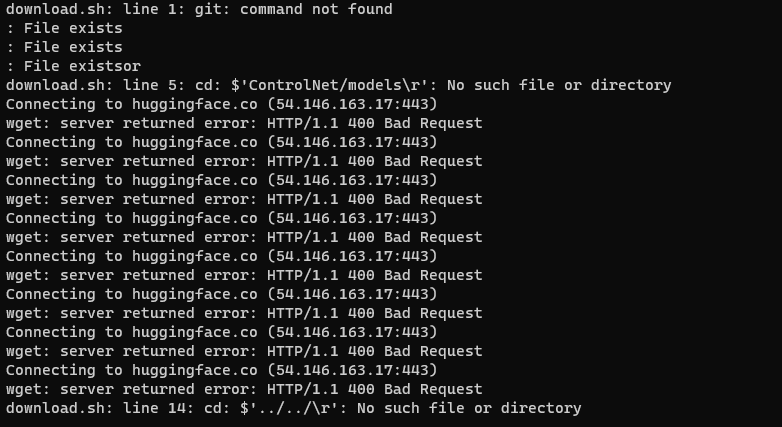

Could you let me know a bit more details on your setup? Are you running this in wsl?
In any case, from the looks of it, you don't git installed. Could you please install it and try to run it again?


Error due to carriage returns (CR, "\r", 0x0d) at the ends of lines in the download.sh shell.
tr -d '\r' < download_original.sh > download_rem.sh
Below is how I got around this
## download the visual foundation models
## Do this in the terminal
# bash download.sh

#### ERROR
vchatgpt/download.sh: line 5: cd: $'ControlNet/models\r': No such file or directory
... ... ...
https://huggingface.co/lllyasviel/ControlNet/resolve/main/models/control_sd15_mlsd.pth%0D
Resolving huggingface.co (huggingface.co)... 52.1.102.136, 52.87.127.254, 54.235.118.239, ...
Connecting to huggingface.co (huggingface.co)|52.1.102.136|:443... connected.
HTTP request sent, awaiting response... 404 Not Found
###

## to resolve the wget 404 error due to the %0D appended to the url
## my fix (assist from https://stackoverflow.com/questions/800030/remove-carriage-return-in-unix/802439#comment133546322_802439)
# **tr -d '\r' < download_original.sh > download_rem.sh**

## where download_original.sh is the 'dowload.sh' in the bash file provided
## the ',' indicate file to work one
## the '>' indicate file to pipe output to
## 'download_rem.sh' is the output file after stripping off the '\r' | '%0D'

bash download_rem.sh

@yusufaly May I ask if it has been resolved? We have also encountered this situation
