

 microsoft
Sometimes MSTest fails with 'Unable to find assembly' when searching for a nuget package dll
Description
Sometimes MSTest fails with 'Unable to find assembly' when searching for a nuget package dll
Steps to reproduce
- Load the project
- Execute
TestMethodLog4Net1
Expected behavior
The project should always be able to find the log4net assembly and load it
Actual behavior
Sometimes MSTest is not able to find the assembly. The problem can be (sometimes) worked around by installed previous versions of MSTest.TestAdapter which will then show the following line:
Multiple versions of same extension found. Selecting the highest version.
But uninstalling the package MSTest.TestAdapter and reinstalling it will bring back the bug.
This is the stacktrace output:
Log level is set to Informational (Default).
Source code repository not available. Some features may not work as expected.
Connected to test environment '< Local Windows Environment >'
Test data store opened in 0,123 sec.
========== Starting test discovery ==========
========== Test discovery skipped: All test containers are up to date ==========
Building Test Projects
========== Starting test run ==========
An exception occurred while invoking executor 'executor://mstestadapter/v2': Unable to find assembly 'log4net, Version=2.0.15.0, Culture=neutral, PublicKeyToken=669e0ddf0bb1aa2a'.
Stack trace:

Server stack trace:
   at System.Runtime.Serialization.Formatters.Binary.BinaryAssemblyInfo.GetAssembly()
   at System.Runtime.Serialization.Formatters.Binary.ObjectReader.GetType(BinaryAssemblyInfo assemblyInfo, String name)
   at System.Runtime.Serialization.Formatters.Binary.ObjectMap..ctor(String objectName, String[] memberNames, BinaryTypeEnum[] binaryTypeEnumA, Object[] typeInformationA, Int32[] memberAssemIds, ObjectReader objectReader, Int32 objectId, BinaryAssemblyInfo assemblyInfo, SizedArray assemIdToAssemblyTable)
   at System.Runtime.Serialization.Formatters.Binary.__BinaryParser.ReadObjectWithMapTyped(BinaryObjectWithMapTyped record)
   at System.Runtime.Serialization.Formatters.Binary.__BinaryParser.Run()
   at System.Runtime.Serialization.Formatters.Binary.ObjectReader.Deserialize(HeaderHandler handler, __BinaryParser serParser, Boolean fCheck, Boolean isCrossAppDomain, IMethodCallMessage methodCallMessage)
   at System.Runtime.Serialization.Formatters.Binary.BinaryFormatter.Deserialize(Stream serializationStream, HeaderHandler handler, Boolean fCheck, Boolean isCrossAppDomain, IMethodCallMessage methodCallMessage)
   at System.Runtime.Remoting.Channels.CrossAppDomainSerializer.DeserializeObject(MemoryStream stm)
   at System.Runtime.Remoting.Messaging.SmuggledMethodReturnMessage.FixupForNewAppDomain()
   at System.Runtime.Remoting.Channels.CrossAppDomainSink.SyncProcessMessage(IMessage reqMsg)

Exception rethrown at [0]:
   at System.Runtime.Remoting.Proxies.RealProxy.HandleReturnMessage(IMessage reqMsg, IMessage retMsg)
   at System.Runtime.Remoting.Proxies.RealProxy.PrivateInvoke(MessageData& msgData, Int32 type)
   at Microsoft.VisualStudio.TestPlatform.MSTest.TestAdapter.Execution.UnitTestRunner.RunSingleTest(TestMethod testMethod, IDictionary`2 testContextProperties)
   at Microsoft.VisualStudio.TestPlatform.MSTest.TestAdapter.Execution.TestExecutionManager.ExecuteTestsWithTestRunner(IEnumerable`1 tests, IRunContext runContext, ITestExecutionRecorder testExecutionRecorder, String source, IDictionary`2 sourceLevelParameters, UnitTestRunner testRunner)
   at Microsoft.VisualStudio.TestPlatform.MSTest.TestAdapter.Execution.TestExecutionManager.ExecuteTestsInSource(IEnumerable`1 tests, IRunContext runContext, IFrameworkHandle frameworkHandle, String source, Boolean isDeploymentDone)
   at Microsoft.VisualStudio.TestPlatform.MSTest.TestAdapter.Execution.TestExecutionManager.ExecuteTests(IEnumerable`1 tests, IRunContext runContext, IFrameworkHandle frameworkHandle, Boolean isDeploymentDone)
   at Microsoft.VisualStudio.TestPlatform.MSTest.TestAdapter.Execution.TestExecutionManager.RunTests(IEnumerable`1 tests, IRunContext runContext, IFrameworkHandle frameworkHandle, TestRunCancellationToken runCancellationToken)
   at Microsoft.VisualStudio.TestPlatform.MSTest.TestAdapter.MSTestExecutor.RunTests(IEnumerable`1 tests, IRunContext runContext, IFrameworkHandle frameworkHandle)
   at Microsoft.VisualStudio.TestPlatform.CrossPlatEngine.Execution.RunTestsWithTests.InvokeExecutor(LazyExtension`2 executor, Tuple`2 executorUri, RunContext runContext, IFrameworkHandle frameworkHandle)
   at Microsoft.VisualStudio.TestPlatform.CrossPlatEngine.Execution.BaseRunTests.<>c__DisplayClass46_0.<RunTestInternalWithExecutors>b__0()
   at Microsoft.VisualStudio.TestPlatform.PlatformAbstractions.PlatformThread.<>c__DisplayClass0_0.<Run>b__0()
--- End of stack trace from previous location where exception was thrown ---
   at System.Runtime.ExceptionServices.ExceptionDispatchInfo.Throw()
   at Microsoft.VisualStudio.TestPlatform.PlatformAbstractions.PlatformThread.Run(Action action, PlatformApartmentState apartmentState, Boolean waitForCompletion)
   at Microsoft.VisualStudio.TestPlatform.CrossPlatEngine.Execution.BaseRunTests.TryToRunInStaThread(Action action, Boolean waitForCompletion)
   at Microsoft.VisualStudio.TestPlatform.CrossPlatEngine.Execution.BaseRunTests.RunTestInternalWithExecutors(IEnumerable`1 executorUriExtensionMap, Int64 totalTests)

========== Test run finished: 0 Tests (0 Passed, 0 Failed, 0 Skipped) run in 1,1 sec ==========
A PoC can be found in https://github.com/elgatov/BugMSTest
Environment
Windows 10 Enterprise N v1809 17763.1935 Test Execution Command Line Tool Version 17.3.0-preview-20220626-01 (x64) Autofac v6.4.0 coverlet.collector v3.1.2 log4net v2.0.15 Microsoft.NET.Test.Sdk v17.3.0 MSTest.TestAdapter v2.2.10 MSTest.TestFramework v2.2.10

Same bug appeared downloading the latest version from github executed in VS2019 community edition:
========== Starting test run ==========
An exception occurred while invoking executor 'executor://mstestadapter/v2': Unable to find assembly 'log4net, Version=2.0.12.0, Culture=neutral, PublicKeyToken=669e0ddf0bb1aa2a'.
Stack trace:

Server stack trace:
   at System.Runtime.Serialization.Formatters.Binary.BinaryAssemblyInfo.GetAssembly()
   at System.Runtime.Serialization.Formatters.Binary.ObjectReader.GetType(BinaryAssemblyInfo assemblyInfo, String name)
   at System.Runtime.Serialization.Formatters.Binary.ObjectMap..ctor(String objectName, String[] memberNames, BinaryTypeEnum[] binaryTypeEnumA, Object[] typeInformationA, Int32[] memberAssemIds, ObjectReader objectReader, Int32 objectId, BinaryAssemblyInfo assemblyInfo, SizedArray assemIdToAssemblyTable)
   at System.Runtime.Serialization.Formatters.Binary.__BinaryParser.ReadObjectWithMapTyped(BinaryObjectWithMapTyped record)
   at System.Runtime.Serialization.Formatters.Binary.__BinaryParser.ReadObjectWithMapTyped(BinaryHeaderEnum binaryHeaderEnum)
   at System.Runtime.Serialization.Formatters.Binary.__BinaryParser.Run()
   at System.Runtime.Serialization.Formatters.Binary.ObjectReader.Deserialize(HeaderHandler handler, __BinaryParser serParser, Boolean fCheck, Boolean isCrossAppDomain, IMethodCallMessage methodCallMessage)
   at System.Runtime.Serialization.Formatters.Binary.BinaryFormatter.Deserialize(Stream serializationStream, HeaderHandler handler, Boolean fCheck, Boolean isCrossAppDomain, IMethodCallMessage methodCallMessage)
   at System.Runtime.Remoting.Channels.CrossAppDomainSerializer.DeserializeObject(MemoryStream stm)
   at System.Runtime.Remoting.Messaging.SmuggledMethodReturnMessage.FixupForNewAppDomain()
   at System.Runtime.Remoting.Channels.CrossAppDomainSink.SyncProcessMessage(IMessage reqMsg)

Exception rethrown at [0]:
   at System.Runtime.Remoting.Proxies.RealProxy.HandleReturnMessage(IMessage reqMsg, IMessage retMsg)
   at System.Runtime.Remoting.Proxies.RealProxy.PrivateInvoke(MessageData& msgData, Int32 type)
   at Microsoft.VisualStudio.TestPlatform.MSTest.TestAdapter.Execution.UnitTestRunner.RunSingleTest(TestMethod testMethod, IDictionary`2 testContextProperties)
   at Microsoft.VisualStudio.TestPlatform.MSTest.TestAdapter.Execution.TestExecutionManager.ExecuteTestsWithTestRunner(IEnumerable`1 tests, IRunContext runContext, ITestExecutionRecorder testExecutionRecorder, String source, IDictionary`2 sourceLevelParameters, UnitTestRunner testRunner)
   at Microsoft.VisualStudio.TestPlatform.MSTest.TestAdapter.Execution.TestExecutionManager.ExecuteTestsInSource(IEnumerable`1 tests, IRunContext runContext, IFrameworkHandle frameworkHandle, String source, Boolean isDeploymentDone)
   at Microsoft.VisualStudio.TestPlatform.MSTest.TestAdapter.Execution.TestExecutionManager.ExecuteTests(IEnumerable`1 tests, IRunContext runContext, IFrameworkHandle frameworkHandle, Boolean isDeploymentDone)
   at Microsoft.VisualStudio.TestPlatform.MSTest.TestAdapter.Execution.TestExecutionManager.RunTests(IEnumerable`1 tests, IRunContext runContext, IFrameworkHandle frameworkHandle, TestRunCancellationToken runCancellationToken)
   at Microsoft.VisualStudio.TestPlatform.MSTest.TestAdapter.MSTestExecutor.RunTests(IEnumerable`1 tests, IRunContext runContext, IFrameworkHandle frameworkHandle)
   at Microsoft.VisualStudio.TestPlatform.CrossPlatEngine.Execution.RunTestsWithTests.InvokeExecutor(LazyExtension`2 executor, Tuple`2 executorUri, RunContext runContext, IFrameworkHandle frameworkHandle)
   at Microsoft.VisualStudio.TestPlatform.CrossPlatEngine.Execution.BaseRunTests.<>c__DisplayClass48_0.<RunTestInternalWithExecutors>b__0()
   at Microsoft.VisualStudio.TestPlatform.PlatformAbstractions.PlatformThread.<>c__DisplayClass0_0.<Run>b__0()
--- End of stack trace from previous location where exception was thrown ---
   at Microsoft.VisualStudio.TestPlatform.PlatformAbstractions.PlatformThread.Run(Action action, PlatformApartmentState apartmentState, Boolean waitForCompletion)
   at Microsoft.VisualStudio.TestPlatform.CrossPlatEngine.Execution.BaseRunTests.TryToRunInSTAThread(Action action, Boolean waitForCompletion)
   at Microsoft.VisualStudio.TestPlatform.CrossPlatEngine.Execution.BaseRunTests.RunTestInternalWithExecutors(IEnumerable`1 executorUriExtensionMap, Int64 totalTests)

========== Test run finished: 0 Tests (0 Passed, 0 Failed, 0 Skipped) run in 1,3 sec ==========
Environment
Windows 10 Enterprise N v1809 17763.1935 Test Execution Command Line Tool Version 16.11.0 Autofac v6.1.0 log4net v2.0.12 MSTest.TestAdapter v2.2.7 MSTest.TestFramework v2.2.7
According to Fuslogvw.exe (Assembly Binding Log Viewer), testhost.net48.exe is looking for the NuGet package dll in the wrong folder (relevant lines bolded):
*** Assembly Binder Log Entry  (26/08/2022 @ 9:43:32) ***

The operation failed.
Bind result: hr = 0x80070002. The system cannot find the file specified.

Assembly manager loaded from:  C:\Windows\Microsoft.NET\Framework64\v4.0.30319\clr.dll
Running under executable  C:\Program Files\Microsoft Visual Studio\2022\Enterprise\Common7\IDE\Extensions\TestPlatform\testhost.net48.exe
--- A detailed error log follows.

=== Pre-bind state information ===
LOG: DisplayName = log4net, Version=2.0.15.0, Culture=neutral, PublicKeyToken=669e0ddf0bb1aa2a
 (Fully-specified)
LOG: Appbase = file:///C:/Program Files/Microsoft Visual Studio/2022/Enterprise/Common7/IDE/Extensions/TestPlatform/
LOG: Initial PrivatePath = NULL
LOG: Dynamic Base = NULL
LOG: Cache Base = NULL
LOG: AppName = testhost.net48.exe
Calling assembly : (Unknown).
===
LOG: This bind starts in default load context.
LOG: Using application configuration file: C:\Program Files\Microsoft Visual Studio\2022\Enterprise\Common7\IDE\Extensions\TestPlatform\testhost.net48.exe.Config
LOG: Using host configuration file:
LOG: Using machine configuration file from C:\Windows\Microsoft.NET\Framework64\v4.0.30319\config\machine.config.
LOG: Post-policy reference: log4net, Version=2.0.15.0, Culture=neutral, PublicKeyToken=669e0ddf0bb1aa2a
LOG: GAC Lookup was unsuccessful.
LOG: Attempting download of new URL file:///C:/Program Files/Microsoft Visual Studio/2022/Enterprise/Common7/IDE/Extensions/TestPlatform/log4net.DLL.
LOG: Attempting download of new URL file:///C:/Program Files/Microsoft Visual Studio/2022/Enterprise/Common7/IDE/Extensions/TestPlatform/log4net/log4net.DLL.
LOG: Attempting download of new URL file:///C:/Program Files/Microsoft Visual Studio/2022/Enterprise/Common7/IDE/Extensions/TestPlatform/Extensions/log4net.DLL.
LOG: Attempting download of new URL file:///C:/Program Files/Microsoft Visual Studio/2022/Enterprise/Common7/IDE/Extensions/TestPlatform/Extensions/log4net/log4net.DLL.
LOG: Attempting download of new URL file:///C:/Program Files/Microsoft Visual Studio/2022/Enterprise/Common7/IDE/Extensions/TestPlatform/log4net.EXE.
LOG: Attempting download of new URL file:///C:/Program Files/Microsoft Visual Studio/2022/Enterprise/Common7/IDE/Extensions/TestPlatform/log4net/log4net.EXE.
LOG: Attempting download of new URL file:///C:/Program Files/Microsoft Visual Studio/2022/Enterprise/Common7/IDE/Extensions/TestPlatform/Extensions/log4net.EXE.
LOG: Attempting download of new URL file:///C:/Program Files/Microsoft Visual Studio/2022/Enterprise/Common7/IDE/Extensions/TestPlatform/Extensions/log4net/log4net.EXE.
LOG: All probing URLs attempted and failed.
I am not sure why the Appbase property is changed from the correct one (net48 inside release or debug folder in the project working directory, e.g. C:\Users\elgato\Source\Repos\TestProject3\TestProject3\bin\Debug\net48\) to the one where testhost.net48exe resides
EDIT: Copying log4net.dll to C:\Program Files\Microsoft Visual Studio\2022\Enterprise\Common7\IDE\Extensions\TestPlatform\ fixes the problem. However, deleting the dll and trying again reveals the following warnings:
*** Assembly Binder Log Entry  (26/08/2022 @ 13:49:42) ***

The operation failed.
Bind result: hr = 0x80070002. The system cannot find the file specified.

Assembly manager loaded from:  C:\Windows\Microsoft.NET\Framework64\v4.0.30319\clr.dll
Running under executable  C:\Program Files\Microsoft Visual Studio\2022\Enterprise\Common7\IDE\Extensions\TestPlatform\testhost.net48.exe
--- A detailed error log follows.

=== Pre-bind state information ===
LOG: DisplayName = log4net
 (Partial)
WRN: Partial binding information was supplied for an assembly:
WRN: Assembly Name: log4net | Domain ID: 1
WRN: A partial bind occurs when only part of the assembly display name is provided.
WRN: This might result in the binder loading an incorrect assembly.
WRN: It is recommended to provide a fully specified textual identity for the assembly,
WRN: that consists of the simple name, version, culture, and public key token.
WRN: See whitepaper http://go.microsoft.com/fwlink/?LinkId=109270 for more information and common solutions to this issue.
LOG: Appbase = file:///C:/Program Files/Microsoft Visual Studio/2022/Enterprise/Common7/IDE/Extensions/TestPlatform/
LOG: Initial PrivatePath = NULL
LOG: Dynamic Base = NULL
LOG: Cache Base = NULL
LOG: AppName = testhost.net48.exe
Calling assembly : (Unknown).
===
LOG: This bind starts in default load context.
LOG: Using application configuration file: C:\Program Files\Microsoft Visual Studio\2022\Enterprise\Common7\IDE\Extensions\TestPlatform\testhost.net48.exe.Config
LOG: Using host configuration file:
LOG: Using machine configuration file from C:\Windows\Microsoft.NET\Framework64\v4.0.30319\config\machine.config.
LOG: Policy not being applied to reference at this time (private, custom, partial, or location-based assembly bind).
LOG: Attempting download of new URL file:///C:/Program Files/Microsoft Visual Studio/2022/Enterprise/Common7/IDE/Extensions/TestPlatform/log4net.DLL.
LOG: Attempting download of new URL file:///C:/Program Files/Microsoft Visual Studio/2022/Enterprise/Common7/IDE/Extensions/TestPlatform/log4net/log4net.DLL.
LOG: Attempting download of new URL file:///C:/Program Files/Microsoft Visual Studio/2022/Enterprise/Common7/IDE/Extensions/TestPlatform/Extensions/log4net.DLL.
LOG: Attempting download of new URL file:///C:/Program Files/Microsoft Visual Studio/2022/Enterprise/Common7/IDE/Extensions/TestPlatform/Extensions/log4net/log4net.DLL.
LOG: Attempting download of new URL file:///C:/Program Files/Microsoft Visual Studio/2022/Enterprise/Common7/IDE/Extensions/TestPlatform/log4net.EXE.
LOG: Attempting download of new URL file:///C:/Program Files/Microsoft Visual Studio/2022/Enterprise/Common7/IDE/Extensions/TestPlatform/log4net/log4net.EXE.
LOG: Attempting download of new URL file:///C:/Program Files/Microsoft Visual Studio/2022/Enterprise/Common7/IDE/Extensions/TestPlatform/Extensions/log4net.EXE.
LOG: Attempting download of new URL file:///C:/Program Files/Microsoft Visual Studio/2022/Enterprise/Common7/IDE/Extensions/TestPlatform/Extensions/log4net/log4net.EXE.
LOG: All probing URLs attempted and failed.
Hi @elgatov, you are mentioning "sometimes fails" which implies you have some scenario where it works. Would you mind sharing it with me? I have tried a couple of versions of MSTest and Test.SDK but I never managed to have the test running (under VS 2022).

Hi @Evangelink,
I have had some success doing this:
- Clean the project and delete
binandobjfolders (may be unnecessary) - Update
MSTest.TestAdapterto version2.2.10 - Reinstall previous version of
MSTest.TestAdapter(i.e.2.2.8) - Run the test
The following information will appear in the Output window under Tests:
Building Test Projects
Starting test discovery for requested test run
========== Starting test discovery ==========
Multiple versions of same extension found. Selecting the highest version.
  Microsoft.VisualStudio.TestPlatform.MSTest.TestAdapter : 14.0.7126.11
========== Test discovery finished: 1 Tests found in 3,4 sec ==========
========== Starting test run ==========
Multiple versions of same extension found. Selecting the highest version.
  Microsoft.VisualStudio.TestPlatform.MSTest.TestAdapter : 14.0.7126.11
========== Test run finished: 1 Tests (1 Passed, 0 Failed, 0 Skipped) run in 1,2 sec ==========
and the test will pass:
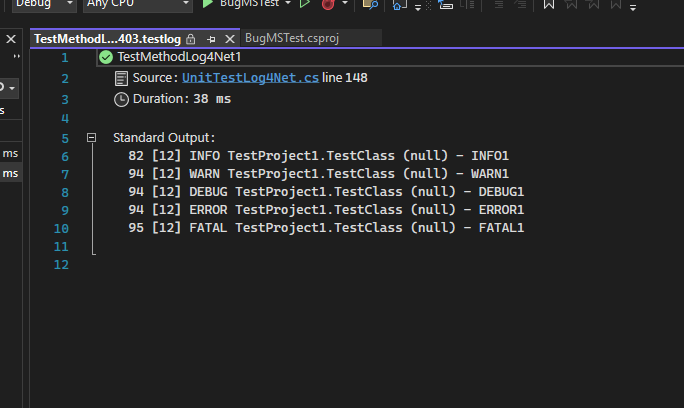
Good luck
Hi @elgatov and sorry for the long delay!
I haven't managed to have any successful run but I have identified that if you are disabling appdomain for your test (by adding <DisableAppDomain>True</DisableAppDomain> to the <RunConfiguration> section), the test is always passing.
I am not sure if the AppDomain is a strong requirement for you or not? Note that this is not available in .NET core/.NET.
Hi @Evangelink,
Currently I am not aware of using AppDomain on the project. I have postponed adding log4net to the project indefinitely until the bug is properly resolved, so it is not a big issue for me.
Thanks for your input.
@elgatov Sadly the default (no user input) is to use AppDomain so if you haven't manually disabled it, it's on by default. We are planning to change this default in some future release (see #1297).
Would you mind trying to specify <DisableAppDomain>True</DisableAppDomain> in the .runsettings file and letting me know if it solves all your issues or not?
Hello again @Evangelink, adding <DisableAppDomain>True</DisableAppDomain> to the .runsettings file does indeed fix this problem.
Thank you.
Awesome! Thanks for the confirmation.
I will move forward and close this ticket as fixed as this is enough for you. We haven't really had a lot of complaint/issues with serialization and AppDomains over MSTest history and .NET Framework is "dying" so we don't really want to invest too much effort there. Obviously, if we get other complaint/problems with AppDomain serialization we may want to investigate it.
Awesome! Thanks for the confirmation.
I will move forward and close this ticket as fixed as this is enough for you. We haven't really had a lot of complaint/issues with serialization and AppDomains over MSTest history and .NET Framework is "dying" so we don't really want to invest too much effort there. Obviously, if we get other complaint/problems with AppDomain serialization we may want to investigate it.
We are having the same issue with our flagship web app, and turning off the AppDomain is not an option for us. Is there some kind of workaround we can do (possibly as part of a ClassInitialize or even a pre-test step) where we can programmatically identify where the test runner resides, find log4net.dll (it should be in {TestProject}/bin/{Configuration}) and copy it into the test runner location?
Worth noting that we use both MSTest and ReSharper, hence why we would want to be able to programmatically identify the runner location, rather than just hard-coding a path.
Also - we are using the latest versions of TestAdapter and TestFramework. Upgrading from previous versions did not solve the problem for us.

Hi @mike-loux-planview, thanks for the bump. I will need to do more investigation to understand exactly what's causing the issue before being able to provide a fix or workaround as I only did a shallow search so far and directly stumbled upon the fact that the serialization issue could be linked to app domains.
Let me reopen the issue (but I will have to remove the milestone because my bandwidth is a little short).
Hi @mike-loux-planview, thanks for the bump. I will need to do more investigation to understand exactly what's causing the issue before being able to provide a fix or workaround as I only did a shallow search so far and directly stumbled upon the fact that the serialization issue could be linked to app domains.
Let me reopen the issue (but I will have to remove the milestone because my bandwidth is a little short).
Thanks, @Evangelink! I understand all too well about short bandwidth. Appreciate you taking the time (however small or long) to look into this some more.