

 microsoft
[Android] Fix issue where CODE_PUSH_APK_BUILD_TIME resource was not generating w/ AGP 4.2+
Relevant issues:
- https://github.com/microsoft/react-native-code-push/issues/1961
- https://github.com/microsoft/react-native-code-push/issues/2063
- https://github.com/microsoft/react-native-code-push/issues/2085
- https://github.com/microsoft/react-native-code-push/issues/2116
- https://github.com/microsoft/react-native-code-push/issues/2135
- https://github.com/microsoft/react-native-code-push/issues/2148
- https://github.com/microsoft/react-native-code-push/issues/2180
- (Maybe?) https://github.com/microsoft/react-native-code-push/issues/2286
- (Maybe?) https://github.com/microsoft/react-native-code-push/issues/2312
- https://github.com/microsoft/react-native-code-push/issues/2314
- https://github.com/microsoft/react-native-code-push/issues/2350
My build setup: We've got a very jank patch of CodePush running, but the problem lies in resource generation. Nevertheless, here's where we're at:
-
[email protected] -
[email protected] -
com.android.tools.build:gradle:7.2.1
Motivation: React Native versions 0.66.0 and up are encouraged to use Android Gradle Plugin 4.2+, so almost certainly anyone who comes across this library will run into some issue regarding this resource value not generating.
Context:
The provided suggestion in almost every one of these issues was to move the resValue call to evaluation time rather than having it run after evaluation time. And this is an important distinction; I'll try to explain why here.
Somewhere around Android Gradle Plugin release 4.2 all the way thru to today, the internals for the ComponentCreationConfig that AGP's GenerateResValues task relies on was changed. I spent a good several hours poking around with a debugger to see what was called, and when. The resValue function of the BaseFlavor, which stores a mapping of resource keys to their respective values, is correctly called for all resource values. This includes the CodePush SDK built time resource value being set here. However, what ended up changing was that halfway between configuration, the map was read from the VariantDSLInfo class and made immutable as part of the task's inputs. Conveniently, any future calls to set new resource values would still be written to the flavor's map internally but would be ignored since the task's MapProperty provider does not change.
As a result, AGP does not honor any resValue calls after evaluation is complete. While it should be throwing an error as it's already doing if you try to configure via a library variant, it is far less strict and will not throw an error if you try to configure from, say a build type or flavor. The GenerateResValues task reaches out to the variant for its resource values, and the VariantImpl reaches over to the VariantDSLInfoImpl which collects from the BaseConfigImpl. After it does all this, it marks the map of resource values immutable only inside of the VariantImpl but we're free to make additions that don't get honored from any futher in that chain.
All of this is to say: TL;DR there are no exceptions thrown by AGP despite the fact that there should be. Either the task should lazily ask the property provider to produce the mapping upon execution, or the various configuration implementations should throw exceptions if you try to modify them. Indeed some do, but not in this case.
Alternatives: There are a couple ways around this change, but I went with the change that felt like it made the most sense.
- Works ✅: replacing
android.buildTypes.eachwithandroid.defaultConfig - Works ✅: wrapping the code block in its own
gradle.afterProjectclosure - Does not work ❌: wrapping the code block in a
gradle.afterEvaluatecloser. In fact, any closure that uses the word evaluated with the word after does not work - Does not work ❌: setting resources via library or application variant. For reasons aforementioned, this seems to be the only case of safeguarding

@chrisglein @jedashford @andreidubov @alexandergoncharov-zz could you review and merge this PR?

@ddikodroid thanks for the PR!
We have couple of question regarding it:
- Will it still work on existing projects (with very old AGP). If not it's OK, but needs to be documented
- Should AGP version be bumped in the project?

* Will it still work on existing projects (with very old AGP). If not it's OK, but needs to be documented
I can confirm that this works with AGP 3.2.0 on Gradle 4.8.1, which is the minimum required version that Android Studio Chipmunk requires. I tried testing with 1.3.0 and 2.2.3, but I hit so many problems with our build setup that I conceded:
| Android Studio error | Successful resource generation |
|---|---|
 |
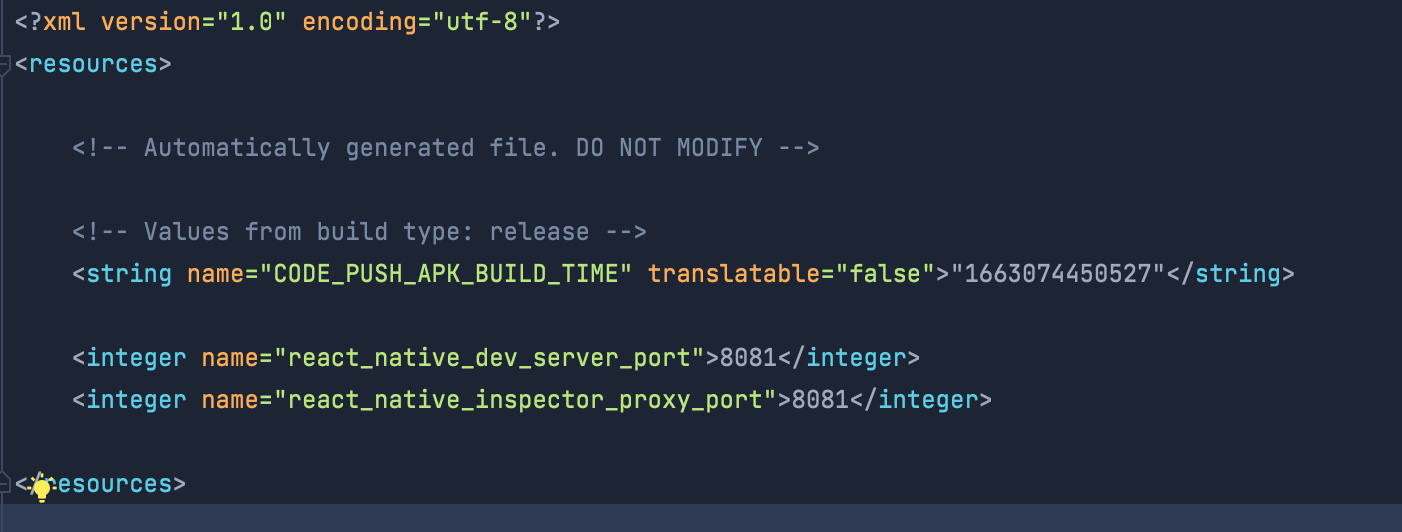 |
* Should AGP version be bumped in the project?
Most definitely. If not for the reasons aforementioned, the demo project is rocking AGP 4.2.2. It's probably out-of-scope for this PR and I'd like to leave it up to your team, but I'm also happy to cut another PR with an upgrade (just boils down to how old you want to support). A peer dependency can be set for react-native to strictly filter out older versions and throw an error should someone try to install, but that might constitute a minor version bump on this package as well.
I've put together a table below of each of the React Native minor versions, their release dates, and the version of AGP that they recommend:
| Minor Version | AGP | Release Date |
|---|---|---|
| 57 | 3.1.4 | Sep 12, 2018 |
| 58 | 3.2.1 | Jan 24, 2019 |
| 59 | 3.3.1 | Mar 12, 2019 |
| 60 | 3.4.1 | Jul 03, 2019 |
| 61 | 3.4.2 | Aug 27, 2019 |
| 62 | 3.5.2 | Mar 26, 2020 |
| 63 | 3.5.3 | Jul 08, 2020 |
| 64 | 4.1.0 | Mar 12, 2021 |
| 65 | 4.2.1 | Aug 17, 2021 |
| 66 | 4.2.2 | Oct 01, 2021 |
| 67 | 4.2.2 | Jan 18, 2022 |
| 68 | 7.0.4 | Mar 30, 2022 |
| 69 | 7.1.1 | Jun 22, 2022 |
| 70 | 7.2.1 | Sept 5, 2022 |
@ddikodroid thanks for the PR!
i'm not creating the PR, i just help the author to be noticed🙌🏻 hope it will get merged soon
Moving the resValue call as was done in the PR did work for me but not until I added back it. to the front of it.
I am using react native 0.69.5 (ejected from expo 46)
-gradle.projectsEvaluated {
-    android.buildTypes.each {
-        // to prevent incorrect long value restoration from strings.xml we need to wrap it with double quotes
-        // https://github.com/microsoft/cordova-plugin-code-push/issues/264
-        it.resValue 'string', "CODE_PUSH_APK_BUILD_TIME", String.format("\"%d\"", System.currentTimeMillis())
-    }
+android.buildTypes.each {
+    // to prevent incorrect long value restoration from strings.xml we need to wrap it with double quotes
+    // https://github.com/microsoft/cordova-plugin-code-push/issues/264
+    it.resValue 'string', "CODE_PUSH_APK_BUILD_TIME", String.format("\"%d\"", System.currentTimeMillis())
+}

+gradle.projectsEvaluated {
     android.applicationVariants.all { variant ->
         def nodeModulesPath;
         if (config.root) {

Moving the
resValuecall as was done in the PR did work for me but not until I added backit.to the front of it.
Good catch! I've fixed this in 3733a6b.
Moving the
resValuecall as was done in the PR did work for me but not until I added backit.to the front of it.Good catch! I've fixed this in 3733a6b.
Thanks that is working
@appcenter-fte Can you please check this one ? This issue is blocking android builds from receiving codepush updates.

Seriously this issue is still open without the attention from the Microsoft Team? We are having the same problem in Android...


Solução temporária
Até que isso seja mesclado, você pode fazer o seguinte para contornar o problema: no
build.gradlearquivo localizado no módulo do seu aplicativo (ou sejamy-project/android/app/build.gradle, não no diretório up), adicione as seguintes linhas no final do arquivo para replicar a correção :android.buildTypes.each { buildType -> // to prevent incorrect long value restoration from strings.xml we need to wrap it with double quotes // https://github.com/microsoft/cordova-plugin-code-push/issues/264 buildType.resValue 'string', "CODE_PUSH_APK_BUILD_TIME", String.format("\"%d\"", System.currentTimeMillis()) }Não há nada de errado em gerar esse recurso duas vezes, o Android avisará se detectar os dois. Para confirmar que o arquivo foi gerado, navegue até
my-project/android/app/build/generated/res/resValues/(debug|release)/values/gradleResValues.xmle você verá oCODE_PUSH_APK_BUILD_TIMEvalor do recurso lá.Descrição de RP
Questões relevantes:
- Android: com.microsoft.codepush.react.CodePushUnknownException: Erro ao obter recursos binários modificados no horário #1961
- [email protected] não está funcionando para android em [email protected] #2063
- [Android] A atualização é inválida, as alterações de push do código foram lançadas com sucesso, o Android não pode obter a alteração, mas o ios pode. #2085
- [CodePush] Erro ao obter recursos binários modificados no horário #2116
- Ocorreu um erro desconhecido #2135
- [Android] Atualização de push de código, encerramento e reversão do aplicativo. #2148
- travamento do android getBinaryResourcesModifiedTime #2180
- (Talvez?) A atualização não terminou de carregar da última vez, revertendo para uma versão anterior #2286
- (Talvez?) O push de código está funcionando bem para reagir na versão nativa 0.68.1? #2312
- Codepush não funciona para RN versão 0.69.2 #2314
- O sucesso libera uma compilação, mas não atualiza no aplicativo Android nº 2350
- Ocorreu um erro desconhecido. Erro ao obter recursos binários modificados no horário #2354
- push de código react-native não está funcionando em [email protected] #2356
- [CodePush] Ocorreu um erro desconhecido. Erro ao obter recursos binários modificados no horário #2397
Minha configuração de compilação: temos um patch muito instável do CodePush em execução, mas o problema está na geração de recursos. No entanto, aqui é onde estamos:
[email protected][email protected]com.android.tools.build:gradle:7.2.1Motivação: as versões 0.66.0 e superiores do React Native são incentivadas a usar o Android Gradle Plugin 4.2+, portanto, quase certamente qualquer pessoa que se deparar com esta biblioteca terá algum problema em relação à geração desse valor de recurso.
Contexto: A sugestão fornecida em quase todos esses problemas foi mover a
resValuechamada para o tempo de avaliação em vez de executá-la após o tempo de avaliação. E esta é uma distinção importante; Vou tentar explicar o porquê aqui.Em algum lugar entre a versão 4.2 do Android Gradle Plugin até hoje, os componentes internos da tarefa
ComponentCreationConfigdo AGP foram alterados.GenerateResValuesPassei várias horas fuçando com um depurador para ver o que era chamado e quando. AresValuefunção doBaseFlavor, que armazena um mapeamento das chaves de recurso para seus respectivos valores, é chamada corretamente para todos os valores de recurso. Isso inclui o valor do recurso de tempo criado do CodePush SDK sendo definido aqui. No entanto, o que acabou mudando foi que no meio do caminho entre a configuração, o mapa foi lido daVariantDSLInfoturma e tornado imutável como parte das entradas da tarefa. Convenientemente, quaisquer chamadas futuras para definir novos valores de recursos ainda seriam gravadas no _tipo_map internamente, mas seria ignorado, pois oMapPropertyprovedor da tarefa não muda.Como resultado, o AGP não aceita nenhuma
resValuechamada após a conclusão da avaliação. Embora deva estar gerando um erro como já está ocorrendo se você tentar configurar por meio de uma variante de biblioteca , é muito menos rigoroso e não gerará um erro se você tentar configurar a partir de, digamos, um tipo de compilação ou sabor. AGenerateResValuestarefa alcança a variante para obter seus valores de recursos eVariantImplalcança oVariantDSLInfoImplque coleta do arquivoBaseConfigImpl. Depois de fazer tudo isso, ele marca o mapa de valores de recursos imutáveis apenas dentro daVariantImplcadeia, mas estamos livres para fazer acréscimos que não são honrados por nenhum outro membro dessa cadeia.Tudo isso é para dizer: TL;DR não há exceções lançadas pelo AGP, apesar do fato de que deveria haver. A tarefa deve solicitar preguiçosamente ao provedor de propriedade para produzir o mapeamento durante a execução ou as várias implementações de configuração devem gerar exceções se você tentar modificá-las. De fato, alguns o fazem, mas não neste caso.
Alternativas: Existem algumas maneiras de contornar essa mudança, mas optei pela mudança que parecia fazer mais sentido.
- Funciona✅: substituindo
android.buildTypes.eachporandroid.defaultConfig- Funciona✅: envolvendo o bloco de código em seu próprio
gradle.afterProjectfechamento- Não funciona❌: envolvendo o bloco de código em um
gradle.afterEvaluateclose. Na verdade, qualquer encerramento que use a palavra avaliada com a palavra depois não funciona- Não funciona❌: configuração de recursos via biblioteca ou variante de aplicativo. Pelas razões acima expostas, este parece ser o único caso de salvaguarda
thanks, its worked for me


I am still facing this issue even after updating codepush to 7.1.0 code is working only after adding this line in default config
resValue 'string', "CODE_PUSH_APK_BUILD_TIME", String.format("\"%d\"", System.currentTimeMillis())
configurations: "react-native": "0.68.5" com.android.tools.build:gradle:7.3.1

@Abbondanzo @thewulf7 I have faced the same problem with CodePush (8.2.1): Workaround helped, but permanent solution is required or documentation should be updated to include the workaround in case it is a permanent solution. Thank for revisiting this.
"react": "18.2.0", "react-native": "0.72.6", "react-native-code-push": "^8.2.1",
Gradle 8.0.1
Build time: 2023-02-17 20:09:48 UTC Revision: 68959bf76cef4d28c678f2e2085ee84e8647b77a
Kotlin: 1.8.10 Groovy: 3.0.13 Ant: Apache Ant(TM) version 1.10.11 compiled on July 10 2021 JVM: 17.0.10 (Eclipse Adoptium 17.0.10+7) OS: Mac OS X 14.3.1 aarch64

@Abbondanzo @thewulf7 I have faced the same problem with CodePush (8.2.1): Workaround helped, but permanent solution is required or documentation should be updated to include the workaround in case it is a permanent solution. Thank for revisiting this.
Which workaround are you using? The fix should be available in every version of CodePush greater than 7.1.0 (if you're following the setup instructions for Android here)
@Abbondanzo @thewulf7 I have faced the same problem with CodePush (8.2.1): Workaround helped, but permanent solution is required or documentation should be updated to include the workaround in case it is a permanent solution. Thank for revisiting this.
Which workaround are you using? The fix should be available in every version of CodePush greater than 7.1.0 (if you're following the setup instructions for Android here)
Hi, I have used the below in android/app/build.gradle
android.buildTypes.each { buildType ->
    // to prevent incorrect long value restoration from strings.xml we need to wrap it with double quotes
    // https://github.com/microsoft/cordova-plugin-code-push/issues/264
    buildType.resValue 'string', "CODE_PUSH_APK_BUILD_TIME", String.format("\"%d\"", System.currentTimeMillis())
}
I am using Multi-Deployment Testing and problem was only with "secondary" deployment releaseStaging
buildTypes {
        debug {
            signingConfig signingConfigs.debug
            // Note: CodePush updates shouldn't be tested in Debug mode as they're overriden by the RN packager. However, because CodePush checks for updates in all modes, we must supply a key.
            resValue "string", "CodePushDeploymentKey", '""'
        }
        releaseStaging {
            // Caution! In production, you need to generate your own keystore file.
            // see https://reactnative.dev/docs/signed-apk-android.
            // signingConfig signingConfigs.debug
            minifyEnabled enableProguardInReleaseBuilds
            proguardFiles getDefaultProguardFile("proguard-android.txt"), "proguard-rules.pro"

            resValue "string", "CodePushDeploymentKey", '"XKaXQyxNyk6kOe9crJAOdDhWL5owuOsZsATIX"'
            // Note: It's a good idea to provide matchingFallbacks for the new buildType you create to prevent build issues
            // Add the following line if not already there
            matchingFallbacks = ['release']
        }
        release {
            // Caution! In production, you need to generate your own keystore file.
            // see https://reactnative.dev/docs/signed-apk-android.
            // signingConfig signingConfigs.debug
            minifyEnabled enableProguardInReleaseBuilds
            proguardFiles getDefaultProguardFile("proguard-android.txt"), "proguard-rules.pro"
            resValue "string", "CodePushDeploymentKey", '"lJOLXjccOLBFhbgfDsnDI1NFi3ofibXfEEsM-"'
        }
    }