

 microsoft
Issue with Function's Name Starts with test
Environment data
- VS Code version: 1.45.1
- Extension version (available under the Extensions sidebar): 2020.5.78807
- OS and version: macOS Catalina 10.15.4
- Python version (& distribution if applicable, e.g. Anaconda): 3.7.3
- Type of virtual environment used (N/A | venv | virtualenv | conda | ...): N/A
- Relevant/affected Python packages and their versions: N/A
- Relevant/affected Python-related VS Code extensions and their versions: N/A
- Jedi or Language Server? (i.e. what is
"python.jediEnabled"set to; more info microsoft/vscode-python#3977): True - Value of the
python.languageServersetting: Microsoft
Expected behaviour
Expect to Go to Definition for a Python object when there is a function definition that starts with test* and has at least one parameter like below:
def testabc(a):
    pass
Actual behaviour
The Go to Definition stops working when there is a function definition that starts with test* and has at least one parameter like above and VSCode consumes a huge amount of compute and RAM resources.
Steps to reproduce:
[NOTE: Self-contained, minimal reproducing code samples are extremely helpful and will expedite addressing your issue]
- Open a new VSCode window.
- Create a Python file, such as
test_abc.py - Enter:
def testabc(a):
    pass
Logs
Python in the Output panel (View→Output, change the drop-down the upper-right of the Output panel to Python)
User belongs to experiment group 'ShowPlayIcon - start'
User belongs to experiment group 'ShowExtensionSurveyPrompt - enabled'
User belongs to experiment group 'DebugAdapterFactory - experiment'
User belongs to experiment group 'PtvsdWheels37 - experiment'
User belongs to experiment group 'LS - control'
User belongs to experiment group 'UseTerminalToGetActivatedEnvVars - control'
User belongs to experiment group 'WebHostNotebook - control'
User belongs to experiment group 'LocalZMQKernel - control'
User belongs to experiment group 'NativeNotebook - control'
User belongs to experiment group 'CollectLSRequestTiming - control'
User belongs to experiment group 'CollectNodeLSRequestTiming - experiment'
User belongs to experiment group 'EnableIPyWidgets - experiment'
User belongs to experiment group 'RunByLine - control'
> conda --version
> conda info --json
> pyenv root
> python3.6 ~/.vscode/extensions/ms-python.python-2020.5.78807/pythonFiles/pyvsc-run-isolated.py -c "import sys;print(sys.executable)"
> python3.7 ~/.vscode/extensions/ms-python.python-2020.5.78807/pythonFiles/pyvsc-run-isolated.py -c "import sys;print(sys.executable)"
> python3 ~/.vscode/extensions/ms-python.python-2020.5.78807/pythonFiles/pyvsc-run-isolated.py -c "import sys;print(sys.executable)"
> python2 ~/.vscode/extensions/ms-python.python-2020.5.78807/pythonFiles/pyvsc-run-isolated.py -c "import sys;print(sys.executable)"
> python ~/.vscode/extensions/ms-python.python-2020.5.78807/pythonFiles/pyvsc-run-isolated.py -c "import sys;print(sys.executable)"
> /usr/bin/python3 ~/.vscode/extensions/ms-python.python-2020.5.78807/pythonFiles/pyvsc-run-isolated.py -c "import sys;print(sys.executable)"
Python interpreter path: /usr/bin/python3
Starting Jedi Python language engine.
> conda --version
> /usr/bin/python3 ~/.vscode/extensions/ms-python.python-2020.5.78807/pythonFiles/pyvsc-run-isolated.py -c "import jupyter"
> /usr/bin/python3 ~/.vscode/extensions/ms-python.python-2020.5.78807/pythonFiles/pyvsc-run-isolated.py -c "import jupyter"
> /usr/bin/python3 ~/.vscode/extensions/ms-python.python-2020.5.78807/pythonFiles/pyvsc-run-isolated.py -c "import notebook"
> /usr/bin/python3 ~/.vscode/extensions/ms-python.python-2020.5.78807/pythonFiles/pyvsc-run-isolated.py -c "import notebook"
> /usr/bin/python3 ~/.vscode/extensions/ms-python.python-2020.5.78807/pythonFiles/pyvsc-run-isolated.py -c "import sys;print(sys.prefix)"
cwd: ~/.vscode/extensions/ms-python.python-2020.5.78807/out/client
> /usr/bin/python3 ~/.vscode/extensions/ms-python.python-2020.5.78807/pythonFiles/pyvsc-run-isolated.py -c "import sys;print(sys.prefix)"
cwd: ~/.vscode/extensions/ms-python.python-2020.5.78807/out/client
> /usr/bin/python3 ~/.vscode/extensions/ms-python.python-2020.5.78807/pythonFiles/pyvsc-run-isolated.py -c "import sys;print(sys.executable)"
cwd: ~/.vscode/extensions/ms-python.python-2020.5.78807/out/client
> /usr/bin/python3 ~/.vscode/extensions/ms-python.python-2020.5.78807/pythonFiles/pyvsc-run-isolated.py -c "import sys;print(sys.executable)"
cwd: ~/.vscode/extensions/ms-python.python-2020.5.78807/out/client
> /usr/bin/python3 ~/.vscode/extensions/ms-python.python-2020.5.78807/pythonFiles/pyvsc-run-isolated.py -c "from distutils.sysconfig import get_python_lib; print(get_python_lib())"
cwd: ~/.vscode/extensions/ms-python.python-2020.5.78807/out/client
> /usr/bin/python3 ~/.vscode/extensions/ms-python.python-2020.5.78807/pythonFiles/pyvsc-run-isolated.py -c "from distutils.sysconfig import get_python_lib; print(get_python_lib())"
cwd: ~/.vscode/extensions/ms-python.python-2020.5.78807/out/client
> /usr/bin/python3 ~/.vscode/extensions/ms-python.python-2020.5.78807/pythonFiles/pyvsc-run-isolated.py site --user-site
cwd: ~/.vscode/extensions/ms-python.python-2020.5.78807/out/client
> /usr/bin/python3 ~/.vscode/extensions/ms-python.python-2020.5.78807/pythonFiles/pyvsc-run-isolated.py site --user-site
cwd: ~/.vscode/extensions/ms-python.python-2020.5.78807/out/client
> /usr/bin/python3 ~/.vscode/extensions/ms-python.python-2020.5.78807/pythonFiles/pyvsc-run-isolated.py ~/.vscode/extensions/ms-python.python-2020.5.78807/pythonFiles/completion.py
> /usr/bin/python3 ~/.vscode/extensions/ms-python.python-2020.5.78807/pythonFiles/pyvsc-run-isolated.py ~/.vscode/extensions/ms-python.python-2020.5.78807/pythonFiles/completion.py
Output from Console under the Developer Tools panel (toggle Developer Tools on under Help; turn on source maps to make any tracebacks be useful by running Enable source map support for extension debugging)
Attached images.
Normal working state:
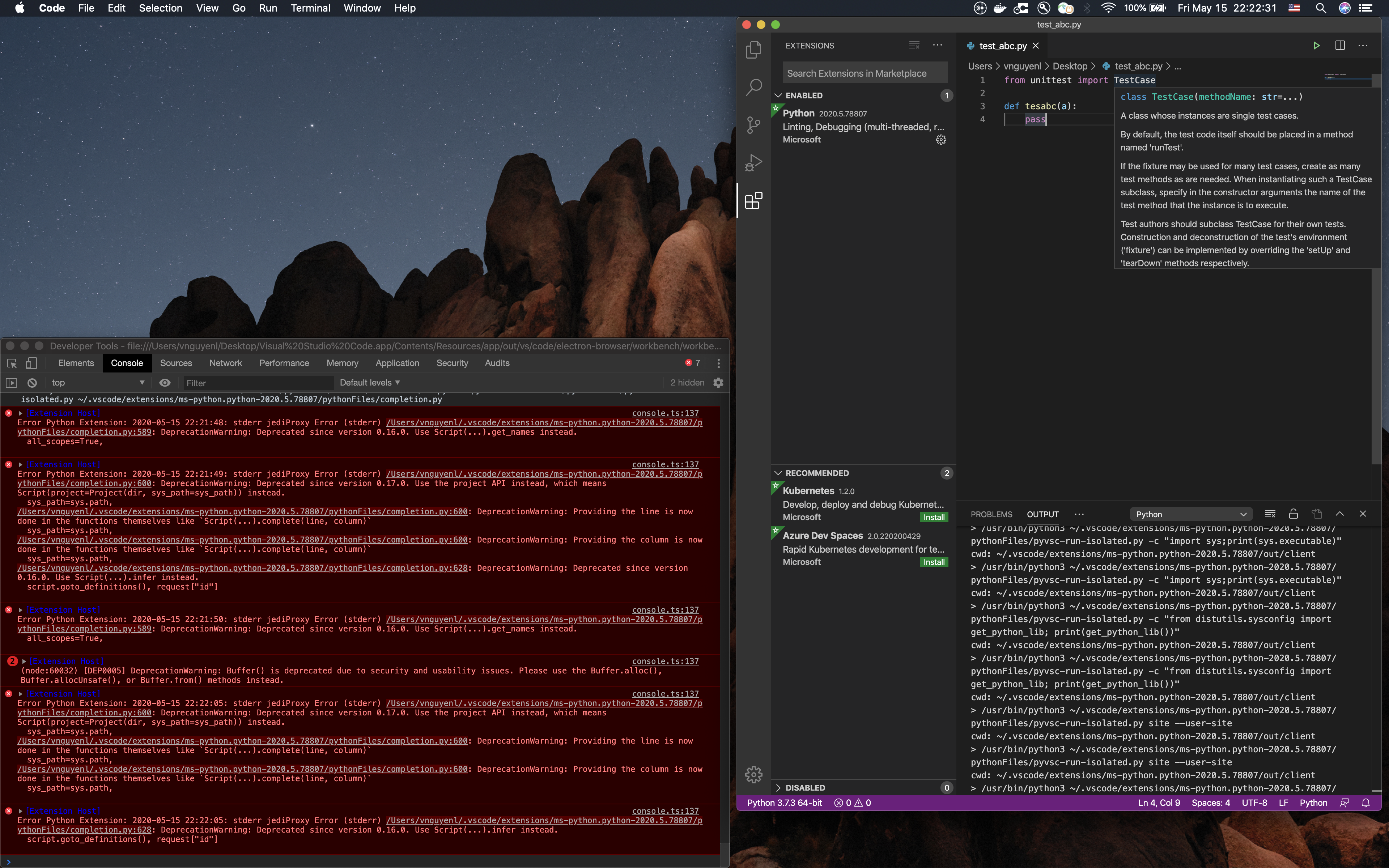
Problem:
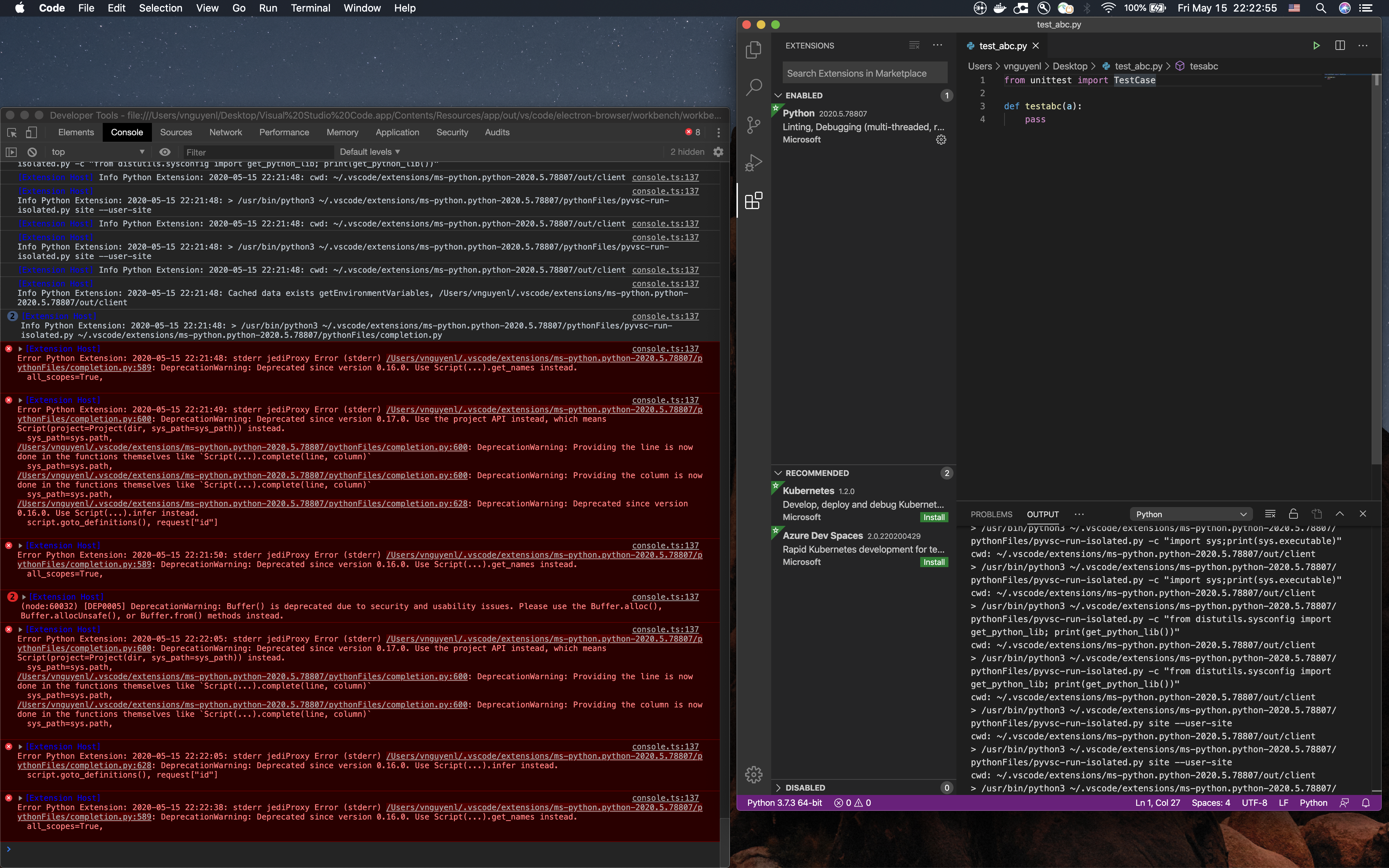
In the working state, I can see the definition of imported TestCase, but I cannot see the same thing when I change the function name to start with test*

Moreover, this issue only happens on my work MacBook Pro and does not happen on my personal MacBook Pro. The 2 MacBook Pro have the same Environment Data like above.
The issue also does not happen when I write in the remote server using remote development.
@nguyenlieunhatvy, thanks for letting us know about this. The information you have provided is helpful. I have some questions, looking for further info:
- what test framework is your workspace configured to use? (specifically, please provide the content of your workspace settings.json)
- how are you triggering "Go to Definition"? (right-click on a name and select "Go to Definition"?)

Hi Eric,
- I do not have any test frameworks configured for my workspace.
Here is my workspace settings:
{
    "python.pythonPath": "/Library/Frameworks/Python.framework/Versions/3.7/bin/python3",
    "editor.fontSize": 18,
    "editor.codeActionsOnSave": {
        "source.fixAll.tslint": true,
        "tslint.autoFixOnSave": true,
    },
    "python.linting.enabled": true,
    "python.formatting.autopep8Args": [
        "-aaaa",
    ],
    "python.linting.pylintArgs": [
        "--include-naming-hint",
        "y",
        "--disable",
        "C0111, C0302, C0330, W0223, E1101",
        "--variable-naming-style",
        "snake_case",
        "--logging-format-style",
        "fstr",
        "--max-line-length",
        "120",
        "--load-plugins",
        "pylint_django"
    ],
    "terminal.integrated.fontSize": 18,
    "window.zoomLevel": 0,
    "editor.renderControlCharacters": true,
    "workbench.activityBar.visible": true,
    "editor.suggestSelection": "first",
    "markdownlint.config": {
        "MD013": false,
        "MD033": false,
        "MD041": false,
    },
    "vim.insertModeKeyBindings": [
        {
            "before": [
                "j",
                "j"
            ],
            "after": [
                "<Esc>"
            ]
        }
    ],
    "html.format.indentHandlebars": true,
    "html.format.indentInnerHtml": true,
    "files.associations": {
        "**/templates/*.html": "django-html",
        "**/templates/*": "django-txt",
        "**/requirements{/**,*}.{txt,in}": "pip-requirements",
        "**/defaults/**/*": "ansible",
        "**/tasks/**/*.yml": "ansible",
        "**/handler/*.yml": "ansible",
        "**/*_vars/**/*.yml": "ansible",
        "**/roles/**/*.yml": "ansible",
        "**/playbooks/**/*.yml": "ansible",
        "**/playbooks/**/*.yaml": "ansible",
        "**/*ansible*/**/*.yml": "ansible",
        "**/vars/**/*.yml": "ansible",
        "**/inventory/*/*": "ansible",
        "*.html": "html",
        "*.yml": "yaml"
    },
    "[django-html]": {
        "editor.quickSuggestions": {
            "other": true,
            "comments": true,
            "strings": true
        },
    },
    "beautify.language": {
        "html": [
            "htm",
            "html",
            "django-html"
        ],
    },
    "auto-close-tag.activationOnLanguage": [
        "xml",
        "php",
        "blade",
        "ejs",
        "jinja",
        "javascript",
        "javascriptreact",
        "typescript",
        "typescriptreact",
        "plaintext",
        "markdown",
        "vue",
        "liquid",
        "erb",
        "lang-cfml",
        "cfml",
        "HTML (Eex)",
        "django-html",
    ],
    "markdown.preview.fontSize": 18,
    "markdown.extension.tableFormatter.normalizeIndentation": true,
    "pythonPreview.code.fontSize": "18",
    "editor.renderWhitespace": "all",
    "editor.minimap.enabled": true,
    "breadcrumbs.enabled": true,
    "python.linting.banditEnabled": true,
    "files.autoSave": "onFocusChange",
    "workbench.iconTheme": "material-icon-theme",
    "terminal.integrated.scrollback": 10000,
    "highlight-matching-tag.highlightFromContent": true,
    "highlight-matching-tag.highlightSelfClosing": true,
    "[typescript]": {
        "editor.defaultFormatter": "vscode.typescript-language-features"
    },
    "importSorter.sortConfiguration.removeUnusedImports": true,
    "[css]": {
        "editor.defaultFormatter": "esbenp.prettier-vscode"
    },
    "[html]": {
        "editor.defaultFormatter": "esbenp.prettier-vscode",
    },
    "npm.enableScriptExplorer": true,
    "prettier.jsxBracketSameLine": true,
    "prettier.arrowParens": "always",
    "prettier.trailingComma": "es5",
    "html.format.endWithNewline": true,
    "importSorter.sortConfiguration.removeUnusedDefaultImports": true,
    "python.linting.mypyArgs": [
        "--show-column-numbers",
        "--ignore-missing-imports",
        "--disallow-any-unimported",
        "--disallow-subclassing-any",
        "--no-implicit-reexport"
    ],
    "[dockerfile]": {
        "editor.defaultFormatter": "ms-azuretools.vscode-docker"
    },
    "[yaml]": {
        "editor.defaultFormatter": "redhat.vscode-yaml"
    },
    "autoDocstring.docstringFormat": "sphinx",
    "editor.fontFamily": "Menlo, Monaco, 'Courier New', monospace, Profont for Powerline",
    "terminal.integrated.confirmOnExit": true,
    "prettier.singleQuote": true,
    "[python]": {
        "editor.defaultFormatter": "ms-python.python"
    },
    "python.formatting.provider": "black",
    "editor.largeFileOptimizations": false,
    "python.linting.pydocstyleEnabled": true,
    "python.linting.prospectorArgs": [
        "--pylint-config-file",
        "/Users/vnguyenl/Documents/Projects/ALPHADEV/Capman_BE/capman/.pylintrc"
    ],
    "git.ignoreLegacyWarning": true,
    "python.autoComplete.addBrackets": true,
    "files.watcherExclude": {
        "**/venv/**": true
    },
}
- Yeah! I do the right-click as you said.
Thanks, @nguyenlieunhatvy. That info helps. Is that your workspace settings.json (from <workspaceroot>/.vscode) or your user settings.json?
Looks like you are using Jedi for completions, go-to-definition, etc. What happens if you switch to the Microsoft language server (set "python.jediEnabled": false)?
FYI, I haven't been able to reproduce the problem. I created a file as you described, right-clicked on testabc and picked "Go to Definition". It worked. Based on your screenshots, I also added from unittest import TestCase and did "Go to Definition" on TestCase. That worked fine as well.
It is my settings.json.
"python.jediEnabled": false still gives the same issues. I tried the combinations of turning on and off both Jedi and Microsoft, but it does not help.
Like I mention in the question, I only have this issue on my work MacBook Pro and do not have this issue on my personal MacBook Pro and a Linux VM on a remote RedHat OS server.
Therefore, I am seeking for any suggestions about why this is happening on my work laptop and not on the other 2.
Try "python.jediEnabled": true and let us know what happens. Also please provide the content of the "Python Test Log" output panel. Thanks!
Actually, I am wrong in my previous comment.
"python.jediEnabled": false does not give me the issue. However, I cannot do Go to Definition for my project defined objects (like Django models). I can still do Go to Definition for built-in packages like unittest.TestCase.
"python.jediEnabled": true gives me the issue with the test* function. However, I can do Go to Definition for my project defined objects (like Django models).
In both cases, the Python Test Log is empty.
I tried to specify this in my global settings.json:
"python.jediPath": "/Library/Frameworks/Python.framework/Versions/3.7/lib/python3.7/site-packages"
I use pip install jedi to install jedi under the above path and
my Python path is "/Library/Frameworks/Python.framework/Versions/3.7/bin/python3"
but it does not help.
Question 1: Do I need to specify Jedi path in the settings.json after installing VSCode Python Extension?
Question 2: If I turn off Jedi and use Microsoft Language Server, what should I do so that the Language Server knows about the my project defined objects (like Django models)?
You should not need to set "python.jediPath". It is only for unusual situations.
As to the language server. I strongly recommend using it. I'd be glad to transfer this issue to that project so they can look into why your Django models are not found by "Go to Definition".