

 microsoft
(SpinButton) DefaultValue field does not function, cannot reset control value
The SpinButton component's DefaultValue property seems to have no effect on the control's value. In addition, Reset([SpinButtonControl]) does not work, meaning it is impossible to refresh the component's value without refreshing the app. This presents issues when using the SpinButton for submittable forms, etc.
AB#988

I have the same issue. Impossible to use the spinbutton unfortunately. Hope someone has a look into it soon, because the spinbutton itself is an awesome thing!

+1 I've seen the same thing. The value state can't be reset when moving back and forth between canvas screens. It is somehow maintaining the

While not a great solution, I did come across an interesting way to reset the SpinButton control leveraging the Suffix property.
Set a variable in the Suffix property of the SpinButton:

When you want to reset the control to the DefaultValue. Set the suffix variable to an empty space (" ").
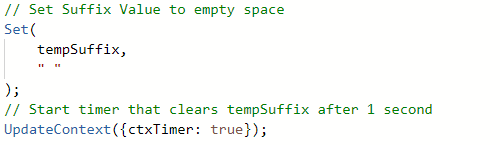
This triggers a re-render of the control which defualts it back to the DefaultValue.
After this, using a timer control I clear the tempSuffix variable back to blank, I found that in order for the re-render to occur the suffix had to be different. Having this allowed me to reuse the above logic throughout my app 🙂

Hopefully this workaround helps, its a great control so hopefully someone is having a look at this 🙂

This workaround works for me! thanks for that. It would be awesome for their to be a reset event or for it to re-render on visible or something similar

I ran across this issue as well. The work-around above worked for me as well. I hope this is on the to be fixed list. Maybe a new Input Event?
