

 microsoft
[Question] How can I use Playwright as a development tool?
In #9960, Pavel asked about the scenario of "why do you want to keep the browser open after a test run?". Here is a bit of context: with Cypress, I'm used to leveraging it as a development tool and not only as a testing tool. The goal is writing a piece of test as long as I work on the front-end application in order to avoid repeating hundreds of manual actions and to write the test after the implementation ended.
In order to do so, I need to:
- ❓ keep the browser open after the test (so every next file saved on the source files results in the application being refreshed on the Playwright page)
- ✅ install the framework-related devtools
Nice to have
- reuse the same tab for the next run (this is not mandatory but handy
- access the Trace Viewer without opening another tab and manually uploading a file
Is it possible to do something like that?
Thanks for the hard work!!!! I did not realize that Playwright evolved so much in the last two years! 👏👏👏 Best Stefano
Related:
- #9960
- Twitter discussion about this approach
- my Front-end productivity boost: Cypress as your main development browser article

Thanks for filing it. I saw your questions on twitter, but I would ask you to file anyways, so thanks.
Reusing the browser between the test and dev modes is something we would be interested in, but there are limitations that are making it non-trivial, both technically around the test isolation and UX-wise.
Playwright is different from Cypress in that the tests are isolated:
- Context settings. Two sibling tests can use dark and light color schemes, can have different storage, network settings, device metrics, user agent, even rendering engine, etc.
- Storage. if you write into Local Storage or IndexedDB, pollute the cookies in one test, the other tests are not affected.
Depending on the testing pattern, users will either have 'similar' tests that share the context settings, or would have vastly different parameterized tests that iterate over those settings in order to test page in different environments.
Leaving the browser / page hanging and using it as a Dev+Watch environment is possible when:
(a) Tests that will run in that page have identical context settings. Fair share of tests (b) Tests either don't pollute the context, or the users don't care about pollution. Unusual
We can assume (a) for a fair percentage of the use cases, that's probably not a blocker. But (b) would require a workaround. We could do something like a best-effort in the storage and network cleanup, but it would not be bulletproof. I'm not sure if Cypress is doing anything about it, but we would definitely want the test to behave the same way in the Dev and Test modes.

Thanks for filing it. I saw your questions on twitter, but I would ask you to file anyways, so thanks.
You're more than welcome!!
Reusing the browser between the test and dev modes is something we would be interested in, but there are limitations that are making it non-trivial, both technically around the test isolation and UX-wise.
Got it
Leaving the browser / page hanging and using it as a Dev+Watch environment is possible when:
(a) Tests that will run in that page have identical context settings. Fair share of tests
How would you accomplish something like that in Playwright? I'd like to see a proposal of yours here because I miss the required Playwright-related experience to do that in a clean way.
More: the VSCode extension is good but does not allow (if I'm correct) to launch the test with PWDEBUG=1. Hence launching only a specific text with PWDEBUG=1 without closing the browser when the test run and accessing the trace viewer at the same time... Is not possible, correct?
I'm not sure if Cypress is doing anything about it, but we would definitely want the test to behave the same way in the Dev and Test modes.
Cypress resets only a part of the browser state.
How would you accomplish something like that in Playwright?
Sorry, I meant to say "would be possible" instead of "is possible". I.e. I'm saying that we would need to restrict this dev mode to the use cases where a set of tests uses the same context settings.
Got it! I'd say that probably is not worth it on your side since it seems that I'm the only champion of this kind of us, right?
Anyway, feel free to re-ping me if you take some steps in this direction and I would be happy to check out Playwright again 😊
Thank you a lot for your support and kudos for the great evolution of the product!!!!
I closed it because what has been elaborated is ok for me, @pavelfeldman do you find it useful to keep it open?
Yeah, I'd keep it open. Dev UX is the last thing remaining that we need to nail down to be well rounded.
Any movement on this? Missing this very much from Cypress :pleading_face:

We are pretty happy with the recent VS Code extension devx, it addresses a lot of liveness issues. It still does not suggest that you are using the same browser instance for both development and testing. I'll close this bug as there is no on-going activity to allow using the same window for dev and testing while we are collecting the feedback for the new VS Code experience.
We are pretty happy with the recent VS Code extension devx, it addresses a lot of liveness issues
I played with it last week, and I'm pretty satisfied too 😊 If I have not missed anything, through the VSCode extension, i can
- run the equivalent of
npx playwright test example - run the equivalent of
npx playwright test example --debug
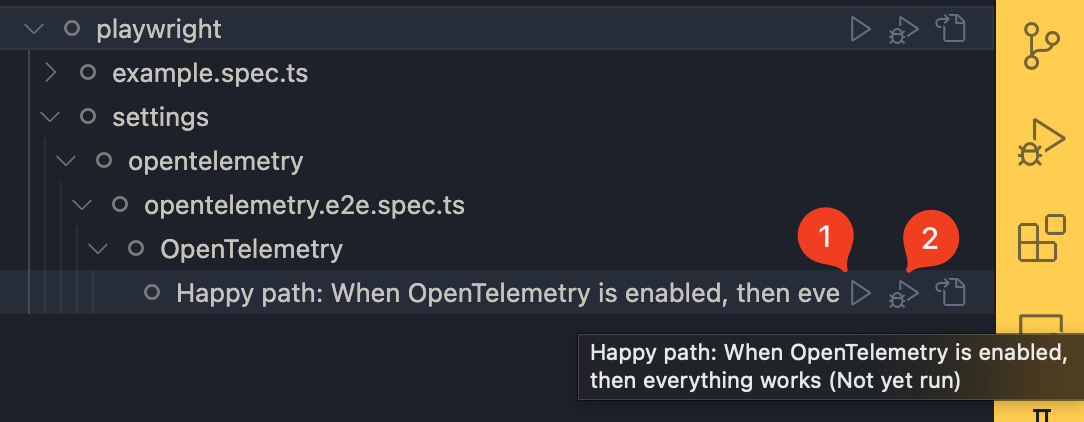
and also all the nice additions
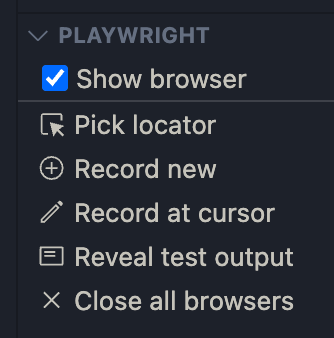
What is missing until now is just a UI-equivalent of PWDEBUG=1 npx playwright test example, is it correct?
Anyway, I saw that the browser is reused and I'm pretty happy with it!
What I miss (and I will look at your VSCode extension implementation to do something similar) is
- Launching Playwright with
PWDEBUG=1from the VSCode UI - Relaunch the test in the browser when I save the test file
- (nice to have) Relaunch the test when the app is reloaded
For point 1: I have been suggested to create a custom task like this
{
  // See https://go.microsoft.com/fwlink/?LinkId=733558
  // for the documentation about the tasks.json format
  "version": "2.0.0",
  "tasks": [
    {
      "label": "testCurrentFileByLine",
      "type": "shell",
      "command": "npx playwright test --headed --workers=1 ${file}:${lineNumber}",
      "group": "test",
      "presentation": {
        "reveal": "always",
        "showReuseMessage": false
      }
    }
  ]
}
where I customize the CLI parameters.
For point 2: I should be able to achieve it too more less the same way.
For point 3: I will think about it.
It still does not suggest that you are using the same browser instance for both development and testing.
I realized just now that I forgot an important clarification, I'm sorry: I do not want to use the Playwright browser both for development and testing (that requires sharing the test state, cookies, etc. between the "dev" tab and the "test" tab). My process, usually is:
- I code step 1 of the happy path of my feature (for simplicity, let's consider that the feature I'm implementing is made up of 3 steps)
- I start writing a browser test that checks step 1 of the happy path (here the server is controlled and it's not the real one)
- I code step 2 of my feature
- I add the necessary code to the browser test to check step 2 (without the real browser)
- I code step 3 of my feature
- I add the necessary code to the browser test to check step 3 (without the real browser)
- I do the same for the non-happy paths (for simplicity, let's consider we have 2 error paths)
- [Now that I have three server-free tests for the frontend paths] I write an E2E test (that includes the real server) for the happy path. The E2E test requires additional code to clear the server state before the E2E test runs
- Now that I'm done, I manually test my feature in the browser (theoretically, this is the first time I manually test my feature)
Thanks to this approach, I developed my feature inside the testing tool, and I do not have the burden of an additional step (writing the tests, that usually happens after implementing the feature).
What I DO NOT NEED from the testing tool: I do not need to launch the tests in a "polluted" context (the one polluted by my dev cookies, my dev sessions, etc.) since the tests that I write are independent from the very beginning! My development browser remains Arc, while my testing browser remains the testing tool one.
With this in mind, you can understand why auto-reloading the test is more than enough for me. Then, I'll maybe use some debugging browser extensions (that require a persisted context, I know).
In the end: my "How can I use Playwright as a development tool?" question translates into "how can I reduce the friction as much as possible between a test launch and the next one?", and the VSCode extension does a pretty job at it now 😊
Thank you so much 😊