

 microsoft
2016-sp1
Hi, I setup a running container using the mssql developer image and using 2016-sp1 tag. I can run it using the following command line:
docker run -d -p 1433:1433 -e sa_password=my_secret_password -e ACCEPT_EULA=Y microsoft/mssql-server-windows-developer:2016-sp1
issuing docker container ps -a gives me evidence that the container is up and healthy. Fine ... I get:
C:\dev\dockerfiles\mssql-dev-2016-sp1>docker container ps -a
CONTAINER ID        IMAGE                                               COMMAND                  CREATED              STATUS                        PORTS                    NAMES
3c247166df6b        microsoft/mssql-server-windows-developer:2016-sp1   "powershell -Command…"   About a minute ago   Up About a minute (healthy)   0.0.0.0:1433->1433/tcp   zen_poincare
Now I would like to connect a client, such as Microsoft SQL Server Managemnet Studio to it, but nope ...
The previous docker command says that the container 1433 port is exposed and mapped to my machine local port on each network interface, more: I already have a Sql server developer instance on my windows 10 box wich is generally reachable from tha LAN I'm in as off there exists a corresponding firewall rule. I stopped the local instance BEFORE running the container. I tried to connect to mssql container instance using localhost, 127.0.0.1, my current IP address, the address of the container I got after a docker inspect command but all my tries fail. I've tried to run the container both as my current user and with administrator privileges but again I got the same error "Unable to login" form the container instance.
Has someone some suggestions?
Thank you for reading.

@lucapaganotti
What error message you got when you are trying to connect to SQL Server database engine with SSMS outside the container?
Can you please go to check if there's login information existed in SQL Server logs inside the container ?
Also have a try to create the container with another port, e,g, 14333 for local port. Then connect to the SQL Server instance with specific port by following syntax(default instance):
Servername(or ip),port

@Pirlo-Zhang
Hi, thank you for your answer, find attached the messagebox image telling me about the error I get.
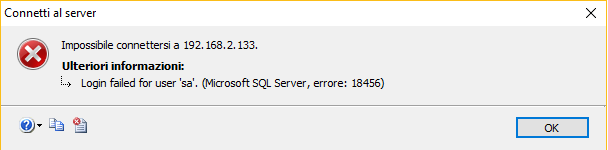
I don't think that changing the server port does the trick ...
I issued a netstat command as
netstat -a -p tcp
with the container active and inspecting its output I'm not able to find 1433 port open ... sigh ...
Hey, I know this is an old issue but I just happened to come across it.
@lucapaganotti, I think it's possible the issue is that in your docker command, you are using -e sa_password rather than - SA_PASSWORD.
As far as I'm aware, environment variables are case-sensitive and so you'd need the uppercase env variable name in order to actually set the SA password to what you expect, which could explain why you're receiving a login error for sa.
